

ChatGPT for business

  • ·

    Automate Real Estate Market Analysis with ChatGPT

    If you are a real estate investor or realtor, your most valuable asset isn’t capital—it’s time. The traditional method of property analysis involves mind-numbing hours spent exporting MLS data, building complex spreadsheet models, and reading through hundred-page HOA disclosures just to see if a deal pencils out.

    But what if you could outsource the heavy lifting to an AI?

    Using ChatGPT for data analysis is no longer a futuristic concept; it is a baseline requirement for staying competitive in today’s fast-moving housing market. By combining ChatGPT’s advanced capabilities with purpose-built real estate AI tools, you can automate your property analysis, spot off-market trends, and calculate your ROI in seconds.

    Here is your complete tutorial on how to automate real estate market analysis using AI.

    Step 1: Export Your Raw Market Data

    ChatGPT cannot analyze what it cannot see. To get started, you need raw data. Go to your local MLS, Redfin, or Zillow, and run a search for your target criteria (e.g., multi-family homes in a specific ZIP code sold in the last 6 months). Export this data as a .csv or .xlsx file.

    Pro Tip: Make sure your spreadsheet has clear column headers like “List Price,” “Days on Market,” “Square Footage,” and “HOA Fees.” Clean data leads to accurate AI insights.

    Step 2: Upload and Prompt ChatGPT

    You will need a ChatGPT Plus, Team, or Enterprise account to use the Advanced Data Analysis feature. Open a new chat, click the paperclip icon to upload your CSV file, and use a highly specific command.

    Do not ask vague questions like, “Is this a good market?” Instead, use a strict analytical prompt:

    • The Prompt: “Act as an expert real estate investment analyst. I have uploaded recent sales data for [ZIP Code/Neighborhood]. Please analyze this dataset and provide a comprehensive market report. Include: 1) The median price per square foot. 2) The average Days on Market (DOM) for properties over $500k versus under $500k. 3) Identify any pricing outliers or anomalies. Present your findings in a clean, bulleted format and generate a bar chart showing the sales price trends over the last six months.”

    Within seconds, ChatGPT will write and execute the Python code necessary to parse your spreadsheet, giving you a digestible report and visual charts you can instantly drop into a client presentation or investor memo.

    Step 3: Automate Cash Flow and Cap Rate Modeling

    Analyzing the broader market is only half the battle; you also need to underwrite the specific property. You can use ChatGPT to instantly build custom cash flow models.

    Upload a property’s financials (taxes, insurance quotes, estimated rent) and use this prompt:

    • The Prompt: “Calculate the projected cap rate and cash-on-cash return for this property. Assume a 20% down payment, a 6.5% interest rate on a 30-year fixed mortgage, and a 5% vacancy rate. Factor in the provided property taxes and maintenance estimates. Output the results in a month-by-month financial table.”

    Step 4: Rapid Due Diligence on Long Documents

    One of the most tedious parts of real estate investing is the due diligence phase. Reading through thick HOA packets, seller disclosures, zoning laws, and inspection reports can take days.

    Instead of reading line-by-line, upload the PDF directly into ChatGPT and command it to find the red flags:

    • The Prompt: “Read this HOA disclosure packet. Extract any buyer-impacting details and summarize them in clear, plain language. Specifically highlight: rental restrictions (like short-term/Airbnb bans), special assessments, pet limitations, and any unusual fees. Format this for easy scanning.”

    This turns a two-hour reading session into a two-minute review.

    Step 5: Level Up with Dedicated Real Estate AI Tools

    While ChatGPT is an incredible general-purpose assistant, scaling a massive portfolio sometimes requires specialized firepower. If you want to automate property analysis at an enterprise level, consider integrating dedicated AI in real estate platforms:

    • HouseCanary: Excellent for automated valuation models (AVMs) and predictive forecasting for residential properties. It uses thousands of data points to predict price movements with institutional-grade accuracy.
    • Reonomy: The go-to platform for commercial real estate. It uses AI to discover off-market deals and analyze debt maturity profiles, helping you find motivated sellers months before they list.
    • Explo & Domo: Great for brokerages that want to build custom, AI-driven analytics dashboards that plug directly into their existing CRM systems.

    Final Thoughts

    Integrating AI in real estate doesn’t mean replacing your local market expertise or your gut instinct for a good deal. It means eliminating the friction between finding a property and making a data-driven offer. By mastering ChatGPT data analysis, you buy back your time—allowing you to focus on negotiating deals, building relationships, and scaling your portfolio.
  • ·

    Build a Custom GPT to Automate Client Onboarding

    If you run an agency or consulting business, you already know the onboarding paradox. Landing a new client is the best feeling in the world, but the administrative hangover that immediately follows—sending welcome packets, chasing down brand assets, and setting up project management boards—is a massive drain on your time.

    What if you could bottle up your exact onboarding process and hand it over to an AI?

    Building a custom ChatGPT agent to handle your new client intake isn’t just a fun tech experiment; it is a scalable business asset. By combining OpenAI’s custom GPT capabilities with AI workflow automation, you can create an assistant that guides your clients, answers their initial questions, and drafts their strategy documents while you focus on the actual billable work.

    Here is a step-by-step custom GPT tutorial to help you automate client onboarding and win back your week.

    Step 1: Map the Workflow (Don’t Skip This)

    A custom GPT is only as smart as the system you anchor it to. Before you even log into OpenAI, you need to document exactly what happens when a prospect says “yes.”

    Grab a piece of paper and outline your current bottlenecks. What do you do on repeat?

    • Do you send the same welcome email with slightly tweaked variables?
    • Do you manually review intake forms to pull out key goals?
    • Do you spend an hour writing a project kickoff brief?

    Pick one specific, repetitive phase of your onboarding process to automate first. A GPT built to “draft a custom project kickoff brief based on a client intake form” will perform ten times better than a GPT told to “handle my new clients.”

    Step 2: Configure Your Custom GPT

    Once your workflow is locked in, head over to ChatGPT. Note: You will need a paid Plus, Team, or Enterprise account to create and save custom GPTs.

    1. Click on Explore GPTs in the left sidebar, then hit Create.
    2. You will see a split screen. While it is tempting to use the “Create” tab to chat with the builder, switch over to the Configure tab. This gives you manual, granular control over how your agent behaves.
    3. Give your assistant a name (e.g., Onboarding Co-Pilot) and a brief description.

    Step 3: Write the System Prompt (The Brain)

    The “Instructions” box is where the magic happens. A standard prompt like “write welcome emails for my clients” will give you generic, robotic outputs.

    To make this tool an extension of your business, give it a strict persona, clear rules, and an expected output format. Try using this structure:

    • Role: You are the Senior Client Success Manager for [Your Agency Name]. Your job is to facilitate a seamless onboarding experience for new B2B clients.
    • Tone: Warm, professional, and concise. Avoid marketing jargon.
    • Task: When I upload a completed client intake form, you will generate three things: 1) A personalized welcome email. 2) A bulleted list of missing assets we need from the client. 3) An internal project brief for my team.
    • Boundaries: Never invent services we do not offer. If the intake form is missing critical budget data, explicitly flag it for my review.

    Step 4: Upload Your Knowledge Base

    This is what separates using ChatGPT for business from using it for parlor tricks. In the Knowledge section, upload the proprietary documents that make your agency unique.

    Upload your standard operating procedures (SOPs), your service pricing tiers, past examples of excellent project briefs, and your brand tone guidelines. When the GPT generates an onboarding plan, it will actively reference these files so the output actually sounds like it came from your desk.

    Pro Tip: Keep your knowledge files clean. Break large, messy PDFs into smaller, clearly titled text documents (e.g., Welcome_Email_Templates.pdf, Service_Tiers.pdf). This helps the AI pull the exact information it needs without hallucinating.

    Step 5: Connect to AI Workflow Automation

    Once your GPT is reliably analyzing intake forms and drafting emails, it is time to connect it to the rest of your tech stack.

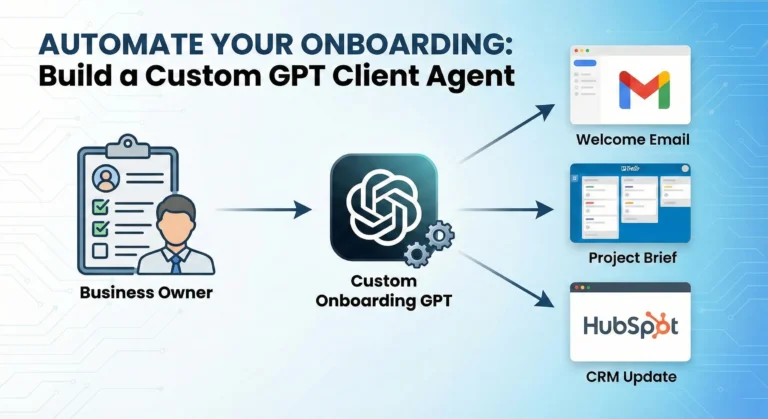
    Under the “Capabilities” section, you can set up Custom Actions. By connecting your GPT to tools like Zapier or Make, your agent can move from just writing text to actually executing tasks. You can configure it so that once the GPT generates the onboarding brief, it automatically pushes that data into a new Trello card, updates the client’s status in HubSpot or Salesforce, and drafts the welcome email directly in your Gmail drafts folder.

    Final Thoughts

    Treat your new custom GPT like a new hire. It will make a few mistakes in its first week. When it gives you an output you don’t like, don’t just fix the output manually—go back into the Configure tab and update the instructions so it learns for next time. Within a few weeks, you will have a rock-solid, automated client onboarding system that scales as fast as your agency does.