
AI Image & Design Tools

AI image and design tools are transforming the creative process by enabling users to generate graphics, illustrations, and marketing visuals in seconds. These tools use machine learning models to convert text prompts or concepts into high-quality images and design assets.

This category explores a range of AI-powered design platforms used by creators, marketers, and businesses. Articles examine tools that generate artwork, design social media graphics, create marketing visuals, and assist with branding workflows.

AI Growth Gear reviews these tools based on usability, output quality, customization options, and real-world applications to help readers choose the best solutions for their creative projects.

  • ·

    Top AI Image Generation Tools for Designers in 2026

    Artificial intelligence has transformed the design industry. What once required hours of manual work in tools like Photoshop or Illustrator can now be achieved in seconds with AI image generation tools.

    Designers, marketers, and content creators are increasingly using AI to generate illustrations, concept art, social media graphics, and marketing visuals. These tools use powerful machine learning models to convert simple text prompts into stunning images.

    Whether you’re a freelance designer, a startup founder, or a content creator, AI-powered design tools can significantly speed up your workflow.

    In this guide, we’ll explore the top AI image generation tools for designers, including Midjourney, Leonardo AI, and Canva, and show how each platform can enhance your creative process.
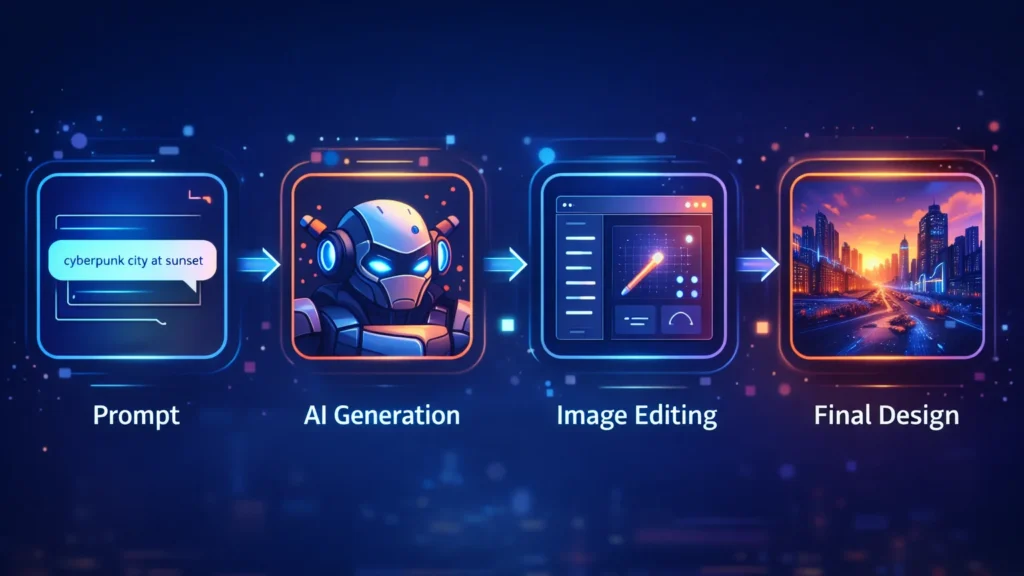
    Workflow diagram showing prompt input, AI image generation, image editing, and final design creation process.
    A visual workflow showing how AI image generators transform a text prompt into a finished design through generation and editing.

    AI design tools are not just about speed—they unlock entirely new creative possibilities.

    Key advantages include:

    • Generate multiple design concepts instantly
    • Create unique visuals without advanced design skills
    • Speed up creative workflows
    • Produce marketing visuals at scale
    • Reduce design costs for startups and creators

    For designers working with tight deadlines, AI tools can act as creative assistants that generate ideas and draft visuals quickly.

    ■ Best Overall: Midjourney
    ■ Best for Game Designers: Leonardo AI
    ■ Best for Beginners: Canva AI
    ■ Best for Marketing Visuals: Canva
    ■ Best for Concept Art: Midjourney

    Below are some of the most powerful AI image generators available today.
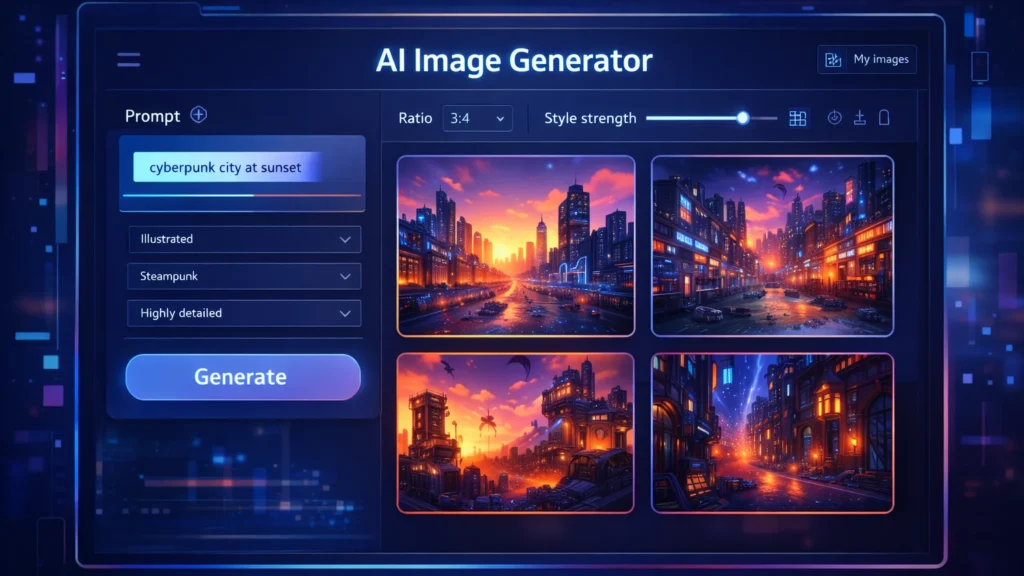
    AI image generator dashboard showing prompt input panel and multiple generated images in a design interface.
    A stylized AI image generator interface where users enter prompts and instantly generate multiple design variations.

    Midjourney is one of the most popular AI art generators used by professional designers and digital artists. It produces highly detailed and cinematic images from simple text prompts.

    Midjourney runs primarily through Discord, making it slightly different from traditional design tools.

    Key Features

    • Extremely high-quality image generation
    • Cinematic and artistic style outputs
    • Advanced prompt customization
    • Active community for prompt sharing

    Pros

    • Exceptional image quality
    • Ideal for concept art and illustration
    • Huge creative flexibility

    Cons

    • Requires Discord interface
    • Learning curve for prompts

    Best For

    Concept artists, creative designers, and illustrators looking for highly detailed artwork.

    Try Midjourney here

    Leonardo AI is becoming a favorite tool among game developers, product designers, and creative professionals who need consistent and customizable AI-generated images.

    It offers more control than many other AI art tools.

    Key Features

    • Custom AI model training
    • Game asset generation
    • Style control and presets
    • Prompt guidance tools

    Pros

    • Strong control over image styles
    • Great for game assets and design assets
    • Fast generation speeds

    Cons

    • Some advanced features require paid plans
    • Interface may feel complex for beginners

    Best For

    Game designers, digital artists, and product designers.

    Try Leonardo AI here

    Canva has integrated powerful AI features into its already popular design platform. With tools like Magic Media and the AI image generator, users can create visuals directly inside Canva.

    This makes it perfect for marketers and beginners.

    Key Features

    • AI text-to-image generator
    • Integrated design templates
    • Drag-and-drop editor
    • AI background removal and editing

    Pros

    • Very beginner-friendly
    • Works within existing design workflows
    • Excellent for marketing graphics

    Cons

    • Image quality may be lower than Midjourney
    • Limited artistic control

    Best For

    Social media creators, bloggers, and marketing teams.

    Try Canva AI here

    ToolBest ForKey FeaturePricing
    MidjourneyConcept artistsHigh-quality AI artPaid
    Leonardo AIGame designersCustom AI modelsFreemium
    Canva AIBeginners & marketersIntegrated design toolsFreemium

    Designers and creators are using AI tools in many creative ways.

    Common applications include:

    • Blog and website illustrations
    • YouTube thumbnails
    • Marketing graphics
    • Game assets
    • Concept art
    • Product mockups
    • Social media visuals

    For freelancers and online businesses, AI image generators can reduce the need for expensive design resources.

    Benefits and Limitations ⚖️

    AI design tools offer incredible advantages but also have some limitations.

    Benefits

    • Massive time savings
    • Endless creative variations
    • Lower design costs
    • Accessibility for beginners

    Limitations

    • Some images may look generic
    • Prompt engineering is required
    • Copyright concerns in some cases

    Designers should use AI tools as creative assistants, not replacements for human creativity.

    If you’re new to AI design tools, follow these steps.

    Step 1: Choose the right tool

    Pick a tool based on your use case.

    • Midjourney → creative artwork
    • Leonardo AI → design assets
    • Canva → marketing visuals

    Step 2: Learn prompt writing

    Your prompts determine the output quality.

    Example prompt:

    “Futuristic cyberpunk city at sunset, ultra-detailed digital art”

    Step 3: Experiment with styles

    Try different prompts, lighting, colors, and art styles to discover unique visuals.
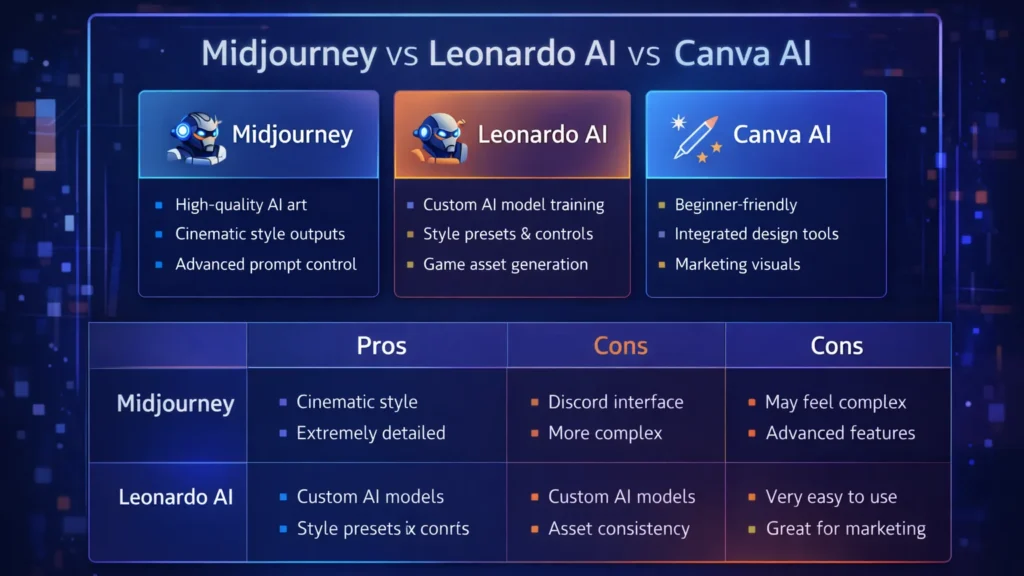
    Comparison chart highlighting features of Midjourney, Leonardo AI, and Canva AI image generation tools.
    Feature comparison of three popular AI image generation tools used by designers: Midjourney, Leonardo AI, and Canva AI.

    Conclusion

    AI image generation tools are transforming how designers create visuals. What once required hours of manual work can now be achieved in seconds using powerful AI platforms.

    Tools like Midjourney, Leonardo AI, and Canva AI give designers the ability to experiment, iterate, and produce high-quality visuals faster than ever.

    For entrepreneurs, bloggers, and digital creators, AI design tools offer a powerful way to scale visual content production while maintaining creativity.

    As AI continues to evolve, these tools will become an essential part of every modern designer’s toolkit.
  • ·

    Character Consistency: Midjourney vs. Flux

    If you have ever tried to make an AI comic book or a storyboard, you know the pain.

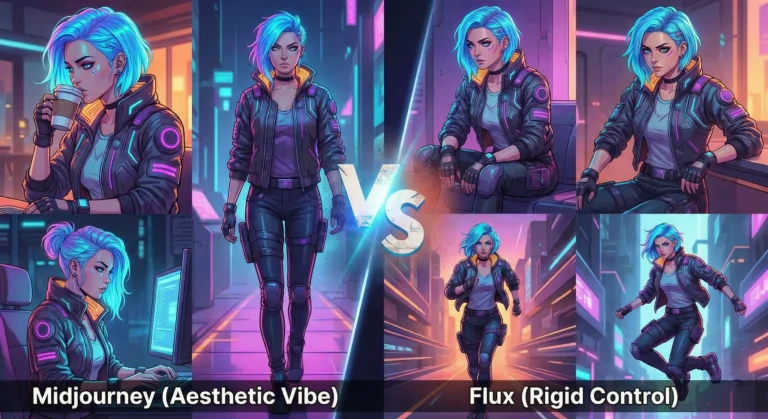
    You generate a stunning protagonist in Scene 1. Let’s call her “Maya, a cyberpunk hacker with a neon blue undercut.” She looks perfect.

    Then you write the prompt for Scene 2: “Maya sitting in a cafe drinking coffee.”

    Suddenly, Maya has a bob cut. Her jacket changed from leather to denim. Her face structure looks like she aged ten years or turned into her own cousin. The immersion is broken.

    For years, this “Shapeshifter Problem” was the wall that separated “cool AI art” from “actual storytelling.” But in 2026, the wall is crumbling. We now have specific tools designed to lock in a character’s identity.

    We put the two heavyweights—Midjourney and Flux—to the test. Here is who wins the Consistency Battle.

    The Contender: Midjourney (The --cref King)

    Midjourney remains the king of aesthetics, but its “Character Reference” (--cref) feature is what storytellers rely on.

    • How it works: You generate your “Master Image” of Maya. You copy the URL. Then, in your next prompt, you add --cref [url].
    • The Experience: It is shockingly good at capturing the vibe and facial features. In our test, Midjourney kept Maya’s neon hair and facial structure consistent about 85% of the time.
    • The Downside: Midjourney is stubborn. It loves to “prettify” things. If you try to put Maya in a gritty, ugly situation, the AI fights you to make it look cinematic. It also struggles with specific clothing consistency. Maya’s face stays the same, but her outfit tends to hallucinate new zippers and pockets in every frame.

    The Challenger: Flux (The Control Freak)

    Flux (specifically the specialized fine-tunes available in 2026) has taken the open-source world by storm.

    • How it works: Flux relies on “LoRAs” (Low-Rank Adaptation). Think of it as a mini-brain training. You upload 10 photos of a character, and the model learns who they are.
    • The Experience: This is the professional’s choice. Once Flux “knows” Maya, it doesn’t just guess; it understands her geometry. You can rotate her, change the lighting, or put her in a spacesuit, and the face remains identical.
    • The Downside: The learning curve is steep. You aren’t just typing a prompt; you are managing a workflow. You need a decent GPU or a cloud host like Fal.ai or Replicate to run it efficiently.

    The Verdict: Which One Do You Need?

    Choose Midjourney if: You are making a mood board, a pitch deck, or a children’s book where “close enough” is okay. It is fast, easy, and the lighting is always beautiful. The --cref tag is enough to fool the casual eye.

    Choose Flux if: You are building a graphic novel or a recurring brand mascot. If you need the character to wear the exact same logo on their shirt in panel 1 and panel 50, Flux is the only tool that offers that level of rigid consistency.

    The days of the shapeshifter are over. Pick your weapon and start telling your story.

  • ·

    Stop Using Midjourney for Logos: The Vector Revolution

    Look, we have all been there.

    You spend two hours perfecting a prompt in Midjourney. You finally get that perfect, minimalist mascot for a client or a new sticker design for your Etsy shop. It looks crisp on your iPhone. It looks stunning on Discord.

    Then you send it to the printer.

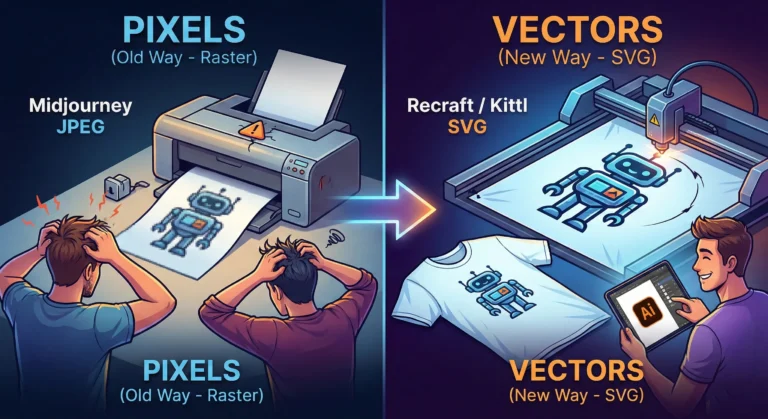
    And the email comes back: “Sorry, this is 72 DPI. Do you have the vector file? When we blow this up for the banner, it looks like a Minecraft screenshot.”

    Panic sets in. You try to use an “AI upscaler,” but it just makes the lines look weird and wobbly. You try to “Image Trace” it in Illustrator, and suddenly your clean lines turn into a jagged mess of a thousand anchor points.

    Here is the hard truth for 2026: Midjourney and DALL-E are for art. They are not for assets.

    If you are a solo entrepreneur, a Print-on-Demand (POD) seller, or a freelancer, you need to stop thinking in pixels and start thinking in math. You need to join the Vector Revolution.

    The “Pixel” Trap

    Tools like Midjourney generate Raster images. They are made of colored dots (pixels). They are painted. If you zoom in, they get fuzzy. You cannot change the color of just the shirt without repainting the whole thing.

    Vectors (SVGs, EPS, AI files) are different. They are math equations. A line is defined by points A and B. Whether you print it on a business card or a billboard, the math stays the same. The line is always sharp.

    For years, AI was bad at vectors because “math” is harder for diffusion models than “painting.” But in 2026, the code has been cracked.

    The New Toolkit: Recraft & Kittl

    If you are still wrestling with raster images for logos, stop. Here are the tools that are actually making money right now.

    1. Recraft (The Heavy Hitter) Recraft isn’t just “Midjourney but different.” It is built from the ground up for designers. When you type “minimalist geometric lion logo,” it doesn’t give you a flat picture. It gives you layers.

    • Why it wins: You can export as SVG. You can open that file in Illustrator or Figma and actually edit the curves. You can change the brand colors in two clicks because the AI understands “color palettes,” not just “pixels.”

    2. Kittl (The POD Powerhouse) If you sell on Redbubble or Merch by Amazon, Kittl is your best friend. Their “AI Vector Generator” is tuned specifically for t-shirt complexity. It avoids those weird, wispy lines that screen printers hate. It creates clean, solid shapes that peel perfectly off a vinyl cutter.

    The “Editable” Advantage

    The biggest reason to switch isn’t just print quality—it’s editability.

    Imagine a client says, “I love the logo, but can you move the star to the left and make the font bold?”

    • With Midjourney: You have to re-roll the prompt and hope the random seed gives you something similar (it won’t).
    • With Vector AI: You just click the star and drag it to the left.

    The Bottom Line

    Stop selling JPEGs. In the freelance world of 2026, a “Logo Package” that includes a scalable SVG file is worth $500+. A JPEG is worth $50.

    The tools have evolved. Your workflow should too. Keep Midjourney for your mood boards and concept art, but when it’s time to build the actual product? Go vector.