AI Tools

AI tools are transforming how businesses, creators, and entrepreneurs work by automating repetitive tasks and improving productivity. From AI writing assistants and design generators to marketing automation platforms and no-code AI builders, modern tools are enabling individuals and teams to accomplish more with fewer resources.

In this section of AI Growth Gear, we review and analyze some of the most useful AI tools available today. Our guides cover software used for content creation, marketing automation, workflow optimization, design, and digital business operations.

Each review focuses on practical use cases, helping readers understand how different tools perform in real-world scenarios. Whether you are a founder, marketer, freelancer, or digital creator, this category highlights technologies that can streamline workflows and unlock new growth opportunities.

  • ·

    Digital Doubles: HeyGen vs. Synthesia – Choosing Your AI Presenter for 2026

    In business, communication is everything. Whether it’s training your global sales force, delivering personalized video messages to thousands of leads, or creating consistent brand explainers, the demand for engaging video is immense. The traditional approach—hiring presenters, booking studios, shooting, editing—is a bottleneck for even the most agile teams.

    This is where AI Avatar & Business Presenters step in. These aren’t just text-to-speech tools; they create convincing digital humans who can speak your message in multiple languages, with realistic expressions and lip-sync. For businesses in the US and UK looking to scale their video output without scaling their production budget, these platforms are a game-changer.

    At AI Growth Gear, we’ve evaluated the leading platforms with our “Director’s Lens,” focusing on realism, brand integration, and operational efficiency. Here’s how the top two—HeyGen (Avatar IV) and Synthesia—compare for your business.

    The Contenders at a Glance

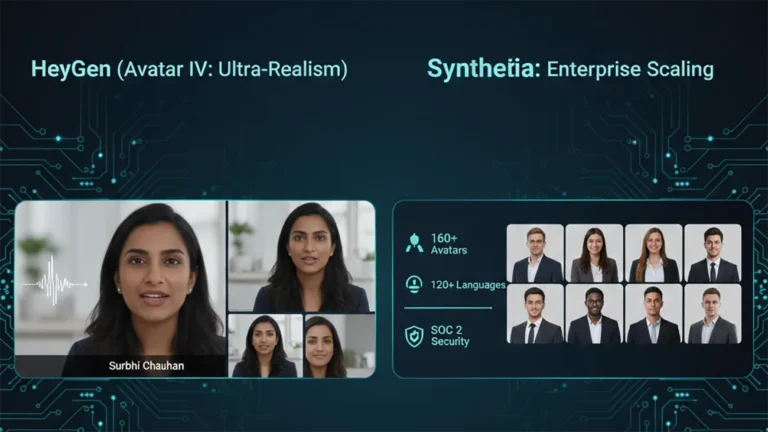
    FeatureHeyGen (Avatar IV)Synthesia
    Primary StrengthUltra-Realistic Digital TwinsEnterprise-Grade Library & Compliance
    Best ForPersonalized Sales, UGCCorporate Training, Explainers
    WeaknessCustom avatars require more inputStock avatars can feel less unique

    1. HeyGen (Avatar IV): The Ultra-Realist

    HeyGen’s latest iteration, Avatar IV, is pushing the boundaries of what’s possible in AI avatar realism. Its “Digital Twin” feature allows businesses to create incredibly lifelike avatars of actual employees or spokespersons from minimal video footage. The subtlety of facial expressions and natural-sounding voice clones are truly impressive.

    • The Aesthetic: Aimed squarely at hyper-realism. If you want your AI presenter to be indistinguishable from a real human, HeyGen is currently leading the pack. It masters the minute details, making it ideal for maintaining a personal touch at scale.
    • The Director’s Take: “HeyGen is for when ‘authentic’ means ‘looks like you.’ It’s unparalleled for personalized sales videos, founder messages, or any content where the presenter’s unique identity is key. It allows a boutique agency to maintain its human brand persona without physically being in every video.”

    2. Synthesia: The Enterprise Powerhouse

    Synthesia has been the long-standing leader in the corporate AI video space, and for good reason. It boasts an extensive library of over 160 diverse stock avatars and 120+ languages, coupled with robust SOC 2 compliance for data security. Its platform is built for scalable, professional use cases across large organizations.

    • The Aesthetic: Polished, professional, and consistent. While its stock avatars are highly realistic, they aim for broad appeal rather than individual uniqueness.
    • The Director’s Take: “Synthesia is the workhorse of the enterprise. If you need to produce hundreds of consistent training modules, international onboarding videos, or routine explainers, its sheer volume of customizable options and security features make it the undisputed choice. It ensures your corporate communication is slick and reliable across the board.”

    The Verdict: Which Digital Double is Right for You?

    • Choose HeyGen if your priority is Personalization and Ultra-Realism. If you need your AI presenter to look and sound exactly like a specific person to build trust or enhance a unique brand identity.
    • Choose Synthesia if your priority is Scalability and Corporate Readiness. If you require a vast library of diverse avatars, multi-language support, and enterprise-grade security for consistent, high-volume video production.

    Our Recommendation for 2026

    For many agencies, the ideal setup might involve a blend: HeyGen for high-impact, personalized, and client-facing content, and Synthesia for internal training, broad-reach explainers, or situations requiring a diverse range of stock avatars. Both tools excel at making video production accessible, but they serve different strategic objectives.

  • ·

    Cinematic Showdown: Google Veo vs. Runway vs. Sora (2026 Comparison)

    In the film world, choosing a camera is a statement of style. An Arri Alexa feels different than a RED. In 2026, choosing an AI Video Generator is no different. You are choosing the “soul” of your footage.

    At AI Growth Gear, we’ve put the top three engines through a rigorous “Director’s Test.” Here is how they stack up for professional agency use.

    The Competitors at a Glance

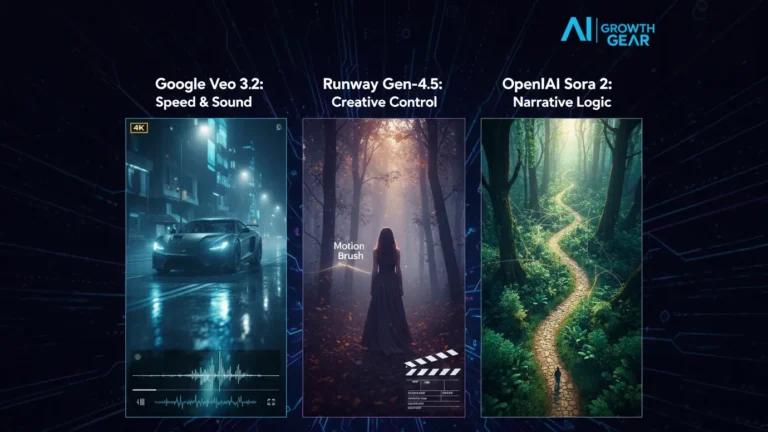
    FeatureGoogle Veo 3.2Runway Gen-4.5OpenAI Sora 2
    Primary StrengthIntegrated Audio & 4K ClarityGranular Creative ControlNarrative Logic & Physics
    Best ForReady-to-use Social AdsHigh-End Brand FilmsLong-Form Storytelling
    WeaknessCan feel “too perfect”Steep learning curveLimited public API access

    1. Google Veo 3.2: The “All-in-One” Workhorse

    Google has leveraged its vast data to create the most stable engine. The standout feature in 2026 is Native Audio Synchronization. When Veo generates a video of a car splashing through rain, it generates the exact sound of that splash perfectly synced to the frame.

    • The Aesthetic: It leans toward commercial realism. It’s vibrant, sharp, and safe.
    • The Director’s Take: “If you need an ad for a UK real estate firm or a US tech startup that needs to look ‘Apple-clean’ in ten minutes, Veo is your gear.”

    2. Runway Gen-4.5: The Artist’s Precision Tool

    Runway remains the favorite for those of us with a NIFT or film background. Their “Motion Brush 3.0” and “Director Mode” allow you to tell the AI exactly where to move the camera (pan, tilt, zoom) and which specific elements should move within the frame.

    • The Aesthetic: Moody, textured, and artistic. It handles “Cinematic Grain” and lighting better than anyone else.
    • The Director’s Take: “Runway doesn’t just ‘generate’; it ‘collaborates.’ It’s the only tool that lets me maintain a specific brand texture without the AI taking over the creative wheel.”

    3. OpenAI Sora 2: The Physics Master

    Sora 2 is still the king of Spatial Consistency. If a character walks behind a tree and comes out the other side, they look identical. Most other AIs still “glitch” the details. Sora understands that a glass of water should reflect the room, and gravity should pull objects down naturally.

    • The Aesthetic: Hyper-realistic and expansive. It excels at wide, sweeping “Drone” shots.
    • The Director’s Take: “Sora is for the ‘Big Picture.’ It’s perfect for world-building or creating complex scenes where physical logic cannot be compromised.”

    The Verdict: Which Gear Should You Pick?

    • Choose Google Veo if your priority is Speed and Sound. It’s the ultimate tool for high-volume content agencies where “done is better than perfect.”
    • Choose Runway if your priority is Aesthetic Control. If your brand relies on a specific “look” or mood, Runway is the only tool that respects your creative direction.
    • Choose Sora if your priority is Realism and Scale. When the physics of the scene must be flawless, Sora is the undisputed leader.

    Our Recommendation for 2026

    For most boutique agencies, a Runway + Veo hybrid workflow is the winner. Use Runway to create the “Hero” visuals that define your style, and use Veo to quickly scale the supporting content with integrated sound.

  • ·

    Beyond the Green Screen: Choosing the Best AI Video Generators for 2026

    The statistics are undeniable: video dominates online engagement. But for years, creating high-quality video content has been a monumental task, demanding expensive equipment, skilled crew, and endless hours in the editing suite. This “production bottleneck” has traditionally kept many ambitious brands from fully leveraging video.

    Enter AI Video Generators.

    In 2026, these tools are no longer just novelties. They are rapidly evolving into powerful platforms that democratize video creation, allowing businesses—from bustling agencies in London to innovative startups in New York—to produce engaging content at unprecedented speed and scale.

    But with a new tool emerging every week, how do you choose the right one? At AI Growth Gear, with our foundation in film production and aesthetic communication, we see AI video as more than just pressing a button; it’s about translating vision into compelling motion, with precision and soul.

    Why AI Video is No Longer Optional

    • Speed to Market: Generate marketing videos, social clips, and product explainers in minutes, not days.
    • Cost Efficiency: Drastically reduce reliance on traditional production budgets, freeing up resources for strategy.
    • Scalability: Produce personalized video content for diverse audiences without increasing headcount.
    • Consistency: Maintain brand voice and visual style across all video assets through templating and AI assistance.

    What to Look For: A Director’s Checklist for AI Video Generators

    Not all AI video generators are created equal. Based on our extensive testing and understanding of professional production needs, here’s what to prioritize:

    1. Aesthetic Output (The Surbhi Chauhan Factor): This is paramount. Does the AI produce videos that look genuinely professional, or do they fall into the “uncanny valley” of robotic, overly polished, or bland visuals? Look for tools that allow granular control over style, lighting, and realistic character animation. Can it capture the texture of your brand?
    2. Ease of Use & Workflow Integration: A tool is only useful if it fits seamlessly into your existing operations. Is the interface intuitive? Can you upload scripts easily? Does it integrate with your content calendar or project management tools (like Notion or Zapier)?
    3. Customization & Brand Control: Can you upload your own brand assets (logos, fonts, color palettes)? Does it offer a range of customizable templates? The more control you have over the final output, the better it aligns with your brand identity.
    4. Voice & Lip-Sync Accuracy: If you’re using AI avatars or text-to-speech, pay close attention to the naturalness of the voice and the lip-sync quality. A robotic voice or mismatched lips can instantly break immersion and trust.
    5. Cost vs. Value: Free tools are tempting, but often come with limitations on quality, features, or branding. Evaluate subscription models based on the number of minutes, avatars, or advanced features you truly need. Calculate the ROI: how much time and money will it actually save you compared to traditional methods?
    6. Ethical Considerations & Rights: Understand the tool’s terms of service regarding content ownership and the ethical use of AI-generated faces or voices. Ensure you have the necessary rights for commercial use.

    The Future is in Motion

    AI video generators are not here to replace human creativity, but to augment it. They free up creatives to focus on strategic storytelling, conceptualization, and the subtle “director’s touch” that elevates content. By carefully selecting the right AI video gear, you can transform your content strategy, capture more attention, and truly scale your brand’s message.

    Ready to bring your brand to life in motion? The right AI video partner is waiting.

  • ·

    Google Gemini Review 2026: Can It Really Beat ChatGPT?

    If you follow AI even a little bit, you’ve probably heard that Google Gemini is supposed to be the company’s big answer to ChatGPT. In this Google Gemini review, I’m focusing on how Gemini AI actually feels in day‑to‑day use in 2026, and whether it genuinely beats ChatGPT or just offers a different flavour of the same thing. This Gemini vs ChatGPT review is based on typical tasks: writing, research, coding, and general productivity for users in the US and UK.

    Setup and Interface: Gemini Feels Naturally Built Into Google

    The first obvious advantage Gemini has is integration. While ChatGPT mostly lives in its own web app (unless you use plugins or third‑party tools), Gemini is woven directly into Google products that people in the US and UK already use daily.

    In Gmail and Google Docs, Gemini can suggest replies, rewrite emails, draft blog posts, and summarise long text without leaving the page. On Android phones and Chromebooks, Gemini is increasingly replacing the old Google Assistant, so it feels like part of the operating system rather than an extra app.

    ChatGPT, on the other hand, still works best as something you open in a separate tab or app and copy‑paste from. For some people that’s fine, but if you live inside Google’s ecosystem, Gemini’s integration is a big practical win.

    Writing and Content Generation: ChatGPT Still Has the Edge for “Voice”

    For writing tasks, the gap between Gemini AI and ChatGPT is smaller than it used to be, but it hasn’t disappeared.

    Gemini is very good at structured writing: outlines, lists, how‑to guides, meeting notes and summaries. It tends to stay organised, on‑topic and fairly concise. If you need a clean first draft of a blog post, a product description, or a set of bullet points for a presentation, Gemini does the job without much drama.

    ChatGPT, especially in its latest versions, still feels a bit more “human” in tone. It’s better at storytelling, humour, and capturing a particular style of writing. When you ask for a conversational article or a creative angle, ChatGPT often sounds more natural and less like a corporate manual.

    So in this part of the Gemini vs ChatGPT review, the result is mixed: Gemini wins on structure and tight integration with Docs, while ChatGPT remains slightly stronger for voice and personality.

    Search, Facts and Live Information: Gemini Plays on Home Ground

    When it comes to live information, Gemini finally looks like the AI that Google promised. Because it sits directly on top of Google Search, it can pull in fresh results, link to sources, and show you where it found the information.

    For example, if you ask for “best AI tools for small businesses in the UK in 2026” or “latest changes in US student loan rules”, Gemini is usually quicker to ground its answer in current web pages. You can see links, visit the original sites, and dig deeper.

    ChatGPT has browsing modes and integrations, but they still feel like an extra layer bolted on top. Sometimes it browses, sometimes it doesn’t, and occasionally it hallucinates details more confidently than Gemini does.

    That doesn’t mean Gemini is perfect: it can still misread pages or over‑simplify complex topics. But for search‑style questions, especially those relevant to US and UK news, Gemini now feels more reliable more often.

    Coding and Technical Tasks: Close Competition, Slight Preference

    Both Gemini AI and ChatGPT are strong coding assistants in 2026, and for most everyday developers there is less difference than marketing suggests.

    Gemini is excellent when used with Google’s developer tools and cloud services. It can help generate code snippets, explain error messages, and suggest improvements in a fairly straightforward way. If you’re already in the Google Cloud world, that tight connection is useful.

    ChatGPT still has a slight edge in explaining code step‑by‑step and offering multiple versions of a solution. Many developers in the US and UK have already built their personal workflow around ChatGPT, and that familiarity matters.

    If you’re starting from scratch, you can comfortably pick either. If you’re deep into Google’s stack, Gemini will feel more natural. If you’ve been using ChatGPT for a year or more, there isn’t a strong reason to abandon it purely for coding.

    Privacy, Pricing and Value for Money

    On pricing, Gemini and ChatGPT both use a mix of free and paid tiers. Google’s free Gemini is competitive for casual users, and the paid versions are mainly attractive for heavy usage or business integrations.

    For many US and UK users, the real question is not just price but trust. Google has a long history of collecting user data, and some people are cautious about giving Gemini access to their documents and emails, even if it is technically necessary for the features to work. OpenAI has had its own controversies, but it still feels slightly more “separate” from your daily accounts.

    If you already rely heavily on Google Workspace, paying for Gemini’s advanced features can make sense: you are getting an AI layer across tools you’re already paying for. If you prefer to keep AI separate from your inbox and personal files, a standalone ChatGPT subscription may feel safer.

    In 2026, Google Gemini has finally become a serious rival instead of just a late response. It doesn’t completely replace ChatGPT, but for many US and UK users, especially those deep in Google’s ecosystem, it might quietly become the AI they reach for first.

    Final Verdict – Is Gemini Better Than ChatGPT in 2026?

    So, the big question of this Gemini vs ChatGPT review: is Google Gemini actually better?

    The honest answer is: it depends how you work.

    Gemini is best for:

    • People who live inside Google Search, Gmail, Docs and Android
    • Structured work: summaries, outlines, emails, reports and quick research
    • Users who want AI blended directly into their existing tools

    ChatGPT is still better for:

    • More creative writing, storytelling and conversational content
    • Users who like a single, central AI workspace separate from their other accounts
    • Developers and power users who already built habits and prompts around ChatGPT

    In 2026, Google Gemini has finally become a serious rival instead of just a late response. It doesn’t completely replace ChatGPT, but for many US and UK users, especially those deep in Google’s ecosystem, it might quietly become the AI they reach for first.