We have all been there. You are playing around in Midjourney, and suddenly, you generate the perfect concept for a client’s logo. It’s the right vibe, the right colors, the right aesthetic. The client loves it.
Then they ask the inevitable follow-up question: “This is great. Can we get a matching icon set for the website and a header image in the same style?”
You go back to Midjourney, paste in the original prompt, hit enter, and… you get something completely different. Panic sets in.
Midjourney is incredible at generating beautiful, singular images, but out of the box, it is terrible at consistency. And in branding, consistency isn’t just nice to have; it’s the whole ballgame. A brand identity is defined by repetition and cohesiveness.
If you want to transition from using AI as a toy to using AI graphic design for business, you have to stop treating it like a slot machine and start treating it like a junior designer that needs very specific instructions.
Here is a tutorial on how to force Midjourney style consistency to build a usable brand identity system.
Phase 1: Defining the “Style Anchor”
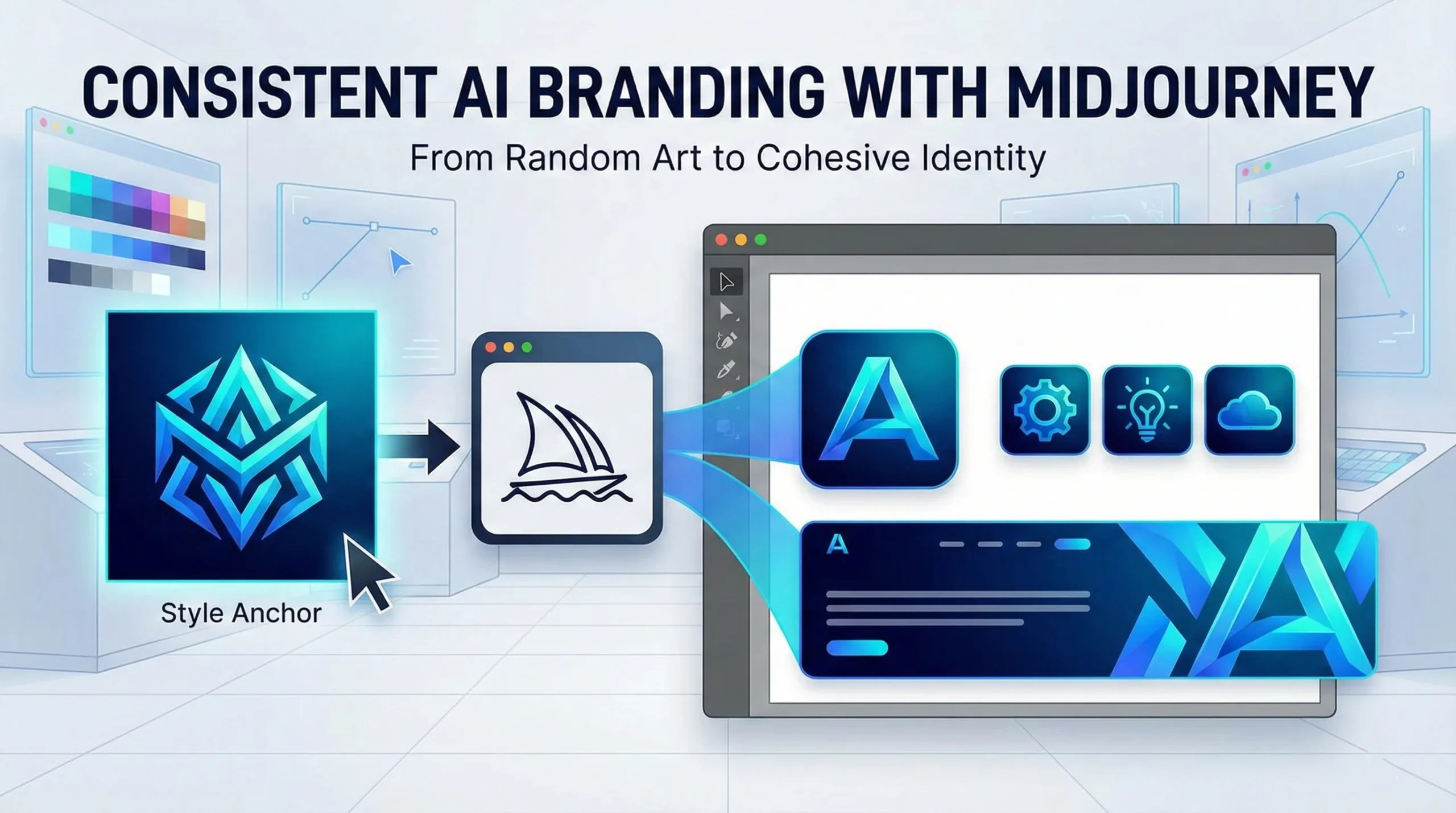
You cannot build a consistent brand until you define what “consistent” looks like. You need one image that perfectly encapsulates the visual DNA of the brand—the color palette, the rendering technique (e.g., flat vector, 3D isometric, watercolor), and the mood.
Don’t try to generate the final logo yet. Just generate the style.
Example Prompt for a Tech Startup Style: /imagine prompt: A futuristic, minimalist geometric emblem, gradients of electric blue and cyan, clean lines, abstract data flow concept, white background, vector art style --v 6.0
Reroll this prompt until you get one image that makes you say, “Yes, that is the look.” Upscale it. This image is now your “Style Anchor.” Right-click it and copy the image URL.
Phase 2: The Secret Weapon (Style References)
For a long time, maintaining consistency meant endlessly tweaking prompt text and praying. Then, Midjourney introduced the Style Reference parameter (--sref). This changed everything for professional designers.
--sref tells Midjourney: “Don’t just look at the words I’m typing; look at this image and copy its vibe.”
This is how we move from a single cool image to an AI logo design tutorial that actually works for business.
Phase 3: Building the Asset Suite
Now we are going to generate different assets, but we will force them all to match our Style Anchor from Phase 1 using the URL we copied.
1. The Primary Logo Icon: Now we ask for the specific subject matter, but apply the anchor style.
Prompt: /imagine prompt: A stylized letter 'A' icon, geometric, tech company logo --sref [INSERT YOUR STYLE ANCHOR URL HERE] --v 6.0
2. Matching Website Icons: You need a set of three icons (a gear, a lightbulb, a cloud) for the services section of a website. They need to look like siblings to the logo.
Prompt: /imagine prompt: A set of three UI icons: a gear, a lightbulb, and a cloud. Clean geometric style, minimalist --sref [INSERT YOUR STYLE ANCHOR URL HERE] --v 6.0
Because you used the --sref link, Midjourney will render these new objects using the exact same electric blue gradients and clean line work as your anchor image.
3. The Hero Background: You need a wide banner for the website header that feels connected to the brand but isn’t just a giant logo.
Prompt: /imagine prompt: A wide website banner background, abstract data flowing, futuristic network patterns, subtle gradients --ar 16:9 --sref [INSERT YOUR STYLE ANCHOR URL HERE] --v 6.0
Phase 4: The Professional Reality Check (Vectorizing)
If you are an agency owner or freelancer, you know you cannot deliver a Midjourney PNG to a client as a final logo file. Midjourney creates raster images (pixels); professional brands need vectors (math).
Midjourney is for ideation and consistency creation. Once you have the approved assets, your workflow must move off-platform. Take your finalized, consistent Midjourney outputs and use tools like Adobe Illustrator’s “Image Trace” or specialized AI vectorizers like Vectorizer.ai to convert them into scalable SVGs or EPS files.
Final Thoughts
Using Midjourney brand assets doesn’t replace the designer’s eye. It just speeds up the iteration process exponentially. By mastering tools like style referencing, you stop fighting the AI’s randomness and start harnessing it to build cohesive, sellable brand identities.