|

Best AI Video Tools for Content Creators in 2026

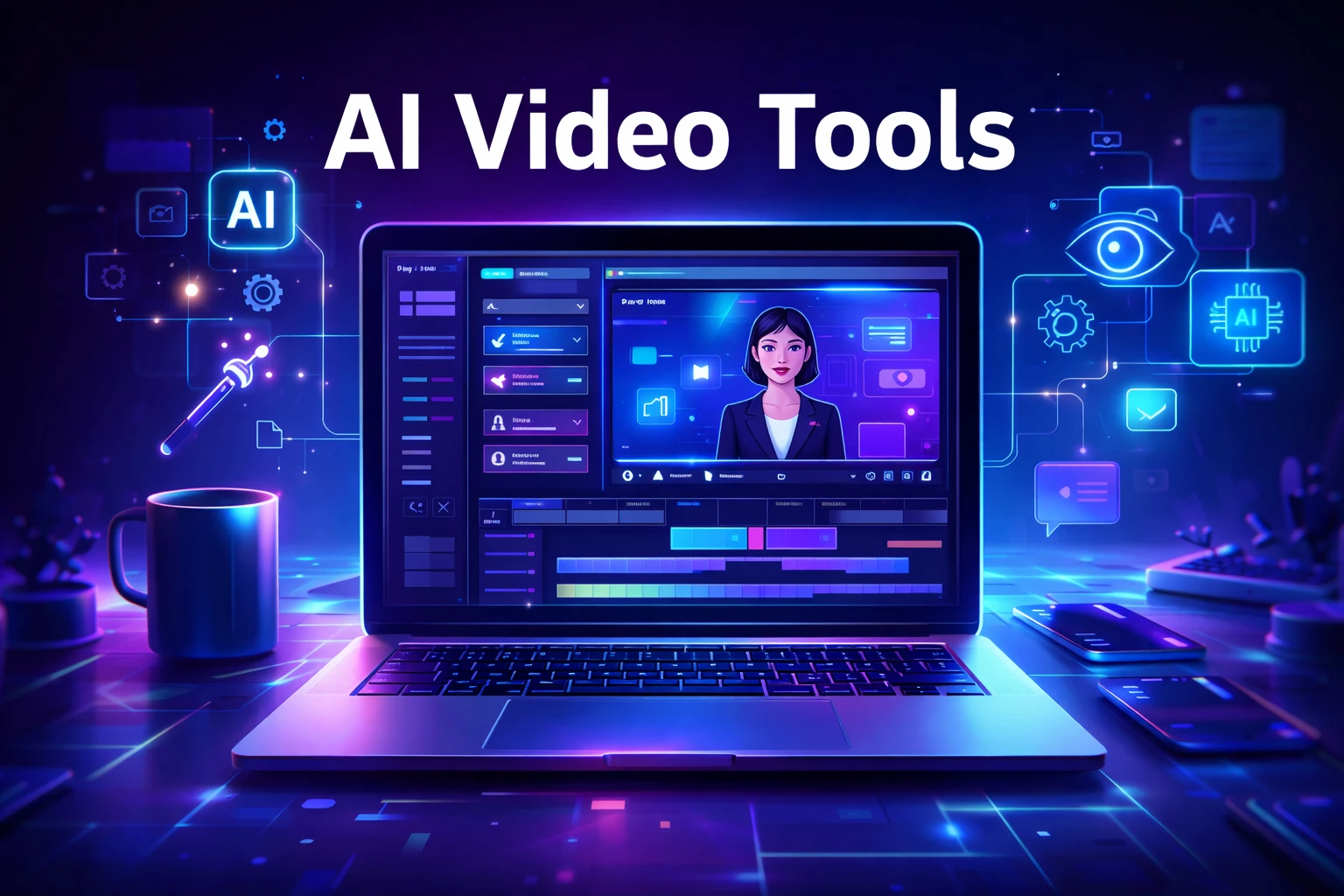
Futuristic workspace showing AI video editing software with an AI avatar and automated video creation tools on a laptop screen

Video content is dominating the internet. Platforms like YouTube, TikTok, Instagram Reels, and LinkedIn video have made video one of the most powerful ways to reach audiences online.

However, producing high-quality videos traditionally requires editing skills, expensive software, and significant time investment.

Artificial intelligence is now transforming this process.

AI video tools allow creators to generate videos from scripts, automatically edit clips, add voiceovers, and even create AI presenters. For entrepreneurs, bloggers, and marketers, this means producing professional video content without needing a full production team.

In this guide, we explore the best AI video tools for content creators and how they can help you scale content production faster and more efficiently.

AI video creation workflow showing idea, script, AI video generation and publishing process for content creators
An infographic illustrating the AI video creation workflow, where content creators transform an idea into a script, generate AI-powered videos, and publish them across digital platforms.

Video production used to be complicated and time-consuming. AI technology now allows creators to automate many parts of the process.

With the right AI video tools, creators can:

• Produce videos much faster
• Reduce editing time dramatically
• Convert blog posts into videos
• Create faceless YouTube channels
• Scale social media marketing campaigns

For freelancers, content creators, and online businesses, these tools help produce more content with fewer resources.


Best Overall: Pictory AI
Best Budget Option: InVideo AI
Best for Beginners: Lumen5
Best for AI Avatars: Synthesia
Best for Advanced Creators: Runway ML


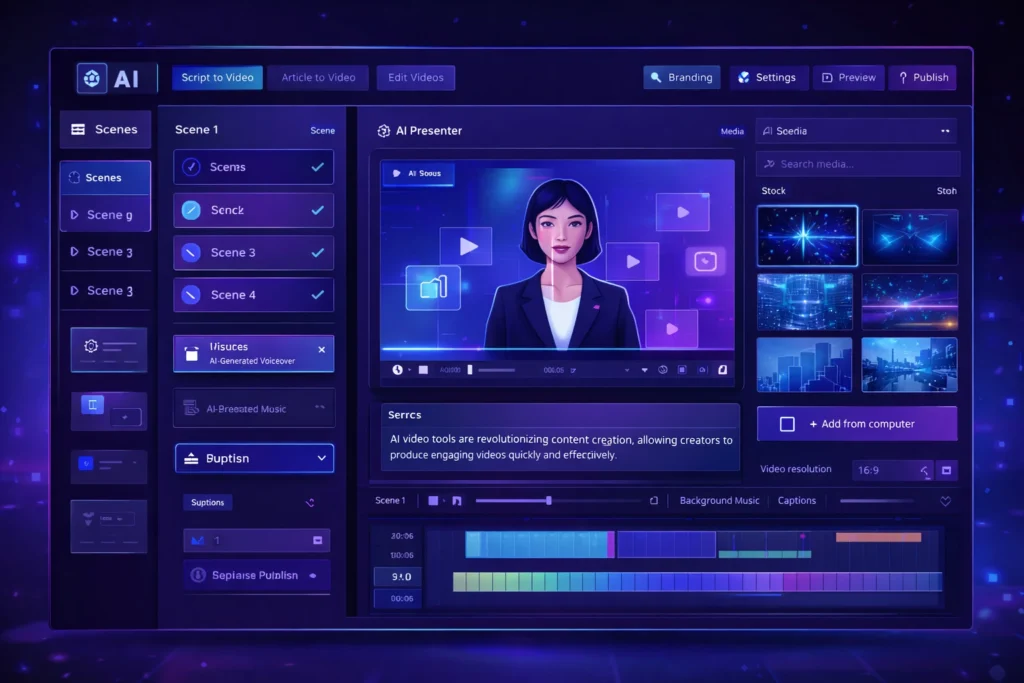
AI video generator dashboard interface showing AI presenter, video timeline editor and automated video creation tools
A modern AI video generator dashboard interface displaying an AI presenter, video editing timeline, and automation tools used by content creators to generate videos quickly.

Pictory AI is widely used by bloggers and YouTubers to convert scripts or articles into engaging videos. It automatically matches your script with visuals, adds captions, and generates voiceovers.

This makes it ideal for creating faceless YouTube content or repurposing blog posts.

Key Features

• Script-to-video automation
• AI voiceovers
• Automatic captions
• Large stock footage library

Pros

• Very beginner friendly
• Fast video creation

Cons

• Limited customization
• Paid plans required for longer videos

Best For

Bloggers, YouTubers, and marketers creating educational or faceless video content.

Try Pictory AI here


Synthesia allows creators to generate videos using realistic AI avatars. Instead of recording yourself, you can simply write a script and the AI presenter delivers the message.

This is especially useful for business videos, training materials, and product explainers.

Key Features

• AI avatar presenters
• Support for 120+ languages
• Text-to-video generation
• Professional video templates

Pros

• Professional looking presenters
• Great for corporate and educational videos

Cons

• Premium pricing
• Limited emotional expressions in avatars

Best For

Businesses, educators, and creators producing professional presentations.

Try Synthesia here


Runway ML is one of the most advanced AI video platforms currently available. It includes powerful AI editing tools, video generation models, and creative features used by filmmakers and digital creators.

This platform is perfect for creators who want more advanced control over video production.

Key Features

• AI video generation tools
• Automatic background removal
• AI-powered video editing
• Creative effects powered by AI models

Pros

• Advanced creative capabilities
• Used by professional creators

Cons

• Learning curve for beginners
• Higher cost for heavy usage

Best For

Professional creators, filmmakers, and advanced video editors.

Try Runway ML here


InVideo AI focuses on creating videos directly from text prompts. Users simply describe the video they want, and the platform automatically generates visuals, voiceovers, and music.

It’s especially popular among marketers and social media creators.

Key Features

• AI text-to-video generator
• Automated script creation
• Huge media library
• Social media optimized templates

Pros

• Affordable pricing
• Simple user interface

Cons

• AI voice quality varies
• Limited advanced editing features

Best For

Social media marketers and beginners creating short-form video content.

Try InVideo AI here


Lumen5 is designed for turning blog posts into engaging videos. It automatically extracts key points from your article and matches them with visuals.

This makes it extremely useful for bloggers and digital marketers repurposing written content.

Key Features

• Blog-to-video conversion
• Drag-and-drop editor
• AI media matching
• Social media formats

Pros

• Easy to use
• Great for content repurposing

Cons

• Limited advanced editing features
• Repetitive stock footage

Best For

Bloggers and marketers converting articles into videos.

Try Lumen5 here


ToolBest ForKey FeaturePricing
Pictory AIBloggersScript to videoPaid
SynthesiaBusiness videosAI avatarsPaid
Runway MLCreatorsAI video editingFreemium
InVideo AISocial mediaText-to-videoFreemium
Lumen5Blog contentBlog-to-videoFreemium

AI video tools are used for many different purposes.

Common use cases include:

• Creating faceless YouTube channels
• Producing Instagram Reels or TikTok content
• Repurposing blog articles into videos
• Creating product marketing videos
• Producing online course materials

Entrepreneurs and digital marketers are increasingly using AI tools to scale content creation across multiple platforms.


• Faster content production
• Lower production costs
• No advanced editing skills required
• Scalable content marketing strategy

• Limited creative control in some tools
• Subscription costs for premium features
• AI-generated content may require manual editing

Despite these limitations, AI video technology continues to improve rapidly.


If you are new to AI video tools, follow these steps:

  1. Choose a beginner-friendly platform such as Pictory or InVideo.
  2. Start with short video projects.
  3. Experiment with AI voiceovers and templates.
  4. Optimize videos for platforms like YouTube or TikTok.

Most platforms offer free trials, allowing creators to test the tools before upgrading.
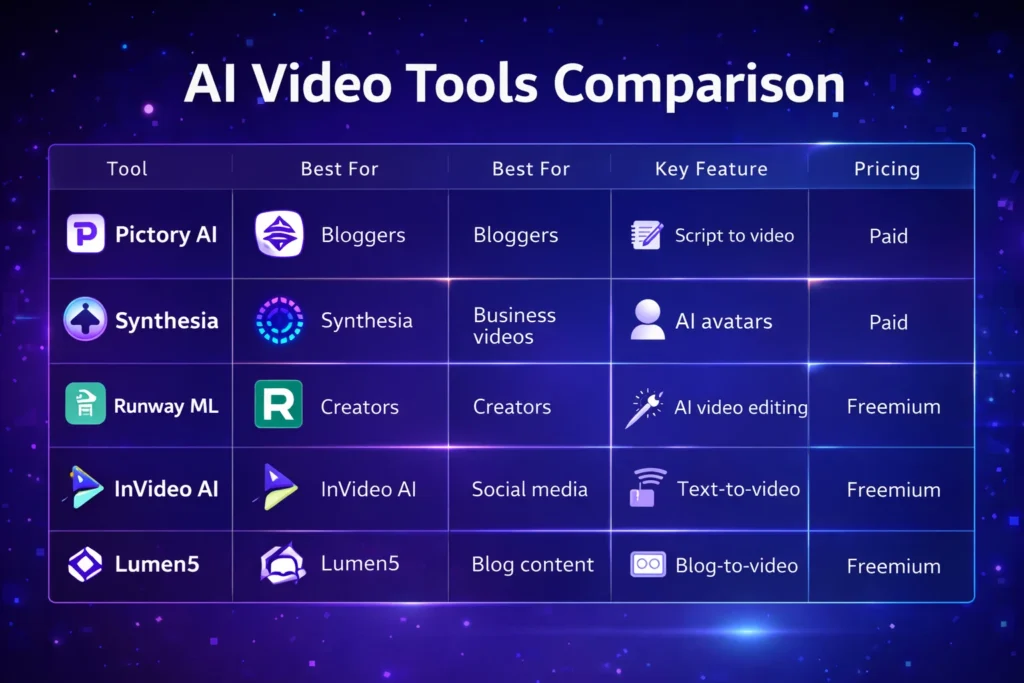

Comparison chart of popular AI video tools including Pictory AI, Synthesia, Runway ML, InVideo AI, and Lumen5 showing features and pricing
A visual comparison chart highlighting key features, best use cases, and pricing models of leading AI video tools used by content creators.

AI video tools are transforming the way content creators produce video content.

Instead of spending hours editing footage, creators can now generate professional videos using artificial intelligence. Platforms like Pictory, Synthesia, Runway ML, InVideo AI, and Lumen5 make it easier than ever to create high-quality video content.

For entrepreneurs, bloggers, and digital marketers, adopting AI video tools can significantly improve productivity and help scale content marketing efforts.

As AI technology continues evolving, these tools will become an essential part of the modern creator’s workflow.

Similar Posts

  • ·

    Gemini vs Grok vs ChatGPT: Which AI Actually Delivers?

    AI tools are no longer novelty software. They’re embedded in marketing stacks, product teams, customer support desks, and solo founder workflows.

    But here’s the real issue: most comparisons between Gemini, Grok, and ChatGPT focus on feature checklists — not actual business impact.

    If you’re running campaigns, building SaaS products, automating workflows, or scaling digital operations, the question isn’t which AI is smartest.

    The question is:

    Which AI fits your workflow, risk tolerance, and monetization model?

    Let’s break this down from a practical, business-first perspective.


    🧠 Core Positioning: What Each Tool Is Really Built For

    ChatGPT has become the default AI workspace for professionals.

    It excels at:

    • Long-form content
    • Structured reasoning
    • Coding assistance
    • Workflow automation via APIs
    • Document summarization
    • Custom GPT workflows

    For many entrepreneurs, ChatGPT acts as a “digital operations assistant.”

    • Draft landing pages
    • Generate ad variations
    • Build Zapier automation logic
    • Create client reporting templates

    It’s flexible and ecosystem-friendly.


    Gemini integrates deeply into Google’s ecosystem.

    Its strength isn’t just intelligence — it’s context.

    It works well with:

    • Google Docs
    • Gmail
    • Sheets
    • Drive
    • Workspace collaboration
    • Analyze campaign data directly in Sheets
    • Draft email updates inside Gmail
    • Summarize meeting notes automatically

    Gemini is strongest when your business already lives inside Google.


    Grok operates differently. It’s closely integrated with the X (formerly Twitter) ecosystem and emphasizes real-time information access.

    Its positioning is:

    • Social intelligence
    • Real-time trend awareness
    • Edgier conversational style
    • Live internet awareness
    • Monitor sentiment shifts
    • Analyze breaking news
    • Generate rapid-response commentary

    Grok shines in live environments. It’s less structured, more reactive.


    ⚙️ Real-World Productivity Comparison

    Here’s where things matter for professionals.

    For AI Automation Builders 🛠️

    • ChatGPT wins due to API maturity and plugin ecosystem.
    • Gemini is improving but less flexible for external automation.
    • Grok isn’t optimized for backend automation yet.

    For AI Marketing Workflows 📈

    • ChatGPT: Best for structured funnel content, copy frameworks, strategy.
    • Gemini: Strong for ad analysis if you live in Google Ads.
    • Grok: Useful for trend-based content and social hooks.

    For SaaS Founders 💻

    • ChatGPT: Product ideation, UX copy, code scaffolding.
    • Gemini: Useful for internal documentation collaboration.
    • Grok: Less relevant unless your SaaS is social-data-driven.

    ⚖️ Strengths and Limitations

    ChatGPT

    Pros

    • Deep reasoning
    • Advanced coding
    • API integrations
    • Custom GPT creation

    Cons

    • May require prompt skill to maximize output
    • Enterprise pricing can scale

    Gemini

    Pros

    • Native Google ecosystem integration
    • Strong document collaboration
    • Smooth Workspace automation

    Cons

    • Less customizable outside Google
    • Not as developer-centric

    Grok

    Pros

    • Real-time awareness
    • Social sentiment alignment
    • Direct integration with X

    Cons

    • Not workflow-automation focused
    • Limited enterprise tooling

    🚀 Practical Implementation Strategy

    Instead of choosing just one, many professionals layer them.

    Here’s a smart approach:

    Step 1: Define Your Primary Use Case

    Ask:

    • Is this content-heavy?
    • Is this data-heavy?
    • Is this trend-heavy?

    Step 2: Assign Roles

    • ChatGPT → Strategy + structure
    • Gemini → Internal collaboration
    • Grok → Real-time market pulse

    Step 3: Build Repeatable AI Workflows

    For example:

    1. Use Grok to identify trending topics.
    2. Use ChatGPT to turn that into structured authority content.
    3. Use Gemini to distribute internally via Docs and Gmail.

    This layered workflow reduces blind spots.


    👥 Who Should Use What?

    Choose ChatGPT If:

    • You build automation workflows
    • You write long-form content
    • You code or build SaaS tools
    • You need structured output

    Choose Gemini If:

    • Your company runs on Google Workspace
    • You collaborate heavily in Docs/Sheets
    • You need built-in AI inside email

    Choose Grok If:

    • You depend on real-time news
    • You operate in finance, crypto, politics, media
    • You build brand presence on X

    🎯 Final Perspective

    There isn’t a universal “best AI.”

    There’s only:

    • Best for workflow
    • Best for ecosystem
    • Best for execution speed

    ChatGPT is currently the most versatile.
    Gemini is the most integrated.
    Grok is the most reactive.

    For serious professionals, the competitive edge isn’t the tool — it’s how intelligently you deploy it.

    AI doesn’t replace strategic thinking.
    It amplifies it.

  • ·

    How to Make Money with AI Tools

    Artificial intelligence is transforming the way people build online businesses. Entrepreneurs, freelancers, and content creators are increasingly using AI tools to automate tasks, produce content faster, and create new revenue streams.

    The biggest advantage of AI technology is accessibility. You no longer need advanced technical skills or expensive software to start an online business. Modern AI platforms allow users to create blog content, marketing graphics, and professional videos in just minutes.

    Many successful online entrepreneurs are already building profitable AI-powered side hustles. With tools like Jasper AI, Canva, and Pictory, it is possible to produce high-quality digital content quickly and scale online income opportunities.

    In this guide, you will learn practical strategies to make money with AI tools, the best tools available today, and how beginners can start an AI side hustle step by step.

    AI workflow diagram showing idea, AI tools, digital product creation, and income generation process.
    A simple AI workflow showing how an idea can be turned into a digital product and income using AI tools.

    Why AI Side Hustles Matter in 2026

    Artificial intelligence is becoming one of the most important drivers of the digital economy. Businesses across industries are using AI to automate marketing, create content, and improve productivity.

    This growing adoption of AI has opened new opportunities for individuals who want to start online businesses.

    Some key reasons AI side hustles are growing rapidly include:

    • Businesses need more content than ever before
    • AI tools dramatically reduce production time
    • Startup costs for online businesses are lower
    • Digital marketing demand continues to increase
    • AI tools are becoming beginner-friendly

    Because of these factors, AI-powered side hustles are becoming one of the most accessible ways to start making money online.


    Best Ways to Make Money with AI Tools

    There are several profitable opportunities where AI tools can help generate income.


    AI writing tools such as Jasper AI allow freelancers and entrepreneurs to create blog posts, marketing copy, and product descriptions much faster than traditional writing.

    Common services include:

    • SEO blog writing
    • Website copywriting
    • Email marketing content
    • Product descriptions for eCommerce

    Many freelance writers charge between $50 and $300 per article depending on the niche and content quality.


    Design platforms like Canva make it easy to create professional graphics even without design experience.

    Using Canva’s AI features, users can create:

    • Social media graphics
    • YouTube thumbnails
    • Marketing banners
    • Presentation designs
    • Digital product templates

    These designs can be sold on marketplaces like Etsy, Fiverr, or Gumroad.


    Video content is one of the fastest growing forms of digital media. AI tools like Pictory make it possible to create videos without advanced editing skills.

    You can use AI video tools for:

    • YouTube automation channels
    • TikTok and Instagram videos
    • Video marketing for businesses
    • Affiliate marketing content

    AI tools convert text or blog posts into engaging videos automatically.


    Blogging remains one of the most powerful online business models, and AI tools make it easier to scale content production.

    AI tools can assist with:

    • Generating article outlines
    • Writing first drafts
    • Creating social media posts
    • Generating blog graphics

    Blog monetization options include:

    • Google AdSense
    • Affiliate marketing
    • Sponsored content
    • Digital products

    Many bloggers now use AI tools to accelerate content publishing.


    Best AI Tools for Making Money

    Below are some of the most useful AI tools for building an AI-powered side hustle.

    Illustration showing AI tools used for making money online including AI writing, design, and video creation tools that help generate side income.
    Popular AI tools like writing, design, and video creation platforms help entrepreneurs create content, digital products, and videos to generate online income.

    Jasper AI is one of the most powerful AI writing assistants designed for marketers, bloggers, and businesses.

    It helps generate blog posts, marketing content, and long-form articles quickly.

    Key Features

    • AI blog post generator
    • SEO optimized content creation
    • Marketing templates
    • Brand voice customization

    Pros

    • Produces high-quality long-form content
    • Saves significant writing time

    Cons

    • Paid subscription required
    • Content may require editing

    Best For

    Bloggers, affiliate marketers, and freelance writers who want to scale content production.

    Try Jasper AI here


    Canva is a popular design platform that now includes powerful AI features for image creation and graphic design.

    It allows beginners to create professional graphics with simple drag-and-drop tools.

    Key Features

    • AI image generator
    • Magic Write AI assistant
    • Thousands of templates
    • Social media design tools

    Pros

    • Extremely beginner friendly
    • Large template library

    Cons

    • Advanced features require Canva Pro
    • Some AI features have usage limits

    Best For

    Freelancers, marketers, and entrepreneurs creating digital graphics or design products.

    Try Canva here


    Pictory is an AI video creation platform that converts text content into professional videos.

    It is widely used by YouTube creators and marketers.

    Key Features

    • Text-to-video generation
    • AI voice narration
    • Automatic video summarization
    • Built-in stock footage library

    Pros

    • Fast video production
    • No editing experience required

    Cons

    • Limited customization compared to professional editors
    • Subscription required

    Best For

    YouTube creators, social media marketers, and businesses producing video content.

    Try Pictory here


    AI Tool Comparison

    ToolBest ForKey FeaturePricing
    Jasper AIBloggers and marketersLong-form AI writingPaid
    CanvaDesigners and beginnersAI graphic designFreemium
    PictoryVideo creatorsText-to-video automationPaid

    Practical Use Cases for AI Tools

    Here are some real ways individuals and businesses use AI tools to generate income:

    • Freelance content writing services
    • Selling digital design templates
    • Running YouTube automation channels
    • Building affiliate marketing blogs
    • Managing social media for businesses

    AI technology does not replace creativity. Instead, it helps creators produce content faster and scale their work.


    Benefits and Limitations of AI Tools

    Benefits

    • Faster content production
    • Lower startup costs
    • Beginner-friendly platforms
    • Ability to scale online businesses

    Limitations

    • AI content still requires editing
    • Competitive markets in some niches
    • Many advanced tools require subscriptions

    Understanding these factors helps you build a sustainable AI-powered business.


    How to Get Started with an AI Side Hustle

    Starting an AI side hustle does not require major investments.

    Follow these simple steps:

    1. Choose a niche that interests you
    2. Select AI tools that fit your goals
    3. Start creating valuable content or services
    4. Promote your work through social media or websites
    5. Monetize through ads, affiliate programs, or client services

    Consistency and quality will play the biggest role in long-term success.


    Infographic comparing AI side hustles including blogging, freelancing, YouTube automation, and digital products for making money online.
    A visual comparison of popular AI side hustles such as blogging, freelancing, YouTube automation, and digital products that can generate income online.

    Conclusion

    Artificial intelligence is creating new opportunities for entrepreneurs, freelancers, and creators around the world. With the right strategy, AI tools can help build scalable online businesses and generate multiple income streams.

    Platforms like Jasper AI, Canva, and Pictory allow individuals to produce content, graphics, and videos more efficiently than ever before.

    If you are interested in starting an online business, learning how to use AI tools effectively could become one of the most valuable skills in the modern digital economy.

  • ·

    Grok AI vs ChatGPT: Features and Real Use Cases

    Artificial intelligence tools are evolving rapidly, but most of them follow a similar pattern: static training data, controlled outputs, and limited real-time awareness. That model works well for structured tasks like coding assistance or writing help. However, it struggles when users want current insights, cultural context, or social trends.

    That gap is where Grok, developed by xAI, enters the picture.

    Unlike many AI assistants that rely primarily on training datasets, Grok was designed to connect directly with X (formerly Twitter). This integration allows the model to analyze public conversations, trending topics, and real-time discussions.

    For professionals working in marketing, research, or online business, that difference can significantly change how AI is used in daily workflows.


    At its core, Grok functions as a conversational AI assistant similar to ChatGPT or Claude. Users can ask questions, generate text, analyze ideas, or explore technical topics.

    But Grok was intentionally designed with a different philosophy: context awareness from live data.

    Key capabilities include:

    Real-time information access
    Grok can interpret current discussions happening on X, making it useful for trend monitoring and sentiment analysis.

    📊 Social conversation insights
    It can summarize how people are reacting to a topic rather than just describing the topic itself.

    🧠 Conversational reasoning
    Grok aims to produce more informal and context-aware answers compared with some traditional AI assistants.

    🔎 Idea exploration and brainstorming
    Because it pulls from real discussions, it can surface unexpected perspectives that static datasets might miss.

    For example, a digital marketer researching a product launch could ask Grok:

    “What are people complaining about in the latest smartphone release?”

    Instead of returning a generic answer, the AI can analyze current posts and highlight common concerns.


    While both systems function as AI assistants, their strengths are slightly different.

    🔹 Data Sources

    Grok

    • Strong connection to real-time social data
    • Useful for trend discovery and sentiment analysis

    ChatGPT

    • Primarily trained on large datasets and structured knowledge
    • Strong for reasoning, coding, and documentation

    🔹 Content Tone

    Grok often responds with a more conversational tone, reflecting its connection to social platforms.

    ChatGPT generally produces more structured, formal responses, which can be useful for professional documentation.

    🔹 Business Applications

    ChatGPT remains stronger in areas like:

    • code generation
    • structured writing
    • workflow automation
    • technical problem solving

    Grok shows promise in areas such as:

    • social trend monitoring
    • public sentiment analysis
    • cultural context research

    For professionals, the tools may complement rather than replace each other.


    Here are practical scenarios where Grok can be particularly useful.

    📈 Marketing trend research

    Marketers can analyze what audiences are discussing about a brand or industry.

    Example:
    A SaaS founder launching a productivity app could analyze conversations around productivity tools to identify common complaints.

    🧩 Product feedback discovery

    Companies can quickly identify how users feel about competing products.

    This type of insight traditionally required expensive social listening tools.

    📰 News and narrative monitoring

    Journalists, analysts, and researchers can track how a story evolves across social media conversations.

    💡 Content brainstorming

    Creators and writers can explore trending topics that resonate with real audiences.

    Instead of guessing what people want to read, Grok can surface ideas based on live discussion patterns.


    Like any AI system, Grok has strengths and trade-offs.

    ✔ Benefits

    • Access to real-time conversations
    • Useful for trend discovery
    • Insight into public sentiment
    • Unique perspective compared to traditional AI tools

    ⚠ Limitations

    • Social data may contain noise or misinformation
    • Real-time data can introduce bias or emotional reactions
    • Not always ideal for technical or academic analysis

    Professionals should treat Grok as a research assistant rather than a final authority.


    If you’re running an online business or digital project, Grok works best when integrated into a broader workflow.

    Practical workflow example

    1️⃣ Trend discovery using Grok
    2️⃣ Content research and structure using ChatGPT
    3️⃣ Publishing strategy based on validated audience interests

    This layered approach combines real-time insight with structured AI reasoning.


    Grok may be especially valuable for:

    • digital marketers
    • startup founders
    • journalists and analysts
    • social media strategists
    • creators researching audience interests

    Who may not benefit as much

    • developers needing deep coding assistance
    • academic researchers needing highly verified sources
    • enterprises requiring strict moderation controls


    AI tools are gradually moving from static knowledge systems toward dynamic intelligence connected to real-world conversations. Grok represents an early experiment in that direction.

    While it may not replace traditional AI assistants like ChatGPT, its ability to interpret live social discussions creates new possibilities for research, marketing, and trend discovery.

    For professionals exploring AI workflows, Grok is less about replacing existing tools and more about adding a new layer of real-time insight to decision making.

  • ·

    Visual Backend Builders for Custom AI Apps

    The no-code movement started with simple frontend drag-and-drop website builders. Today, the real revolution is happening entirely behind the scenes. For technical founders, fractional CTOs, and lean dev teams building custom AI applications, the bottleneck isn’t the user interface; it’s the backend logic.

    How do you securely connect your proprietary database to an enterprise LLM, build custom API endpoints, and orchestrate complex routing without spending months writing backend code? The answer lies in visual backend builders.

    At AI Growth Gear (part of the Enoxx News network), we focus heavily on the infrastructure that makes AI scalable. These tools are designed for the “low-code” or highly technical no-code developer who understands logic, databases, and APIs but wants to skip the syntax errors and deployment headaches.

    If you are building an AI app that requires serious backend power, these are the visual API builders you need to master.

    BuildShip: The Visual AI Workflow Engine

    BuildShip has rapidly become a favorite for developers who need to build complex AI features and deploy them as scalable APIs. It is essentially a visual interface for writing backend code, specifically optimized for AI tasks.

    • The Technical Play: Let’s say you are building an app that takes a user’s audio file, transcribes it, runs sentiment analysis via Claude 3, and then saves the result to your database. BuildShip allows you to visually connect these nodes—Stripe for billing, Whisper for transcription, Anthropic for analysis, and Supabase for storage. If you hit a wall with the visual nodes, BuildShip allows you to use its AI assistant to write a custom JavaScript or TypeScript function block right in the middle of the workflow. You get the speed of visual building with the absolute flexibility of custom code.

    Xano: The No-Code Database & API Backend

    If your AI application is highly data-intensive, you need a backend that can handle millions of records without lagging. Xano is widely considered the most powerful no-code backend available, offering a scalable PostgreSQL database and a robust API builder.

    • The Technical Play: Xano is perfect for building the backend of a custom RAG (Retrieval-Augmented Generation) application. You can store your company’s massive internal documents in Xano, use its built-in functions to convert those documents into vector embeddings (often via OpenAI’s API), and then build custom API endpoints that allow your frontend app to query that vector data securely. It handles complex data transformations and logic that would crash lighter platforms, making it ideal for enterprise-grade internal tools.

    Make (Advanced AI Routing): The Logic Orchestrator

    While often thought of as a simple Zapier alternative, Make (formerly Integromat) is actually a visual programming language capable of handling incredibly complex, multi-path routing and error handling.

    • The Technical Play: Make shines when your AI application requires complex “if/then” logic and needs to talk to dozens of different external services. For example, you can build an AI routing system where an incoming user query is first analyzed by a fast, cheap LLM to determine intent. If the query is simple, Make routes it to a pre-written response. If it’s complex, Make routes it to a slower, more expensive model (like GPT-4), formats the response, and sends it back to the user via Slack, Email, or your custom frontend. It allows you to build highly resilient, cost-optimized AI systems visually.

    The Bottom Line

    Building a sophisticated AI application no longer requires a massive backend engineering team. By leveraging visual backend builders like BuildShip, Xano, and Make, technical founders can architect scalable databases, build custom API endpoints, and orchestrate complex LLM logic in a fraction of the time.

  • ·

    Predictive AI Marketing Software: Stop Churn Before It Happens

    For solo entrepreneurs and boutique agency owners, there’s a silent killer that’s far more damaging than a bad month of sales: churn. You spend countless hours and thousands of dollars acquiring a new high-value client in the US or UK, only to have them quietly slip away through the back door six months later. It’s the classic leaky bucket problem.

    Historically, fixing churn was a reactive game. You’d conduct an exit interview after the client had already left to find out what went wrong. At AI Growth Gear, a division of Enoxx News Private Limited, we believe true digital growth comes from securing your backend financial stability first. That means moving from reactive firefighting to proactive prediction.

    Thanks to a new wave of accessible AI tools, you no longer need a team of data scientists to predict the future. You can now use the data you already have to flag at-risk clients before they cancel. Here are the top predictive AI marketing software platforms that are helping lean businesses turn retention into a science in 2026.

    Pecan AI: The Democratization of Predictive Modeling

    Until recently, building a predictive churn model required a PhD in data science. Pecan AI has changed that by building a low-code platform designed for business users, not just data engineers.

    • The Retention Play: As a solo operator, you are sitting on a goldmine of historical data in your CRM and billing systems. Pecan connects directly to these sources and uses automated machine learning to build custom models specifically for your business. Within days, it can generate a list of your current clients with a “churn probability score.” This allows you to focus your limited time and energy on the 10% of clients who are actually at risk, rather than spray-and-praying generic retention emails to everyone.

    Mixpanel: Behavioral Analytics as a Crystal Ball

    While many tools tell you what happened, Mixpanel specializes in telling you why. It’s a powerful product analytics platform that helps you understand user behavior at a granular, event-based level.

    • The Retention Play: Churn rarely happens overnight; there are almost always leading indicators. Perhaps a client stopped logging into your project management portal, or their usage of a key feature dropped by 30% last month. Mixpanel’s deep behavioral cohort analysis helps you identify these specific patterns of “pre-churn” behavior. By setting up alerts for these leading indicators, you can intervene with a personalized check-in call or a targeted helpful resource at the exact moment a client’s engagement begins to wobble.

    Optimove: The AI Orchestrator for Retention Actions

    Knowing who is going to churn is only half the battle. You also need to know what action will prevent it. Optimove sits at the intersection of predictive data and marketing execution. It’s a Customer-Led Marketing Hub that uses AI to determine the next best action for every individual client.

    • The Retention Play: Optimove’s AI builds dynamic micro-segments of your client base based on their predicted future value and churn risk. Instead of sending a generic monthly newsletter, you can set up autonomous workflows. For a high-value client showing moderate churn risk, Optimove might automatically trigger an exclusive offer for a free strategy session via email. For a lower-tier client, it might trigger a series of educational in-app messages. It ensures that every retention effort is hyper-personalized and delivered at the optimal time to change the outcome.

    The Bottom Line

    In the high-stakes world of B2B services, client retention is your most sustainable growth strategy. By integrating predictive AI tools like Pecan AI, Mixpanel, and Optimove into your backend operations, you can stop guessing about who might leave and start proactively securing your business’s future revenue.

  • ·

    Best AI Tools for Content Creation in 2026

    Content creation in 2026 is faster, smarter, and more competitive than ever. Whether you’re a blogger, marketer, or entrepreneur, producing high-quality content consistently is one of the biggest challenges today.

    AI tools are transforming how we write blogs, create ads, and manage content workflows. Instead of spending hours writing manually, creators now use AI to generate ideas, draft content, and optimize for SEO in minutes.

    If you’re looking to scale your content output and grow your online business, choosing the right AI tools can make all the difference.

    AI writing tool dashboard generating blog content with templates and editor interface
    AI writing tool dashboard helping creators generate and edit content efficiently

    • AI tools can reduce content creation time by up to 70%
    • They help generate blog posts, ads, and social media content
    • Great for beginners and professionals alike
    • Can significantly boost income through content scaling
    • Tools like Jasper AI and Copy.ai dominate the market


    Creating content consistently is hard.

    Most creators struggle with:
    • Writer’s block
    • Time constraints
    • Lack of SEO knowledge
    • Scaling content production

    This leads to missed opportunities in traffic, revenue, and audience growth.


    AI tools automate content creation by:
    • Generating blog drafts instantly
    • Creating ad copies and captions
    • Providing SEO optimization
    • Repurposing content

    This allows creators to focus on strategy instead of writing everything manually.


    Description: Premium AI writing assistant for high-quality content

    Key Features:
    • Long-form content generation
    • SEO integration
    • Brand voice customization

    Pros:
    • High-quality output
    • Great for professionals

    Cons:
    • Expensive

    Best For: Agencies, marketers

    Verdict: Best overall tool for scaling content


    Description: Affordable AI writing tool with multiple templates

    Key Features:
    • Blog generator
    • Ad copy tools
    • Chatbot integration

    Pros:
    • Budget-friendly
    • Fast output

    Cons:
    • Quality varies

    Best For: Beginners

    Split screen showing multiple AI writing tools like Jasper, Writesonic and Copy.ai generating content
    Comparison view of popular AI writing tools used for content creation and marketing

    Description: Easy-to-use AI content generator

    Key Features:
    • Social media content
    • Email writing
    • Blog ideas

    Pros:
    • Simple interface
    • Great for quick content

    Cons:
    • Limited advanced features

    Best For: Beginners and freelancers


    Description: Lightweight AI writing tool

    Key Features:
    • Multiple tones
    • Fast generation

    Pros:
    • Very affordable

    Cons:
    • Limited long-form capabilities

    Best For: Small creators

    👉 Start using Rytr


    Description: AI + SEO content optimization tool

    Key Features:
    • SERP analysis
    • Content briefs

    Pros:
    • SEO-focused

    Cons:
    • Learning curve

    Best For: SEO writers


    ToolBest ForKey FeaturePricing
    Jasper AIProfessionalsLong-form writingPremium
    WritesonicBudget usersFast generationAffordable
    Copy.aiBeginnersEase of useModerate
    RytrSmall creatorsLow costCheap
    FraseSEO writersOptimizationModerate

    ToolProsCons
    Jasper AIHigh qualityExpensive
    WritesonicAffordableInconsistent output
    Copy.aiEasy to useLimited depth
    RytrCheapBasic features
    FraseSEO focusedComplex

    A blogger can:

    1. Use Jasper AI to generate blog draft
    2. Use Frase for SEO optimization
    3. Use Copy.ai for social posts

    Total time saved: 3–5 hours per article

    Step-by-step workflow showing how AI writing tools generate, edit, and publish content
    Step-by-step process of creating content using AI writing tools for faster and scalable results

    Blog writing
    Affiliate marketing
    • YouTube scripts
    Social media posts
    • Email marketing


    With AI tools, creators can:
    • Publish more content
    • Rank faster on Google
    • Earn via ads + affiliates

    Many bloggers scale to $1000–$5000/month using AI-assisted workflows.


    Benefits:
    • Speed
    • Scalability
    • Cost-effective

    Limitations:
    • Requires editing
    • May lack originality without guidance


    • Always edit AI content
    • Combine multiple tools
    • Focus on SEO keywords
    • Use AI for ideas, not just writing


    Are AI tools good for SEO?
    Yes, if used correctly with optimization.

    Which AI tool is best?
    Jasper AI is best overall.

    Can beginners use AI tools?
    Yes, tools like Copy.ai are beginner-friendly.


    If you want the best results, go with Jasper AI.

    It offers the best quality, scalability, and SEO integration.


    Start with one tool, create your first AI-generated article, and scale your content strategy from there.


    AI tools are no longer optional—they are essential.

    If you want to grow faster, earn more, and stay competitive, using AI for content creation is the smartest move you can make in 2026.