|

Build Premium AI Client Portals Without Code

Build Premium AI Client Portals Without Code

If you are running a high-end consulting firm or a boutique agency targeting clients in the US and UK, your deliverables are top-tier. But how are you delivering them?

If you are still relying on scattered email chains, password-protected zip files, and messy shared spreadsheets to manage a five-figure retainer client, you have a perception problem. In the premium B2B space, the experience of working with you is just as important as the results.

The modern solution is a dedicated, white-labeled client portal. It’s the difference between looking like a freelancer and looking like an enterprise infrastructure.

Traditionally, building a secure, custom portal required expensive CRM development and dedicated engineering. Today, no-code AI builders have democratized this process. You can now build sophisticated client management software that not only displays data but uses AI to make that data actionable for your clients.

Here are the top no-code tools to build high-value client portals in 2026.

Softr: The Fastest Path from Database to Dashboard

Softr has cornered the market on speed and ease of use, especially if your agency already operates out of Airtable or Google Sheets. It turns those static databases into secure, beautiful web apps in minutes.

  • The Agency Play: Use Softr to build a transparent project tracker. Instead of weekly status calls, give clients a login where they can see real-time progress. Where Softr shines now is its native AI integration. You can use it to automatically generate executive summaries of project status reports within the portal, saving your project managers hours of writing while giving the C-suite client a quick, digestible update.

Stacker: Deep Permissions for Sensitive Data

When dealing with larger corporate clients, security and granular permissions are paramount. Stacker excels at taking complex, messy datasets (from sources like Salesforce or complex Airtable bases) and turning them into clean, restricted client views.

  • The Agency Play: If you are a financial consultant or handling sensitive marketing data, you can’t show every client the whole database. Stacker allows you to build one master app where Client A only sees Client A’s data, and Client B only sees Client B’s. You can build a sophisticated, secure B2B portal that looks like a million-dollar custom build, ensuring absolute data privacy while providing high-level visibility.

Noloco: The Premium White-Label Experience

For boutique agencies where branding is everything, Noloco offers perhaps the most polished, high-end feel right out of the box. It is designed specifically for building client-facing apps and internal tools that look completely bespoke.

  • The Agency Play: Noloco is ideal for high-ticket creative or strategic agencies. You can fully remove any trace of the builder’s branding, use your own domain, and deeply customize the UI to match your firm’s aesthetic. You can build portals where clients approve creative assets, view AI-generated performance forecasts, and access contract documents in an environment that feels intensely premium and professional.

Glide: The Mobile-First Action Portal

Sometimes your clients aren’t at a desk; they are in the field. Glide (which we also love for micro-SaaS) is phenomenal for building mobile-optimized portals that turn data into action.

  • The Agency Play: Imagine you run a property management consulting firm. You can build a Glide portal for your investors that sits on their phone home screen. They can view property performance data and, crucially, use Glide’s AI columns to instantly interact with that data—for example, snapping a photo of a maintenance issue and having Glide’s AI instantly categorize it and draft a work order for approval. It turns a passive report into an active tool.

The Bottom Line

A client portal is no longer just a nice-to-have utility; it is a core piece of agency infrastructure. By using platforms like Softr, Stacker, Noloco, and Glide, you are not just organizing files—you are providing a sophisticated software experience that cements client retention and justifies premium retainer fees.
Similar Posts

  • ·

    Best AI Video Tools for Content Creators in 2026

    Video content is dominating the internet. Platforms like YouTube, TikTok, Instagram Reels, and LinkedIn video have made video one of the most powerful ways to reach audiences online.

    However, producing high-quality videos traditionally requires editing skills, expensive software, and significant time investment.

    Artificial intelligence is now transforming this process.

    AI video tools allow creators to generate videos from scripts, automatically edit clips, add voiceovers, and even create AI presenters. For entrepreneurs, bloggers, and marketers, this means producing professional video content without needing a full production team.

    In this guide, we explore the best AI video tools for content creators and how they can help you scale content production faster and more efficiently.

    AI video creation workflow showing idea, script, AI video generation and publishing process for content creators
    An infographic illustrating the AI video creation workflow, where content creators transform an idea into a script, generate AI-powered videos, and publish them across digital platforms.

    Video production used to be complicated and time-consuming. AI technology now allows creators to automate many parts of the process.

    With the right AI video tools, creators can:

    • Produce videos much faster
    • Reduce editing time dramatically
    • Convert blog posts into videos
    • Create faceless YouTube channels
    • Scale social media marketing campaigns

    For freelancers, content creators, and online businesses, these tools help produce more content with fewer resources.


    Best Overall: Pictory AI
    Best Budget Option: InVideo AI
    Best for Beginners: Lumen5
    Best for AI Avatars: Synthesia
    Best for Advanced Creators: Runway ML


    AI video generator dashboard interface showing AI presenter, video timeline editor and automated video creation tools
    A modern AI video generator dashboard interface displaying an AI presenter, video editing timeline, and automation tools used by content creators to generate videos quickly.

    Pictory AI is widely used by bloggers and YouTubers to convert scripts or articles into engaging videos. It automatically matches your script with visuals, adds captions, and generates voiceovers.

    This makes it ideal for creating faceless YouTube content or repurposing blog posts.

    Key Features

    • Script-to-video automation
    • AI voiceovers
    • Automatic captions
    • Large stock footage library

    Pros

    • Very beginner friendly
    • Fast video creation

    Cons

    • Limited customization
    • Paid plans required for longer videos

    Best For

    Bloggers, YouTubers, and marketers creating educational or faceless video content.

    Try Pictory AI here


    Synthesia allows creators to generate videos using realistic AI avatars. Instead of recording yourself, you can simply write a script and the AI presenter delivers the message.

    This is especially useful for business videos, training materials, and product explainers.

    Key Features

    • AI avatar presenters
    • Support for 120+ languages
    • Text-to-video generation
    • Professional video templates

    Pros

    • Professional looking presenters
    • Great for corporate and educational videos

    Cons

    • Premium pricing
    • Limited emotional expressions in avatars

    Best For

    Businesses, educators, and creators producing professional presentations.

    Try Synthesia here


    Runway ML is one of the most advanced AI video platforms currently available. It includes powerful AI editing tools, video generation models, and creative features used by filmmakers and digital creators.

    This platform is perfect for creators who want more advanced control over video production.

    Key Features

    • AI video generation tools
    • Automatic background removal
    • AI-powered video editing
    • Creative effects powered by AI models

    Pros

    • Advanced creative capabilities
    • Used by professional creators

    Cons

    • Learning curve for beginners
    • Higher cost for heavy usage

    Best For

    Professional creators, filmmakers, and advanced video editors.

    Try Runway ML here


    InVideo AI focuses on creating videos directly from text prompts. Users simply describe the video they want, and the platform automatically generates visuals, voiceovers, and music.

    It’s especially popular among marketers and social media creators.

    Key Features

    • AI text-to-video generator
    • Automated script creation
    • Huge media library
    • Social media optimized templates

    Pros

    • Affordable pricing
    • Simple user interface

    Cons

    • AI voice quality varies
    • Limited advanced editing features

    Best For

    Social media marketers and beginners creating short-form video content.

    Try InVideo AI here


    Lumen5 is designed for turning blog posts into engaging videos. It automatically extracts key points from your article and matches them with visuals.

    This makes it extremely useful for bloggers and digital marketers repurposing written content.

    Key Features

    • Blog-to-video conversion
    • Drag-and-drop editor
    • AI media matching
    • Social media formats

    Pros

    • Easy to use
    • Great for content repurposing

    Cons

    • Limited advanced editing features
    • Repetitive stock footage

    Best For

    Bloggers and marketers converting articles into videos.

    Try Lumen5 here


    ToolBest ForKey FeaturePricing
    Pictory AIBloggersScript to videoPaid
    SynthesiaBusiness videosAI avatarsPaid
    Runway MLCreatorsAI video editingFreemium
    InVideo AISocial mediaText-to-videoFreemium
    Lumen5Blog contentBlog-to-videoFreemium

    AI video tools are used for many different purposes.

    Common use cases include:

    • Creating faceless YouTube channels
    • Producing Instagram Reels or TikTok content
    • Repurposing blog articles into videos
    • Creating product marketing videos
    • Producing online course materials

    Entrepreneurs and digital marketers are increasingly using AI tools to scale content creation across multiple platforms.


    • Faster content production
    • Lower production costs
    • No advanced editing skills required
    • Scalable content marketing strategy

    • Limited creative control in some tools
    • Subscription costs for premium features
    • AI-generated content may require manual editing

    Despite these limitations, AI video technology continues to improve rapidly.


    If you are new to AI video tools, follow these steps:

    1. Choose a beginner-friendly platform such as Pictory or InVideo.
    2. Start with short video projects.
    3. Experiment with AI voiceovers and templates.
    4. Optimize videos for platforms like YouTube or TikTok.

    Most platforms offer free trials, allowing creators to test the tools before upgrading.


    Comparison chart of popular AI video tools including Pictory AI, Synthesia, Runway ML, InVideo AI, and Lumen5 showing features and pricing
    A visual comparison chart highlighting key features, best use cases, and pricing models of leading AI video tools used by content creators.

    AI video tools are transforming the way content creators produce video content.

    Instead of spending hours editing footage, creators can now generate professional videos using artificial intelligence. Platforms like Pictory, Synthesia, Runway ML, InVideo AI, and Lumen5 make it easier than ever to create high-quality video content.

    For entrepreneurs, bloggers, and digital marketers, adopting AI video tools can significantly improve productivity and help scale content marketing efforts.

    As AI technology continues evolving, these tools will become an essential part of the modern creator’s workflow.

  • ·

    Predictive AI Marketing Software: Stop Churn Before It Happens

    For solo entrepreneurs and boutique agency owners, there’s a silent killer that’s far more damaging than a bad month of sales: churn. You spend countless hours and thousands of dollars acquiring a new high-value client in the US or UK, only to have them quietly slip away through the back door six months later. It’s the classic leaky bucket problem.

    Historically, fixing churn was a reactive game. You’d conduct an exit interview after the client had already left to find out what went wrong. At AI Growth Gear, a division of Enoxx News Private Limited, we believe true digital growth comes from securing your backend financial stability first. That means moving from reactive firefighting to proactive prediction.

    Thanks to a new wave of accessible AI tools, you no longer need a team of data scientists to predict the future. You can now use the data you already have to flag at-risk clients before they cancel. Here are the top predictive AI marketing software platforms that are helping lean businesses turn retention into a science in 2026.

    Pecan AI: The Democratization of Predictive Modeling

    Until recently, building a predictive churn model required a PhD in data science. Pecan AI has changed that by building a low-code platform designed for business users, not just data engineers.

    • The Retention Play: As a solo operator, you are sitting on a goldmine of historical data in your CRM and billing systems. Pecan connects directly to these sources and uses automated machine learning to build custom models specifically for your business. Within days, it can generate a list of your current clients with a “churn probability score.” This allows you to focus your limited time and energy on the 10% of clients who are actually at risk, rather than spray-and-praying generic retention emails to everyone.

    Mixpanel: Behavioral Analytics as a Crystal Ball

    While many tools tell you what happened, Mixpanel specializes in telling you why. It’s a powerful product analytics platform that helps you understand user behavior at a granular, event-based level.

    • The Retention Play: Churn rarely happens overnight; there are almost always leading indicators. Perhaps a client stopped logging into your project management portal, or their usage of a key feature dropped by 30% last month. Mixpanel’s deep behavioral cohort analysis helps you identify these specific patterns of “pre-churn” behavior. By setting up alerts for these leading indicators, you can intervene with a personalized check-in call or a targeted helpful resource at the exact moment a client’s engagement begins to wobble.

    Optimove: The AI Orchestrator for Retention Actions

    Knowing who is going to churn is only half the battle. You also need to know what action will prevent it. Optimove sits at the intersection of predictive data and marketing execution. It’s a Customer-Led Marketing Hub that uses AI to determine the next best action for every individual client.

    • The Retention Play: Optimove’s AI builds dynamic micro-segments of your client base based on their predicted future value and churn risk. Instead of sending a generic monthly newsletter, you can set up autonomous workflows. For a high-value client showing moderate churn risk, Optimove might automatically trigger an exclusive offer for a free strategy session via email. For a lower-tier client, it might trigger a series of educational in-app messages. It ensures that every retention effort is hyper-personalized and delivered at the optimal time to change the outcome.

    The Bottom Line

    In the high-stakes world of B2B services, client retention is your most sustainable growth strategy. By integrating predictive AI tools like Pecan AI, Mixpanel, and Optimove into your backend operations, you can stop guessing about who might leave and start proactively securing your business’s future revenue.

  • ·

    Best AI Writing Tools for Bloggers in 2026: Tools That Actually Improve Content

    Creating consistent blog content can be challenging, especially when bloggers are expected to publish regularly while maintaining high quality. Research, outlining, drafting, editing, and optimizing for SEO all take time. As competition grows online, bloggers are increasingly looking for tools that can help streamline their workflow.

    AI writing tools have become powerful assistants for bloggers and content creators. Instead of replacing writers, these tools help generate ideas, draft articles, improve clarity, and speed up the content creation process. Many modern AI tools can also assist with SEO optimization, marketing copy, and productivity workflows.

    In this guide, we explore the best AI writing tools for bloggers in 2026, how they work, and how they can help bloggers create better content faster.

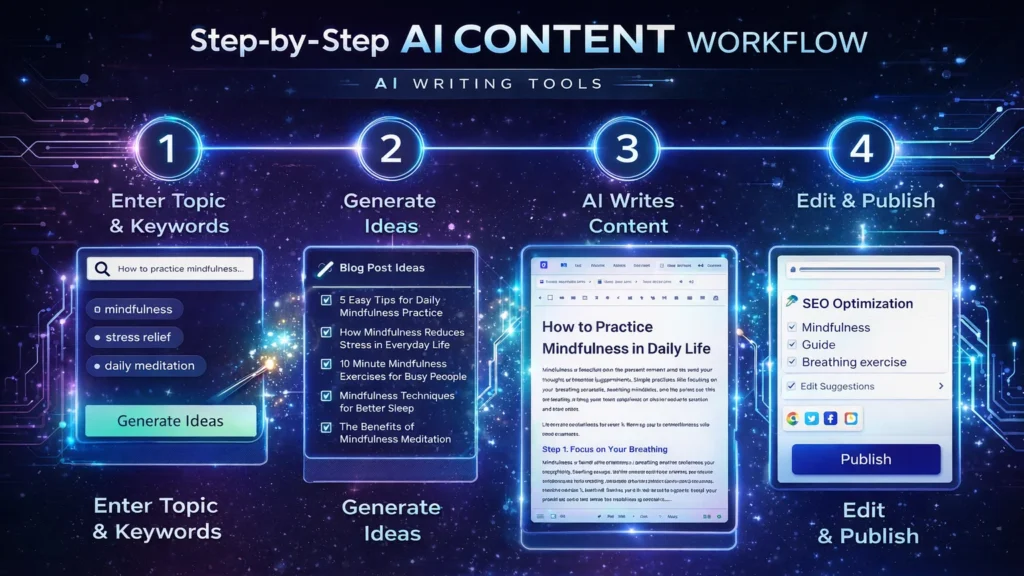
    Diagram showing an AI writing workflow including idea generation, drafting, editing, and publishing stages used by bloggers and content creators.
    A simple AI writing workflow illustrating how bloggers use AI tools to generate ideas, draft articles, edit content, and publish posts efficiently.

    Quick Tool Summary

    Best Overall: Jasper AI
    Best Budget Option: Rytr
    Best for Beginners: ChatGPT
    Best for Marketing Content: Copy.ai
    Best Productivity Tool: Notion AI


    Why Bloggers Are Using AI Writing Tools ✍️

    AI writing tools are becoming essential for bloggers for several reasons.

    Faster content creation

    AI can generate outlines, drafts, and ideas in seconds.

    Overcoming writer’s block

    Many bloggers use AI tools to brainstorm new content topics.

    Content scaling

    AI allows bloggers to produce more articles without sacrificing quality.

    SEO support

    Some tools assist with keyword integration, readability, and structure.

    These advantages make AI writing tools particularly useful for entrepreneurs, marketers, and freelancers managing multiple content projects.


    Best AI Writing Tools for Bloggers

    Below are some of the most widely used AI writing tools available today.

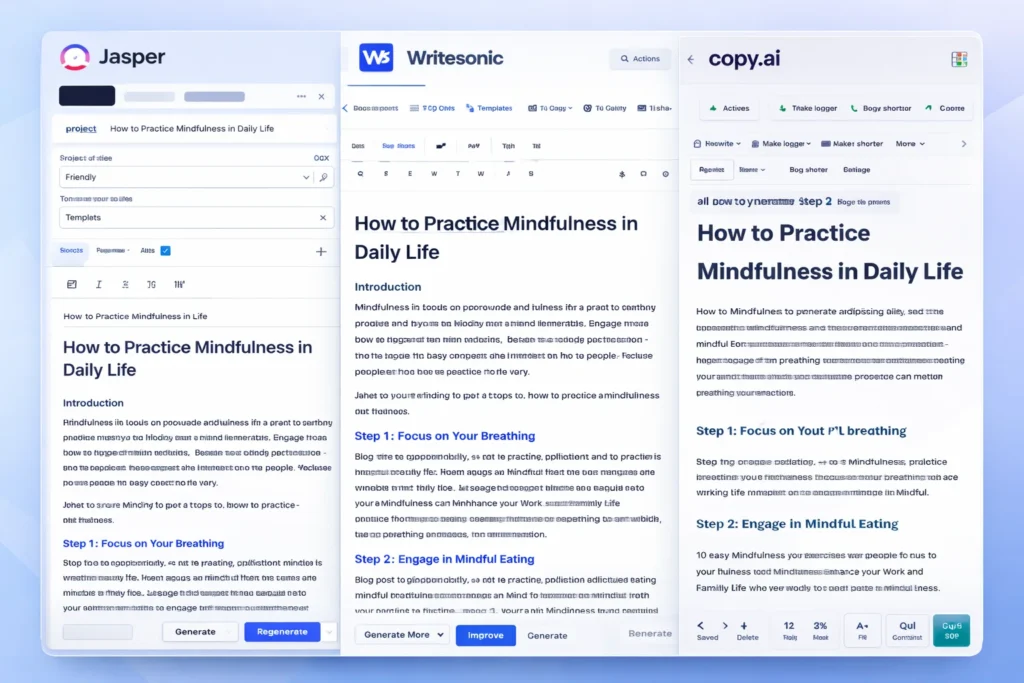
    Screenshot-style illustration of an AI writing assistant dashboard showing blog content suggestions, SEO tips, and tone settings for generating AI-powered blog posts.
    An AI writing assistant dashboard displaying content suggestions, blog ideas, and tone settings used by bloggers to generate and edit articles efficiently.

    1. ChatGPT

    ChatGPT has become one of the most popular AI writing assistants used by bloggers and content creators. It can generate article ideas, outlines, paragraphs, and full drafts with simple prompts.

    Key Features

    • Blog topic generation
    • Article outlines and drafts
    • Content rewriting and editing
    • Brainstorming ideas

    Pros

    • Very flexible writing assistant
    • Supports multiple writing styles

    Cons

    • Requires good prompts
    • Content still needs editing and fact-checking

    Best For

    Bloggers who want a versatile AI assistant for brainstorming and writing drafts.

    You can try ChatGPT for free here: https://chatgpt.com/


    2. Jasper AI

    Jasper AI is one of the most advanced AI writing platforms designed for marketers and professional content creators.

    Key Features

    • Long-form blog writing
    • Marketing copy templates
    • Brand voice customization
    • Content campaign workflows

    Pros

    • High-quality output
    • Powerful marketing features

    Cons

    • Higher pricing compared to other tools
    • Slight learning curve

    Best For

    Professional bloggers and marketing teams producing high volumes of content.

    Try Jasper AI here → https://www.jasper.ai/


    3. Copy.ai

    Copy.ai focuses heavily on marketing copy but is also widely used by bloggers for idea generation and short-form content.

    Key Features

    • Blog idea generator
    • Social media content creation
    • Marketing copy templates
    • Quick draft generation

    Pros

    • Easy to use
    • Excellent for brainstorming

    Cons

    • Limited long-form writing capabilities

    Best For

    Bloggers who want quick inspiration and marketing copy assistance.

    Try Copy.ai here → Copy AI


    4. Writesonic

    Writesonic combines AI writing capabilities with SEO optimization tools, making it popular among bloggers and marketers.

    Key Features

    • Blog article generator
    • SEO-focused writing tools
    • Content rewriting and editing
    • Marketing copy creation

    Pros

    • Good for SEO content
    • Supports multiple writing formats

    Cons

    • Output may require manual editing

    Best For

    Bloggers who want AI assistance with SEO-optimized content.

    Try Writesonic here


    5. Rytr

    Rytr is known as one of the most affordable AI writing tools available today.

    Key Features

    • Blog writing assistant
    • Tone customization
    • Content rewriting
    • Multi-language support

    Pros

    • Budget friendly
    • Simple and easy interface

    Cons

    • Less advanced than premium tools

    Best For

    Beginner bloggers looking for an affordable AI writing solution.

    Try Rytr here →


    6. Notion AI

    Notion AI integrates AI writing capabilities directly into the Notion productivity platform.

    Key Features

    • AI document editing
    • Writing suggestions
    • Content summarization
    • Project organization

    Pros

    • Excellent for productivity workflows
    • Ideal for managing content ideas

    Cons

    • Limited marketing-focused features

    Best For

    Bloggers who manage writing projects and ideas within Notion.

    Try Notion AI here →


    AI Writing Tools Comparison Table

    Infographic comparing popular AI writing tools including ChatGPT, Jasper AI, Copy.ai, Writesonic, Rytr, and Notion AI with their key features for bloggers.
    Visual comparison chart of leading AI writing tools such as ChatGPT, Jasper AI, Copy.ai, Writesonic, Rytr, and Notion AI, highlighting their main capabilities for blogging and content creation.
    ToolBest ForKey FeaturePricing
    ChatGPTBloggersFlexible writing assistantFreemium
    Jasper AIMarketersLong-form AI writingPaid
    Copy.aiMarketing contentIdea generationFreemium
    WritesonicSEO bloggersSEO writing toolsPaid
    RytrBeginnersBudget-friendly AI writingLow cost
    Notion AIProductivityWriting inside workspacePaid

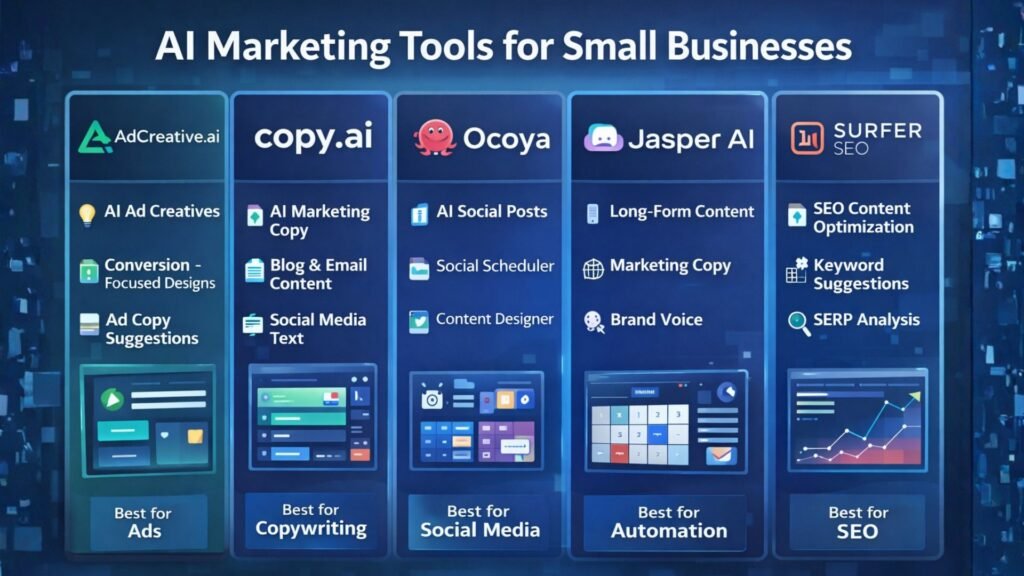
    Best AI Marketing Tools for Small Businesses to Automate Marketing and Grow Faster

    Practical Use Cases for Bloggers

    Bloggers use AI writing tools in several ways to improve productivity and efficiency.

    Content Idea Generation

    AI tools can quickly generate blog topic ideas based on keywords or niche themes.

    Blog Outlines

    Instead of starting from a blank page, bloggers can create structured outlines using AI.

    Draft Writing

    AI tools can produce first drafts that writers can edit and refine.

    Editing and Optimization

    Some AI tools help improve clarity, grammar, and readability.

    These workflows allow bloggers to focus more on creativity and strategy while automation handles repetitive tasks.


    Benefits and Limitations ⚖️

    While AI writing tools offer many advantages, they still require human oversight.

    Benefits

    • Faster content production
    • Improved productivity
    • Easier brainstorming
    • Scalable blogging workflows

    Limitations

    • AI content requires fact checking
    • Tone may need human editing
    • Some tools generate generic text

    The best results come from combining AI assistance with human creativity and expertise.


    How to Get Started with AI Writing Tools 🚀

    If you are new to AI writing tools, start with a simple workflow.

    1. Choose a topic and research keywords.
    2. Use AI to generate an outline.
    3. Draft the article using AI assistance.
    4. Edit the content to improve accuracy and tone.
    5. Optimize the article for SEO before publishing.

    With practice, bloggers can significantly reduce the time required to produce high-quality content.


    Conclusion

    AI writing tools are rapidly transforming how bloggers create content. From generating ideas to drafting full articles, these tools help streamline the blogging process and improve productivity.

    The key is choosing the right tool for your workflow. Beginners may prefer flexible tools like ChatGPT, while professional bloggers and marketing teams often benefit from advanced platforms such as Jasper AI.

    When used correctly, AI writing tools can help bloggers publish more consistently, scale their content strategy, and grow their online audience in an increasingly competitive digital landscape.

  • ·

    Google Gemini Review 2026: Can It Really Beat ChatGPT?

    If you follow AI even a little bit, you’ve probably heard that Google Gemini is supposed to be the company’s big answer to ChatGPT. In this Google Gemini review, I’m focusing on how Gemini AI actually feels in day‑to‑day use in 2026, and whether it genuinely beats ChatGPT or just offers a different flavour of the same thing. This Gemini vs ChatGPT review is based on typical tasks: writing, research, coding, and general productivity for users in the US and UK.

    Setup and Interface: Gemini Feels Naturally Built Into Google

    The first obvious advantage Gemini has is integration. While ChatGPT mostly lives in its own web app (unless you use plugins or third‑party tools), Gemini is woven directly into Google products that people in the US and UK already use daily.

    In Gmail and Google Docs, Gemini can suggest replies, rewrite emails, draft blog posts, and summarise long text without leaving the page. On Android phones and Chromebooks, Gemini is increasingly replacing the old Google Assistant, so it feels like part of the operating system rather than an extra app.

    ChatGPT, on the other hand, still works best as something you open in a separate tab or app and copy‑paste from. For some people that’s fine, but if you live inside Google’s ecosystem, Gemini’s integration is a big practical win.

    Writing and Content Generation: ChatGPT Still Has the Edge for “Voice”

    For writing tasks, the gap between Gemini AI and ChatGPT is smaller than it used to be, but it hasn’t disappeared.

    Gemini is very good at structured writing: outlines, lists, how‑to guides, meeting notes and summaries. It tends to stay organised, on‑topic and fairly concise. If you need a clean first draft of a blog post, a product description, or a set of bullet points for a presentation, Gemini does the job without much drama.

    ChatGPT, especially in its latest versions, still feels a bit more “human” in tone. It’s better at storytelling, humour, and capturing a particular style of writing. When you ask for a conversational article or a creative angle, ChatGPT often sounds more natural and less like a corporate manual.

    So in this part of the Gemini vs ChatGPT review, the result is mixed: Gemini wins on structure and tight integration with Docs, while ChatGPT remains slightly stronger for voice and personality.

    Search, Facts and Live Information: Gemini Plays on Home Ground

    When it comes to live information, Gemini finally looks like the AI that Google promised. Because it sits directly on top of Google Search, it can pull in fresh results, link to sources, and show you where it found the information.

    For example, if you ask for “best AI tools for small businesses in the UK in 2026” or “latest changes in US student loan rules”, Gemini is usually quicker to ground its answer in current web pages. You can see links, visit the original sites, and dig deeper.

    ChatGPT has browsing modes and integrations, but they still feel like an extra layer bolted on top. Sometimes it browses, sometimes it doesn’t, and occasionally it hallucinates details more confidently than Gemini does.

    That doesn’t mean Gemini is perfect: it can still misread pages or over‑simplify complex topics. But for search‑style questions, especially those relevant to US and UK news, Gemini now feels more reliable more often.

    Coding and Technical Tasks: Close Competition, Slight Preference

    Both Gemini AI and ChatGPT are strong coding assistants in 2026, and for most everyday developers there is less difference than marketing suggests.

    Gemini is excellent when used with Google’s developer tools and cloud services. It can help generate code snippets, explain error messages, and suggest improvements in a fairly straightforward way. If you’re already in the Google Cloud world, that tight connection is useful.

    ChatGPT still has a slight edge in explaining code step‑by‑step and offering multiple versions of a solution. Many developers in the US and UK have already built their personal workflow around ChatGPT, and that familiarity matters.

    If you’re starting from scratch, you can comfortably pick either. If you’re deep into Google’s stack, Gemini will feel more natural. If you’ve been using ChatGPT for a year or more, there isn’t a strong reason to abandon it purely for coding.

    Privacy, Pricing and Value for Money

    On pricing, Gemini and ChatGPT both use a mix of free and paid tiers. Google’s free Gemini is competitive for casual users, and the paid versions are mainly attractive for heavy usage or business integrations.

    For many US and UK users, the real question is not just price but trust. Google has a long history of collecting user data, and some people are cautious about giving Gemini access to their documents and emails, even if it is technically necessary for the features to work. OpenAI has had its own controversies, but it still feels slightly more “separate” from your daily accounts.

    If you already rely heavily on Google Workspace, paying for Gemini’s advanced features can make sense: you are getting an AI layer across tools you’re already paying for. If you prefer to keep AI separate from your inbox and personal files, a standalone ChatGPT subscription may feel safer.

    In 2026, Google Gemini has finally become a serious rival instead of just a late response. It doesn’t completely replace ChatGPT, but for many US and UK users, especially those deep in Google’s ecosystem, it might quietly become the AI they reach for first.

    Final Verdict – Is Gemini Better Than ChatGPT in 2026?

    So, the big question of this Gemini vs ChatGPT review: is Google Gemini actually better?

    The honest answer is: it depends how you work.

    Gemini is best for:

    • People who live inside Google Search, Gmail, Docs and Android
    • Structured work: summaries, outlines, emails, reports and quick research
    • Users who want AI blended directly into their existing tools

    ChatGPT is still better for:

    • More creative writing, storytelling and conversational content
    • Users who like a single, central AI workspace separate from their other accounts
    • Developers and power users who already built habits and prompts around ChatGPT

    In 2026, Google Gemini has finally become a serious rival instead of just a late response. It doesn’t completely replace ChatGPT, but for many US and UK users, especially those deep in Google’s ecosystem, it might quietly become the AI they reach for first.

  • ·

    Stop Using Midjourney for Logos: The Vector Revolution

    Look, we have all been there.

    You spend two hours perfecting a prompt in Midjourney. You finally get that perfect, minimalist mascot for a client or a new sticker design for your Etsy shop. It looks crisp on your iPhone. It looks stunning on Discord.

    Then you send it to the printer.

    And the email comes back: “Sorry, this is 72 DPI. Do you have the vector file? When we blow this up for the banner, it looks like a Minecraft screenshot.”

    Panic sets in. You try to use an “AI upscaler,” but it just makes the lines look weird and wobbly. You try to “Image Trace” it in Illustrator, and suddenly your clean lines turn into a jagged mess of a thousand anchor points.

    Here is the hard truth for 2026: Midjourney and DALL-E are for art. They are not for assets.

    If you are a solo entrepreneur, a Print-on-Demand (POD) seller, or a freelancer, you need to stop thinking in pixels and start thinking in math. You need to join the Vector Revolution.

    The “Pixel” Trap

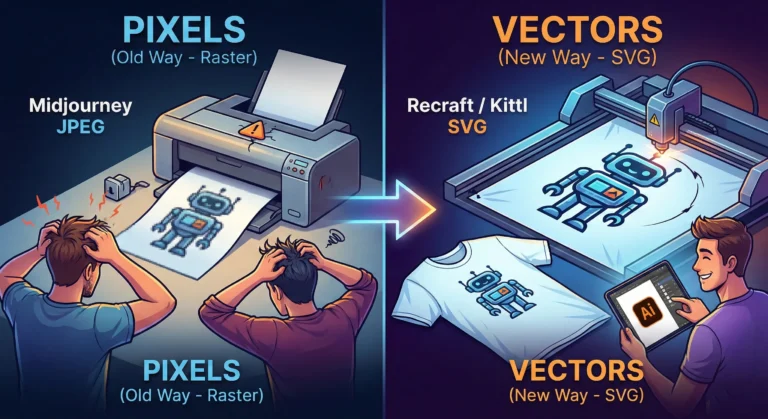
    Tools like Midjourney generate Raster images. They are made of colored dots (pixels). They are painted. If you zoom in, they get fuzzy. You cannot change the color of just the shirt without repainting the whole thing.

    Vectors (SVGs, EPS, AI files) are different. They are math equations. A line is defined by points A and B. Whether you print it on a business card or a billboard, the math stays the same. The line is always sharp.

    For years, AI was bad at vectors because “math” is harder for diffusion models than “painting.” But in 2026, the code has been cracked.

    The New Toolkit: Recraft & Kittl

    If you are still wrestling with raster images for logos, stop. Here are the tools that are actually making money right now.

    1. Recraft (The Heavy Hitter) Recraft isn’t just “Midjourney but different.” It is built from the ground up for designers. When you type “minimalist geometric lion logo,” it doesn’t give you a flat picture. It gives you layers.

    • Why it wins: You can export as SVG. You can open that file in Illustrator or Figma and actually edit the curves. You can change the brand colors in two clicks because the AI understands “color palettes,” not just “pixels.”

    2. Kittl (The POD Powerhouse) If you sell on Redbubble or Merch by Amazon, Kittl is your best friend. Their “AI Vector Generator” is tuned specifically for t-shirt complexity. It avoids those weird, wispy lines that screen printers hate. It creates clean, solid shapes that peel perfectly off a vinyl cutter.

    The “Editable” Advantage

    The biggest reason to switch isn’t just print quality—it’s editability.

    Imagine a client says, “I love the logo, but can you move the star to the left and make the font bold?”

    • With Midjourney: You have to re-roll the prompt and hope the random seed gives you something similar (it won’t).
    • With Vector AI: You just click the star and drag it to the left.

    The Bottom Line

    Stop selling JPEGs. In the freelance world of 2026, a “Logo Package” that includes a scalable SVG file is worth $500+. A JPEG is worth $50.

    The tools have evolved. Your workflow should too. Keep Midjourney for your mood boards and concept art, but when it’s time to build the actual product? Go vector.

  • ·

    Beyond the Green Screen: Choosing the Best AI Video Generators for 2026

    The statistics are undeniable: video dominates online engagement. But for years, creating high-quality video content has been a monumental task, demanding expensive equipment, skilled crew, and endless hours in the editing suite. This “production bottleneck” has traditionally kept many ambitious brands from fully leveraging video.

    Enter AI Video Generators.

    In 2026, these tools are no longer just novelties. They are rapidly evolving into powerful platforms that democratize video creation, allowing businesses—from bustling agencies in London to innovative startups in New York—to produce engaging content at unprecedented speed and scale.

    But with a new tool emerging every week, how do you choose the right one? At AI Growth Gear, with our foundation in film production and aesthetic communication, we see AI video as more than just pressing a button; it’s about translating vision into compelling motion, with precision and soul.

    Why AI Video is No Longer Optional

    • Speed to Market: Generate marketing videos, social clips, and product explainers in minutes, not days.
    • Cost Efficiency: Drastically reduce reliance on traditional production budgets, freeing up resources for strategy.
    • Scalability: Produce personalized video content for diverse audiences without increasing headcount.
    • Consistency: Maintain brand voice and visual style across all video assets through templating and AI assistance.

    What to Look For: A Director’s Checklist for AI Video Generators

    Not all AI video generators are created equal. Based on our extensive testing and understanding of professional production needs, here’s what to prioritize:

    1. Aesthetic Output (The Surbhi Chauhan Factor): This is paramount. Does the AI produce videos that look genuinely professional, or do they fall into the “uncanny valley” of robotic, overly polished, or bland visuals? Look for tools that allow granular control over style, lighting, and realistic character animation. Can it capture the texture of your brand?
    2. Ease of Use & Workflow Integration: A tool is only useful if it fits seamlessly into your existing operations. Is the interface intuitive? Can you upload scripts easily? Does it integrate with your content calendar or project management tools (like Notion or Zapier)?
    3. Customization & Brand Control: Can you upload your own brand assets (logos, fonts, color palettes)? Does it offer a range of customizable templates? The more control you have over the final output, the better it aligns with your brand identity.
    4. Voice & Lip-Sync Accuracy: If you’re using AI avatars or text-to-speech, pay close attention to the naturalness of the voice and the lip-sync quality. A robotic voice or mismatched lips can instantly break immersion and trust.
    5. Cost vs. Value: Free tools are tempting, but often come with limitations on quality, features, or branding. Evaluate subscription models based on the number of minutes, avatars, or advanced features you truly need. Calculate the ROI: how much time and money will it actually save you compared to traditional methods?
    6. Ethical Considerations & Rights: Understand the tool’s terms of service regarding content ownership and the ethical use of AI-generated faces or voices. Ensure you have the necessary rights for commercial use.

    The Future is in Motion

    AI video generators are not here to replace human creativity, but to augment it. They free up creatives to focus on strategic storytelling, conceptualization, and the subtle “director’s touch” that elevates content. By carefully selecting the right AI video gear, you can transform your content strategy, capture more attention, and truly scale your brand’s message.

    Ready to bring your brand to life in motion? The right AI video partner is waiting.