|

Top Agentic AI Tools for Boutique Agencies

Top Agentic AI Tools for Boutique Agencies

For boutique agencies and solo entrepreneurs scaling in the US and UK markets, the bottleneck isn’t usually a lack of ideas—it’s headcount. You want enterprise-level marketing output without the enterprise-level payroll. Enter agentic AI.

Unlike traditional “if-this-then-that” marketing automation, agentic AI tools don’t just follow static, rigid rules. They perceive data, make decisions, and execute multi-step workflows autonomously based on context. They act less like software and more like digital team members.

Here is a breakdown of the top agentic AI marketing tools that are changing how lean agencies handle B2B lead generation, CRM management, and digital growth in 2026.

Gumloop: The No-Code Operations Architect

If you need to build custom AI workflows without writing a single line of code, Gumloop is your sandbox. It’s a drag-and-drop platform designed to automate heavy, logic-based marketing and sales tasks.

  • The Agency Play: Use Gumloop to build an autonomous lead-scraping agent. You can set it up to monitor specific industry triggers (like companies that just raised Series A funding), scrape their executive data, and automatically categorize the leads based on your specific Ideal Customer Profile (ICP). It handles the tedious, top-of-funnel research that normally eats up hours of a junior marketer’s week, passing only the most qualified data into your CRM.

Artisan AI (Ava): Your Autonomous BDR

Artisan AI built “Ava,” an AI-driven Business Development Representative (BDR). Instead of buying a fragmented tech stack for data sourcing, email warm-up, and sequence scheduling, Artisan bundles the entire outbound motion into one autonomous platform.

  • The Agency Play: Ava taps into a built-in database of over 300 million B2B contacts. You give her your target parameters, and she handles the rest. She researches the prospects, writes hyper-personalized cold outreach emails based on real-time data (such as a recent LinkedIn post or company news), and dynamically manages the follow-ups based on recipient behavior. For boutique agencies selling high-ticket B2B services, Ava keeps the outbound pipeline full while you focus entirely on closing the deal.

HubSpot Breeze: The Enterprise CRM Brain

HubSpot has heavily integrated agentic AI directly into its ecosystem with Breeze. It features specific agents for content, social media, and prospecting, all tied directly to your core CRM data so it never loses context.

  • The Agency Play: Breeze Intelligence automatically enriches your inbound leads with critical B2B data points (industry, headcount, tech stack). Meanwhile, the Prospecting Agent tracks buyer intent. If a prospect from a UK-based enterprise visits your pricing page, Breeze can auto-add them to the CRM, score the lead, and draft a context-aware outreach email for you to approve. It bridges the gap between marketing activity and sales execution seamlessly, ensuring no high-value lead slips through the cracks.

Make: The Ultimate Workflow Orchestrator

Make (formerly Integromat) isn’t strictly a standalone AI agent, but it is the visual infrastructure that makes complex agentic workflows possible. It allows you to connect thousands of different apps and inject AI decision-making (via LLMs like OpenAI or Anthropic) at any step of the journey.

  • The Agency Play: You can use Make to tie your entire marketing stack together into one autonomous loop. For example, when a high-value lead fills out a form, Make can route the data to an LLM to analyze the lead’s intent, ping your team’s Slack channel with a summary, and automatically generate a personalized proposal draft in Google Docs. It allows solo operators to build a bespoke, highly automated backend that rivals massive agencies.

The Bottom Line

Scaling a boutique agency no longer requires a massive hiring sprint. By integrating these agentic AI platforms into your B2B marketing strategies, you can automate the heavy lifting, keep your CRM spotless, and focus your human capital on high-value digital growth and strategy.

Similar Posts

  • ·

    Top 10 AI Writers of 2026: The Ultimate List

    Remember 2023? It felt like a new “revolutionary” AI writing tool launched every Tuesday. It was chaotic, noisy, and honestly, most of them were just cheap wrappers around the same basic OpenAI API.

    Welcome to 2026. The dust has settled. The contenders have separated themselves from the pretenders.

    Today, having an AI assistant isn’t a competitive advantage; it’s baseline table stakes. But the game has changed. We are no longer looking for tools that can just generate words. We are looking for tools that fit specific workflows, understand nuance, and most importantly, don’t sound like a robot trying too hard to impress its corporate overlords.

    At AI Growth Gear, we don’t believe in “one tool to rule them all.” A novelist needs different features than an SEO agency.

    I’ve tested the market leaders to bring you the definitive top 10 list for 2026, categorized by what they actually do best.


    The Titans (The Generalists)

    1. Claude (by Anthropic)

    The undisputed king of nuance and flow. If you want writing that feels surprisingly human straight out of the box, Claude is currently unmatched. Its latest models understand tone, context, and rhythm better than anything else. It doesn’t overuse clichéd AI words like “delve” or “unleash.” If you are writing long-form essays, newsletters, or books, this is your muse.

    • Best For: Long-form writers, authors, and anyone who hates heavy editing.
    • Pricing: Free tier available; Pro is ~$20/mo.

    2. ChatGPT (by OpenAI)

    The incredibly versatile Swiss Army Knife. You can’t make a list without the OG. While Claude might beat it purely on prose quality, ChatGPT (with GPT-5/4o) is a productivity powerhouse. Its ability to handle multimodal inputs—analyzing a chart, reading code, browsing the live web, and generating an image all in one chat—makes it indispensable for complex projects. It’s less a writer and more a brilliant, jack-of-all-trades assistant.

    • Best For: Brainstorming, coding help, and multi-step complex tasks.
    • Pricing: Free tier available; Plus is ~$20/mo.

    The Marketers (For Growth & SEO)

    3. Jasper

    The enterprise-grade marketing engine. Jasper stopped trying to be just a “chatbot” years ago. In 2026, it is a robust platform for marketing teams. Its killer features are “Brand Voice” (which it nails perfectly) and its ability to turn a single brief into an entire multi-channel campaign (blog, social, email) with AI agents. It’s pricey, but it replaces a junior marketing coordinator.

    • Best For: Marketing agencies and in-house enterprise teams.
    • Pricing: Premium pricing, starting around ~$49/mo per seat.

    4. Writesonic

    The speed demon for SEO and trending topics. If your business relies on catching trending waves on Google, Writesonic is essential. It integrates tightly with live Google data, allowing you to write factually accurate articles on current events faster than competitors. It’s designed specifically to rank, focusing on structure and keywords.

    • Best For: News sites, affiliate marketers, and high-volume bloggers.
    • Pricing: Competitive tier structure based on usage.

    5. Copy.ai

    The GTM (Go-To-Market) automation specialist. Copy.ai has pivoted brilliantly towards sales and GTM workflows. It’s less about “write me a paragraph” and more about “take this LinkedIn profile, analyze their pain points, and write a personalized 3-email cold outreach sequence.” For sales teams, it’s pure gold.

    • Best For: Sales development reps (SDRs), founders doing outreach, and social media managers.
    • Pricing: Free tier available; Pro plans focus on workflow limits.

    The Specialists (Niche Experts)

    6. Perplexity

    The research-first writer. Perplexity isn’t a traditional “writer,” but it’s the best tool to start the writing process. It’s an answer engine that cites its sources in real-time. When I need to write a fact-heavy piece and cannot afford AI hallucinations, I start here to gather my research before moving to a drafting tool.

    • Best For: Journalists, academics, and creating fact-based content briefs.
    • Pricing: Excellent free version; Pro offers deeper models.

    7. Sudowrite

    The novelist’s best friend. If you are writing fiction, ignore the other tools and start here. Sudowrite understands narrative arcs, character development, and “show, don’t tell.” Features like “Story Engine” help you map out entire novels, and its “Describe” button helps you break through writer’s block with sensory details.

    • Best For: Fiction authors, screenwriters, and creative writers.
    • Pricing: Tiered based on word count.

    8. Surfer AI

    The pure SEO optimization tool. Surfer isn’t about creative flair; it’s about math. It analyzes the top-ranking pages on Google for your keyword and tells you exactly what structure, word count, and semantic terms you need to compete. It writes to satisfy the algorithm first, humans second.

    • Best For: Hardcore SEO professionals focused on SERP rankings.
    • Pricing: Per-article pricing model (expensive but effective).

    The Integrators (Workflow Enhancers)

    9. Notion AI

    The messy workspace organizer. Notion AI isn’t trying to write your next novel. It’s trying to make sense of your messy notes. Its strength is summarizing meetings, expanding bullet points into memos, and editing directly within your existing project management workspace. It removes the friction of copy-pasting between apps.

    • Best For: Project managers and teams already living inside Notion.
    • Pricing: Add-on to existing Notion plans (~$10/member/mo).

    10. Grammarly GO

    The final polish essential. You might not think of Grammarly as a “generative” AI, but their latest features are fantastic for rewriting. It’s the ultimate safety net. No matter which tool I use to draft, everything runs through Grammarly for a final tone check and clarity polish before publishing.

    • Best For: Literally everyone who types on a keyboard.
    • Pricing: Essential free version; Premium is a staple investment.

    Final Thoughts from Surbhi

    The best tool in 2026 isn’t the one with the most features; it’s the one that fits your specific daily grind. Don’t fall for the hype. Define your output—are you selling, storytelling, or ranking?—and choose the specialist for the job.

  • ·

    Best AI Writing Tools for Bloggers in 2026: Tools That Actually Improve Content

    Creating consistent blog content can be challenging, especially when bloggers are expected to publish regularly while maintaining high quality. Research, outlining, drafting, editing, and optimizing for SEO all take time. As competition grows online, bloggers are increasingly looking for tools that can help streamline their workflow.

    AI writing tools have become powerful assistants for bloggers and content creators. Instead of replacing writers, these tools help generate ideas, draft articles, improve clarity, and speed up the content creation process. Many modern AI tools can also assist with SEO optimization, marketing copy, and productivity workflows.

    In this guide, we explore the best AI writing tools for bloggers in 2026, how they work, and how they can help bloggers create better content faster.

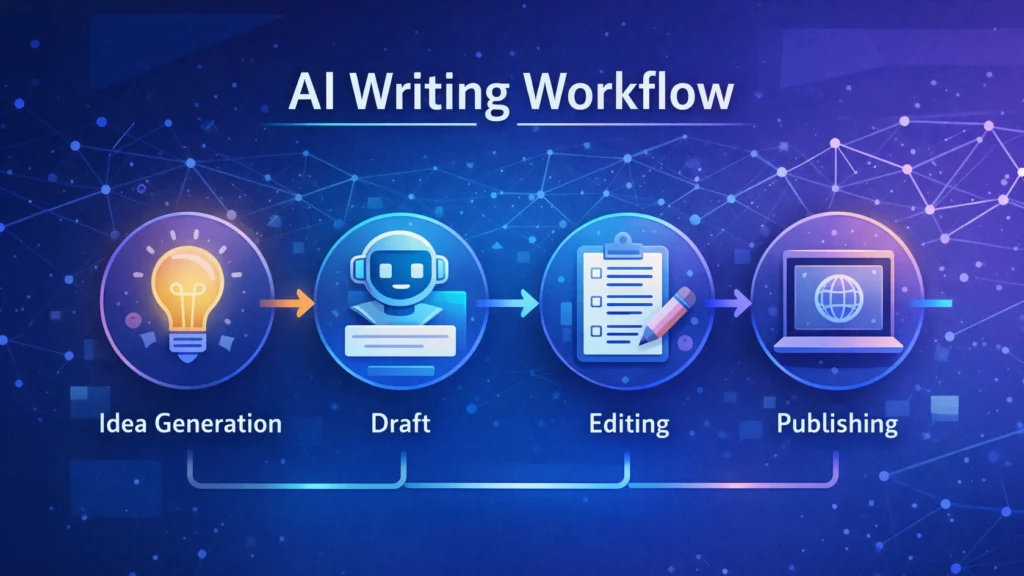
    Diagram showing an AI writing workflow including idea generation, drafting, editing, and publishing stages used by bloggers and content creators.
    A simple AI writing workflow illustrating how bloggers use AI tools to generate ideas, draft articles, edit content, and publish posts efficiently.

    Quick Tool Summary

    Best Overall: Jasper AI
    Best Budget Option: Rytr
    Best for Beginners: ChatGPT
    Best for Marketing Content: Copy.ai
    Best Productivity Tool: Notion AI


    Why Bloggers Are Using AI Writing Tools ✍️

    AI writing tools are becoming essential for bloggers for several reasons.

    Faster content creation

    AI can generate outlines, drafts, and ideas in seconds.

    Overcoming writer’s block

    Many bloggers use AI tools to brainstorm new content topics.

    Content scaling

    AI allows bloggers to produce more articles without sacrificing quality.

    SEO support

    Some tools assist with keyword integration, readability, and structure.

    These advantages make AI writing tools particularly useful for entrepreneurs, marketers, and freelancers managing multiple content projects.


    Best AI Writing Tools for Bloggers

    Below are some of the most widely used AI writing tools available today.

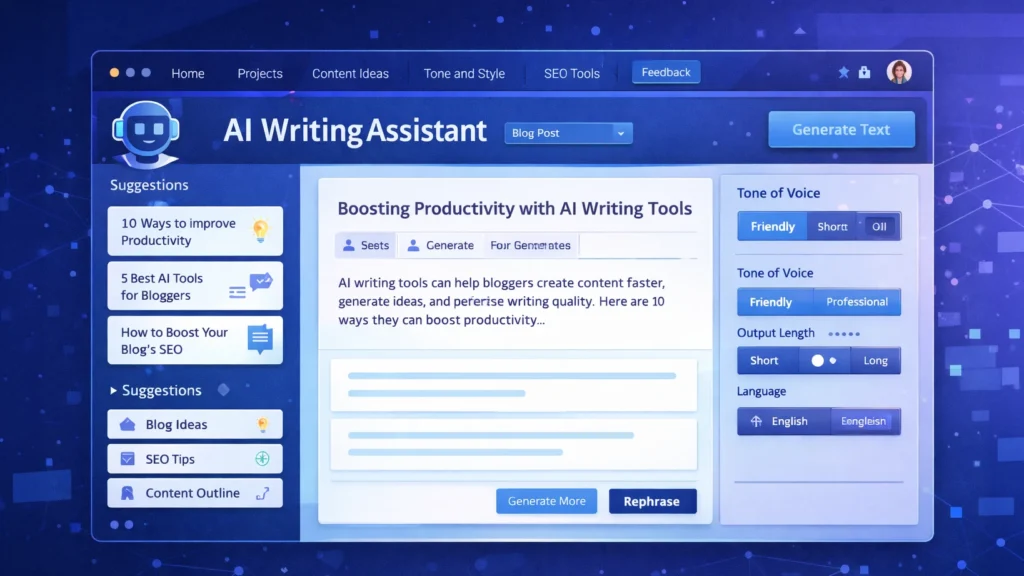
    Screenshot-style illustration of an AI writing assistant dashboard showing blog content suggestions, SEO tips, and tone settings for generating AI-powered blog posts.
    An AI writing assistant dashboard displaying content suggestions, blog ideas, and tone settings used by bloggers to generate and edit articles efficiently.

    1. ChatGPT

    ChatGPT has become one of the most popular AI writing assistants used by bloggers and content creators. It can generate article ideas, outlines, paragraphs, and full drafts with simple prompts.

    Key Features

    • Blog topic generation
    • Article outlines and drafts
    • Content rewriting and editing
    • Brainstorming ideas

    Pros

    • Very flexible writing assistant
    • Supports multiple writing styles

    Cons

    • Requires good prompts
    • Content still needs editing and fact-checking

    Best For

    Bloggers who want a versatile AI assistant for brainstorming and writing drafts.

    You can try ChatGPT for free here: https://chatgpt.com/


    2. Jasper AI

    Jasper AI is one of the most advanced AI writing platforms designed for marketers and professional content creators.

    Key Features

    • Long-form blog writing
    • Marketing copy templates
    • Brand voice customization
    • Content campaign workflows

    Pros

    • High-quality output
    • Powerful marketing features

    Cons

    • Higher pricing compared to other tools
    • Slight learning curve

    Best For

    Professional bloggers and marketing teams producing high volumes of content.

    Try Jasper AI here → https://www.jasper.ai/


    3. Copy.ai

    Copy.ai focuses heavily on marketing copy but is also widely used by bloggers for idea generation and short-form content.

    Key Features

    • Blog idea generator
    • Social media content creation
    • Marketing copy templates
    • Quick draft generation

    Pros

    • Easy to use
    • Excellent for brainstorming

    Cons

    • Limited long-form writing capabilities

    Best For

    Bloggers who want quick inspiration and marketing copy assistance.

    Try Copy.ai here → Copy AI


    4. Writesonic

    Writesonic combines AI writing capabilities with SEO optimization tools, making it popular among bloggers and marketers.

    Key Features

    • Blog article generator
    • SEO-focused writing tools
    • Content rewriting and editing
    • Marketing copy creation

    Pros

    • Good for SEO content
    • Supports multiple writing formats

    Cons

    • Output may require manual editing

    Best For

    Bloggers who want AI assistance with SEO-optimized content.

    Try Writesonic here


    5. Rytr

    Rytr is known as one of the most affordable AI writing tools available today.

    Key Features

    • Blog writing assistant
    • Tone customization
    • Content rewriting
    • Multi-language support

    Pros

    • Budget friendly
    • Simple and easy interface

    Cons

    • Less advanced than premium tools

    Best For

    Beginner bloggers looking for an affordable AI writing solution.

    Try Rytr here →


    6. Notion AI

    Notion AI integrates AI writing capabilities directly into the Notion productivity platform.

    Key Features

    • AI document editing
    • Writing suggestions
    • Content summarization
    • Project organization

    Pros

    • Excellent for productivity workflows
    • Ideal for managing content ideas

    Cons

    • Limited marketing-focused features

    Best For

    Bloggers who manage writing projects and ideas within Notion.

    Try Notion AI here →


    AI Writing Tools Comparison Table

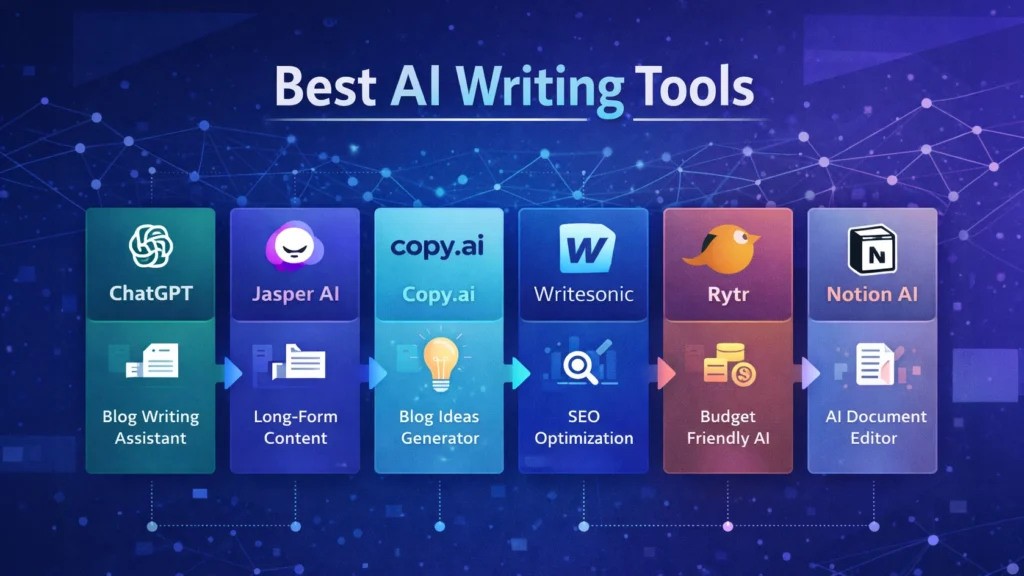
    Infographic comparing popular AI writing tools including ChatGPT, Jasper AI, Copy.ai, Writesonic, Rytr, and Notion AI with their key features for bloggers.
    Visual comparison chart of leading AI writing tools such as ChatGPT, Jasper AI, Copy.ai, Writesonic, Rytr, and Notion AI, highlighting their main capabilities for blogging and content creation.
    ToolBest ForKey FeaturePricing
    ChatGPTBloggersFlexible writing assistantFreemium
    Jasper AIMarketersLong-form AI writingPaid
    Copy.aiMarketing contentIdea generationFreemium
    WritesonicSEO bloggersSEO writing toolsPaid
    RytrBeginnersBudget-friendly AI writingLow cost
    Notion AIProductivityWriting inside workspacePaid

    Best AI Marketing Tools for Small Businesses to Automate Marketing and Grow Faster

    Practical Use Cases for Bloggers

    Bloggers use AI writing tools in several ways to improve productivity and efficiency.

    Content Idea Generation

    AI tools can quickly generate blog topic ideas based on keywords or niche themes.

    Blog Outlines

    Instead of starting from a blank page, bloggers can create structured outlines using AI.

    Draft Writing

    AI tools can produce first drafts that writers can edit and refine.

    Editing and Optimization

    Some AI tools help improve clarity, grammar, and readability.

    These workflows allow bloggers to focus more on creativity and strategy while automation handles repetitive tasks.


    Benefits and Limitations ⚖️

    While AI writing tools offer many advantages, they still require human oversight.

    Benefits

    • Faster content production
    • Improved productivity
    • Easier brainstorming
    • Scalable blogging workflows

    Limitations

    • AI content requires fact checking
    • Tone may need human editing
    • Some tools generate generic text

    The best results come from combining AI assistance with human creativity and expertise.


    How to Get Started with AI Writing Tools 🚀

    If you are new to AI writing tools, start with a simple workflow.

    1. Choose a topic and research keywords.
    2. Use AI to generate an outline.
    3. Draft the article using AI assistance.
    4. Edit the content to improve accuracy and tone.
    5. Optimize the article for SEO before publishing.

    With practice, bloggers can significantly reduce the time required to produce high-quality content.


    Conclusion

    AI writing tools are rapidly transforming how bloggers create content. From generating ideas to drafting full articles, these tools help streamline the blogging process and improve productivity.

    The key is choosing the right tool for your workflow. Beginners may prefer flexible tools like ChatGPT, while professional bloggers and marketing teams often benefit from advanced platforms such as Jasper AI.

    When used correctly, AI writing tools can help bloggers publish more consistently, scale their content strategy, and grow their online audience in an increasingly competitive digital landscape.

  • ·

    Build Premium AI Client Portals Without Code

    If you are running a high-end consulting firm or a boutique agency targeting clients in the US and UK, your deliverables are top-tier. But how are you delivering them?

    If you are still relying on scattered email chains, password-protected zip files, and messy shared spreadsheets to manage a five-figure retainer client, you have a perception problem. In the premium B2B space, the experience of working with you is just as important as the results.

    The modern solution is a dedicated, white-labeled client portal. It’s the difference between looking like a freelancer and looking like an enterprise infrastructure.

    Traditionally, building a secure, custom portal required expensive CRM development and dedicated engineering. Today, no-code AI builders have democratized this process. You can now build sophisticated client management software that not only displays data but uses AI to make that data actionable for your clients.

    Here are the top no-code tools to build high-value client portals in 2026.

    Softr: The Fastest Path from Database to Dashboard

    Softr has cornered the market on speed and ease of use, especially if your agency already operates out of Airtable or Google Sheets. It turns those static databases into secure, beautiful web apps in minutes.

    • The Agency Play: Use Softr to build a transparent project tracker. Instead of weekly status calls, give clients a login where they can see real-time progress. Where Softr shines now is its native AI integration. You can use it to automatically generate executive summaries of project status reports within the portal, saving your project managers hours of writing while giving the C-suite client a quick, digestible update.

    Stacker: Deep Permissions for Sensitive Data

    When dealing with larger corporate clients, security and granular permissions are paramount. Stacker excels at taking complex, messy datasets (from sources like Salesforce or complex Airtable bases) and turning them into clean, restricted client views.

    • The Agency Play: If you are a financial consultant or handling sensitive marketing data, you can’t show every client the whole database. Stacker allows you to build one master app where Client A only sees Client A’s data, and Client B only sees Client B’s. You can build a sophisticated, secure B2B portal that looks like a million-dollar custom build, ensuring absolute data privacy while providing high-level visibility.

    Noloco: The Premium White-Label Experience

    For boutique agencies where branding is everything, Noloco offers perhaps the most polished, high-end feel right out of the box. It is designed specifically for building client-facing apps and internal tools that look completely bespoke.

    • The Agency Play: Noloco is ideal for high-ticket creative or strategic agencies. You can fully remove any trace of the builder’s branding, use your own domain, and deeply customize the UI to match your firm’s aesthetic. You can build portals where clients approve creative assets, view AI-generated performance forecasts, and access contract documents in an environment that feels intensely premium and professional.

    Glide: The Mobile-First Action Portal

    Sometimes your clients aren’t at a desk; they are in the field. Glide (which we also love for micro-SaaS) is phenomenal for building mobile-optimized portals that turn data into action.

    • The Agency Play: Imagine you run a property management consulting firm. You can build a Glide portal for your investors that sits on their phone home screen. They can view property performance data and, crucially, use Glide’s AI columns to instantly interact with that data—for example, snapping a photo of a maintenance issue and having Glide’s AI instantly categorize it and draft a work order for approval. It turns a passive report into an active tool.

    The Bottom Line

    A client portal is no longer just a nice-to-have utility; it is a core piece of agency infrastructure. By using platforms like Softr, Stacker, Noloco, and Glide, you are not just organizing files—you are providing a sophisticated software experience that cements client retention and justifies premium retainer fees.

  • ·

    Best AI Marketing Tools for Small Businesses to Automate Marketing and Grow Faster

    Marketing is one of the biggest challenges for small businesses. Entrepreneurs often need to manage content creation, advertising, social media, email campaigns, and analytics — often with limited time and resources.

    This is where AI marketing tools for small businesses are changing the game.

    Artificial intelligence can now automate many marketing tasks that previously required a full marketing team. AI tools can generate ad creatives, write marketing copy, schedule social media posts, analyze campaign performance, and optimize marketing strategies.

    For entrepreneurs, bloggers, freelancers, and online business owners, AI marketing tools provide a powerful advantage: better results with less effort.

    In this guide, we’ll explore the best AI marketing tools for small businesses that can help automate marketing workflows, improve campaign performance, and accelerate growth.


    A young entrepreneur working on a laptop while AI marketing dashboards display ad performance, social media scheduling, and analytics tools used by small businesses for marketing automation.
    A small business owner using AI marketing tools to manage ads, social media scheduling, and analytics from a single dashboard.

    Why AI Marketing Tools Matter for Small Businesses 🚀

    Small businesses often struggle with limited time, budget, and resources. AI tools help solve these challenges by automating key marketing activities.

    ⏳ Save Time

    AI tools automate repetitive tasks such as:

    • Writing marketing copy
    • Designing ad creatives
    • Scheduling social media posts
    • Generating blog content
    • Analyzing marketing data

    This allows entrepreneurs to focus on strategy and growth instead of repetitive work.


    💰 Reduce Marketing Costs

    Hiring a full marketing team can be expensive.

    AI tools allow small businesses to perform tasks that normally require:

    • Copywriters
    • Designers
    • Social media managers
    • Marketing analysts

    This significantly lowers marketing expenses.


    📊 Improve Marketing Performance

    AI tools analyze data quickly and suggest improvements like:

    • Better ad creatives
    • High-performing content ideas
    • Optimal posting schedules
    • Improved audience targeting

    These insights can help businesses achieve higher ROI from marketing campaigns.


    Quick Tool Summary ⚡

    Best Overall: AdCreative.ai
    Best Budget Option: Copy.ai
    Best for Social Media Marketing: Ocoya
    Best for Content Marketing: Jasper AI
    Best for Marketing Automation: HubSpot AI
    Best for SEO Content: Surfer SEO


    Best AI Marketing Tools for Small Businesses 🧠


    Comparison infographic of AI marketing tools for small businesses highlighting features such as ad creation, AI copywriting, social media automation, content generation, and SEO optimization.
    Comparison infographic showing popular AI marketing tools like AdCreative.ai, Copy.ai, Ocoya, Jasper AI, and Surfer SEO for small business marketing.

    1. AdCreative.ai 🎯

    AdCreative.ai is one of the most powerful AI advertising tools designed to generate high-converting ad creatives automatically.

    Instead of manually designing ads, businesses can use AI to generate optimized ad visuals based on proven marketing data.

    Key Features

    • AI-generated ad creatives
    • Conversion-focused design suggestions
    • Ad copy generation
    • Creative scoring for performance
    • Integration with major ad platforms

    Pros

    ✔ Generates ads in seconds
    ✔ Optimized for advertising campaigns

    Cons

    ✖ Most useful for businesses running regular ads
    ✖ Requires some experimentation

    Best For

    Businesses running Facebook Ads, Google Ads, and display campaigns.

    Try AdCreative.ai here


    2. Copy.ai ✍️

    Copy.ai is a popular AI writing tool designed to generate marketing content quickly.

    The platform helps businesses create blog posts, product descriptions, ad copy, and email marketing content.

    Key Features

    • AI marketing copy generator
    • Blog writing tools
    • Email marketing templates
    • Social media caption generator
    • Content idea generation

    Pros

    ✔ Easy to use
    ✔ Fast content creation

    Cons

    ✖ AI output may require editing
    ✖ Limited customization

    Best For

    Entrepreneurs who need quick marketing copy and content ideas.

    Affiliate Call-To-Action

    Try Copy.ai here


    3. Ocoya 📱

    Ocoya is an AI-powered social media marketing platform that combines content creation, scheduling, and analytics.

    It helps businesses generate posts and automatically publish them across multiple social media platforms.

    Key Features

    • AI social media captions
    • Automated post scheduling
    • Graphic design tools
    • Social media analytics

    Pros

    ✔ Excellent for social media automation
    ✔ Multi-platform integrations

    Cons

    ✖ Analytics features are limited
    ✖ Advanced features require paid plans

    Best For

    Small businesses managing multiple social media platforms.

    Try Ocoya here


    4. Jasper AI 📝

    Jasper AI is one of the most advanced AI writing tools for marketing and content creation.

    It helps marketers generate blog posts, landing pages, and marketing campaigns.

    Key Features

    • Long-form AI writing
    • Marketing copy templates
    • AI brand voice customization
    • SEO-friendly content creation

    Pros

    ✔ High-quality AI writing
    ✔ Ideal for content marketing

    Cons

    ✖ Higher pricing
    ✖ Content may require editing

    Best For

    Bloggers and marketers focused on content-driven growth.

    Try Jasper AI here


    5. HubSpot AI 🤖

    HubSpot integrates AI into its marketing automation platform.

    The tool provides advanced features for email marketing, lead generation, CRM automation, and analytics.

    Key Features

    • AI email generation
    • Marketing automation workflows
    • CRM integration
    • Campaign analytics

    Pros

    ✔ Complete marketing ecosystem
    ✔ Powerful automation tools

    Cons

    ✖ Expensive for small startups
    ✖ Advanced features require premium plans

    Best For

    Businesses managing large marketing campaigns and sales funnels.


    6. Surfer SEO 🔎

    Surfer SEO helps businesses create SEO-optimized content that ranks on Google.

    The platform analyzes top-ranking pages and provides real-time optimization suggestions.

    Key Features

    • Content optimization
    • Keyword suggestions
    • SEO score tracking
    • SERP analysis

    Pros

    ✔ Excellent for SEO-driven content
    ✔ Data-backed recommendations

    Cons

    ✖ Requires some SEO knowledge
    ✖ Paid plans can be expensive

    Best For

    Bloggers and marketers focused on organic traffic growth.


    AI Marketing Tools Comparison Table 📊

    ToolBest ForKey FeaturePricing
    AdCreative.aiAdvertisingAI ad creativesPaid
    Copy.aiCopywritingAI marketing copyFreemium
    OcoyaSocial mediaAI schedulingPaid
    Jasper AIContent marketingLong-form writingPaid
    HubSpot AIAutomationCRM marketingPaid
    Surfer SEOSEO marketingContent optimizationPaid

    Practical Use Cases for AI Marketing Tools 💡

    AI marketing tools can transform how small businesses operate.

    Social Media Automation

    AI tools can:

    • Generate social media posts
    • Schedule content automatically
    • Analyze engagement performance

    Ad Campaign Creation

    AI can quickly generate:

    • Ad visuals
    • Ad headlines
    • Targeting suggestions

    Content Marketing

    AI tools can produce:

    • Blog posts
    • Email newsletters
    • Product descriptions
    • Website content

    Benefits and Limitations ⚖️

    Benefits

    ✔ Faster marketing execution
    ✔ Lower marketing costs
    ✔ Improved campaign performance
    ✔ Better marketing insights


    Limitations

    ✖ AI-generated content may need editing
    ✖ Over-automation can reduce brand personality
    ✖ Some tools require learning time


    Best AI Writing Tools for Bloggers in 2026: Tools That Actually Improve Content

    How to Get Started with AI Marketing Tools 🛠️

    If you’re new to AI marketing, follow this simple process.

    Step 1

    Choose one or two tools based on your marketing needs.

    Step 2

    Use AI to automate repetitive tasks such as content creation and social media scheduling.

    Step 3

    Monitor campaign performance using analytics.

    Step 4

    Expand your AI marketing stack as your business grows.


    AI-powered marketing funnel showing content creation, advertising campaigns, analytics tracking, and business growth automation.
    Illustration of an AI-powered marketing funnel showing how content, ads, analytics, and automation work together to drive business growth.

    Conclusion 🎯

    Artificial intelligence is transforming digital marketing, allowing small businesses to compete with larger brands.

    The best AI marketing tools for small businesses help automate content creation, advertising, and social media management while improving efficiency.

    Tools like AdCreative.ai, Copy.ai, and Ocoya allow entrepreneurs and marketers to scale their marketing efforts without large teams or huge budgets.

    By adopting AI marketing tools today, businesses can build smarter marketing strategies and unlock new growth opportunities.

  • ·

    Chatbots Are Dead. Long Live AI Agents: A 2026 Guide

    Let’s be honest for a second. We all spent 2023 and 2024 being amazed that ChatGPT could write a haiku or summarize a PDF. It was cool, it was novel, but let’s face it: it was passive. You had to show up, type a prompt, wait for the text, copy it, and then paste it somewhere else to actually do something with it.

    In 2026, that workflow is already obsolete.

    If your business is still treating AI like a smart encyclopedia, you are leaving money on the table. The shift happening right now—in Silicon Valley, London, and Berlin—is the move from Chatbots to AI Agents.

    The Difference: “Talk” vs. “Action”

    The distinction is simple but critical.

    • A Chatbot is like a library. You ask a question; it gives you an answer. It waits for you.
    • An AI Agent is like an intern. You give it a goal (“Plan my travel”), and it goes off, checks flights, compares hotels, books the tickets, and puts them on your calendar. It has agency.

    For business automation, this is the holy grail. We are no longer using AI to write the email; we are using AI to send the email, update the CRM, and notify the sales team on Slack—without you touching the keyboard.

    The Anatomy of an Agent

    You don’t need a computer science degree to build one. You just need to understand the three parts of an “Agentic Workflow”:

    1. The Brain (The LLM): This is GPT-4o, Claude 3.5, or Gemini. Its job isn’t to generate text, but to make decisions. It decides which tool to use based on your instructions.
    2. The Hands (The Tools): This is where the magic happens. You give the “Brain” access to your apps—Gmail, Salesforce, Excel, Slack—via APIs.
    3. The Rails (The Rules): Agents can hallucinate. You need guardrails to ensure it doesn’t accidentally email your entire database.

    How to Build Your First “Loop” (Without Code)

    You don’t need to hire a Python developer to start. Platforms like Zapier Central, Make.com, or Microsoft Copilot Studio have democratized this.

    Here is a simple “Lead Qualification” agent you can build this afternoon:

    Step 1: The Trigger Don’t start with “I want AI.” Start with a pain point. Let’s say: “I spend too much time reading contact forms.”

    • Trigger: A new entry lands in your Typeform or website contact form.

    Step 2: The Agent Analysis Instead of just forwarding that email to you, the AI Agent intercepts it.

    • Instruction: “Read the message. If the budget mentioned is under $5,000, label it ‘Low Priority.’ If it’s over $5,000, label it ‘High Priority’ and draft a personalized meeting invite.”

    Step 3: The Action This is the part that feels like magic.

    • If Low Priority: The Agent adds the row to a Google Sheet for later review.
    • If High Priority: The Agent pings you on Slack with a summary (“Hot lead from London, budget $10k”) and drafts the email in your Drafts folder, waiting for one click to send.

    The “Human-in-the-Loop” Rule

    The biggest mistake I see businesses make is trusting the Agent too much too soon. In 2026, the best workflow is “AI Drafts, Human Approves.”

    Let the Agent do the grunt work—the searching, the sorting, the drafting. But keep your finger on the “Approve” button for the final mile. As these agents get smarter, you can slowly remove the training wheels, but for now, trust is good; control is better.

    The Bottom Line

    The businesses that win in the next decade won’t be the ones with the smartest prompt engineers. They will be the ones who successfully outsource their repetitive, low-value cognitive loops to digital agents.

    Stop asking your AI questions. Start giving it a job description.

  • ·

    AI Workflow Automation for Small Businesses (2026 Guide)

    Running a small business means handling dozens of repetitive tasks every day—emails, invoices, customer responses, lead management, and social media updates. These tasks consume valuable time that could be spent growing the business.

    This is where AI workflow automation comes in.

    By using automation platforms like Zapier and Make, small businesses can automate repetitive workflows, connect multiple apps, and reduce manual work dramatically.

    In this guide, you will learn:

    • What AI workflow automation is
    • Why small businesses should use it
    • The best automation tools available
    • Real examples of automated workflows
    • How to start automation in your business today

    What is AI Workflow Automation?

    AI workflow automation is the process of using automation tools and artificial intelligence to perform repetitive business tasks automatically.

    Instead of manually transferring data between apps, sending emails, or updating spreadsheets, automation platforms create trigger-based workflows.

    Example workflow:

    Customer fills website form →
    Lead added to CRM →
    Welcome email sent →
    Sales team notified →
    Task created in project management tool.

    All of this happens automatically without human intervention.

    Manual business workflow compared with AI automated workflow
    Comparison of manual business processes and AI automated workflows that eliminate repetitive tasks.

    Why Small Businesses Need Workflow Automation

    Small businesses usually operate with limited staff and resources. Automation allows teams to do more work with fewer people.

    1. Save Time

    Automation removes repetitive tasks such as:

    • Email responses
    • Data entry
    • Report generation
    • File organization

    2. Reduce Human Errors

    Manual data entry often leads to mistakes. Automation ensures accurate data transfer across systems.

    3. Increase Productivity

    Employees can focus on high-value activities like sales, strategy, and customer relationships.

    4. Scale Operations Faster

    As business grows, automation ensures workflows remain efficient without hiring additional staff.


    Best AI Workflow Automation Tools

    Zapier is one of the most popular automation platforms used by millions of businesses worldwide.

    It allows users to connect 6,000+ apps and automate tasks without coding.

    Key Features

    • No-code workflow builder
    • Thousands of app integrations
    • AI automation suggestions
    • Conditional workflows
    • Multi-step automation

    Example Automation

    When a customer purchases from Shopify →
    Automatically add customer to email marketing list →
    Send onboarding email →
    Create invoice.

    Zapier is ideal for small businesses, freelancers, and startups.

    workflow automation diagram connecting CRM email marketing Google Sheets and Slack
    Workflow automation tools connect apps like CRM, email marketing, Google Sheets, and Slack through automation triggers.

    Make (formerly Integromat) is a powerful visual automation platform designed for complex workflows.

    Unlike Zapier, Make uses a visual scenario builder where users can see how data flows between apps.

    Key Features

    • Visual automation builder
    • Advanced conditional logic
    • Data transformation tools
    • Real-time automation execution
    • Powerful integrations

    Example Automation

    New lead from Facebook Ads →
    Filter high-quality leads →
    Add to CRM →
    Send SMS notification to sales team.

    Make is perfect for businesses that require advanced automation and detailed control.

    visual automation builder interface connecting marketing apps CRM and analytics
    Visual workflow builders allow businesses to design complex automation scenarios using connected nodes and triggers.

    Real AI Workflow Automation Examples

    Here are practical automation workflows small businesses can implement immediately.

    Website contact form →
    Add lead to CRM →
    Send welcome email →
    Notify sales team on Slack.

    Customer email received →
    AI categorizes issue →
    Ticket created in helpdesk →
    Auto response sent to customer.

    New blog post published →
    Automatically share on:

    • Facebook
    • LinkedIn
    • Twitter
    • Pinterest

    Customer order placed →
    Inventory updated →
    Invoice generated →
    Shipping notification sent.

    AI business automation flowchart showing customer form CRM email and sales notification
    Example of an automated business workflow from customer form submission to CRM entry, email response, and sales team notification.

    AI + Workflow Automation: The Future of Business

    AI is rapidly transforming automation.

    Modern tools now include:

    • AI-powered workflow suggestions
    • Smart data extraction
    • Automated decision making
    • AI customer support bots

    This means businesses can automate not just tasks—but entire decision processes.

    For example:

    AI analyzes customer behavior →
    Predicts churn →
    Triggers retention email automatically.

    artificial intelligence analyzing business dashboards and predictive analytics automation
    Advanced AI systems analyze business data and trigger automated decisions using predictive analytics.

    How to Start AI Workflow Automation

    Follow these simple steps:

    Look for tasks that happen frequently such as:

    • Email responses
    • Data entry
    • Lead management
    • Reporting

    Beginners usually start with:

    • Zapier for simplicity
    • Make for advanced workflows

    Most businesses integrate:

    • CRM
    • Email marketing tools
    • Google Sheets
    • Payment gateways
    • Customer support tools

    Create a trigger → action system.

    Example:

    New customer →
    Send welcome email.


    Common Automation Mistakes to Avoid

    Automation should improve workflows—not automate inefficient ones.

    Too many automations can create complexity and confusion.

    Always test and monitor automations regularly to ensure they function correctly.


    small business owner using AI automation dashboard for CRM email and marketing tasks
    Small businesses can automate emails, CRM updates, and marketing tasks using AI workflow automation tools.

    Final Thoughts

    AI workflow automation is no longer just for large companies. Today, even small businesses can automate operations using tools like Zapier and Make.

    By automating repetitive tasks, businesses can:

    • Save time
    • Reduce costs
    • Increase efficiency
    • Scale faster

    If you’re running a small business in 2026, workflow automation is one of the most powerful tools you can adopt to stay competitive.