|

Best AI Marketing Tools for Small Businesses to Automate Marketing and Grow Faster

Small business owner using AI marketing tools for ads, content creation, and marketing analytics.

Marketing is one of the biggest challenges for small businesses. Entrepreneurs often need to manage content creation, advertising, social media, email campaigns, and analytics — often with limited time and resources.

This is where AI marketing tools for small businesses are changing the game.

Artificial intelligence can now automate many marketing tasks that previously required a full marketing team. AI tools can generate ad creatives, write marketing copy, schedule social media posts, analyze campaign performance, and optimize marketing strategies.

For entrepreneurs, bloggers, freelancers, and online business owners, AI marketing tools provide a powerful advantage: better results with less effort.

In this guide, we’ll explore the best AI marketing tools for small businesses that can help automate marketing workflows, improve campaign performance, and accelerate growth.
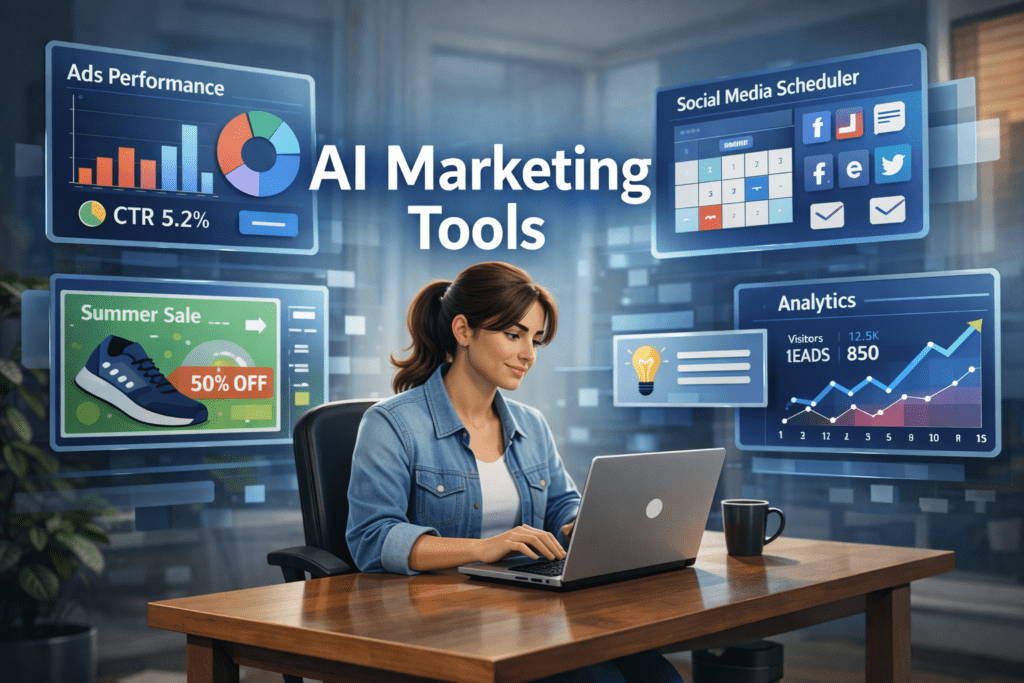

A young entrepreneur working on a laptop while AI marketing dashboards display ad performance, social media scheduling, and analytics tools used by small businesses for marketing automation.
A small business owner using AI marketing tools to manage ads, social media scheduling, and analytics from a single dashboard.

Why AI Marketing Tools Matter for Small Businesses 🚀

Small businesses often struggle with limited time, budget, and resources. AI tools help solve these challenges by automating key marketing activities.

⏳ Save Time

AI tools automate repetitive tasks such as:

  • Writing marketing copy
  • Designing ad creatives
  • Scheduling social media posts
  • Generating blog content
  • Analyzing marketing data

This allows entrepreneurs to focus on strategy and growth instead of repetitive work.


💰 Reduce Marketing Costs

Hiring a full marketing team can be expensive.

AI tools allow small businesses to perform tasks that normally require:

  • Copywriters
  • Designers
  • Social media managers
  • Marketing analysts

This significantly lowers marketing expenses.


📊 Improve Marketing Performance

AI tools analyze data quickly and suggest improvements like:

  • Better ad creatives
  • High-performing content ideas
  • Optimal posting schedules
  • Improved audience targeting

These insights can help businesses achieve higher ROI from marketing campaigns.


Quick Tool Summary ⚡

Best Overall: AdCreative.ai
Best Budget Option: Copy.ai
Best for Social Media Marketing: Ocoya
Best for Content Marketing: Jasper AI
Best for Marketing Automation: HubSpot AI
Best for SEO Content: Surfer SEO


Best AI Marketing Tools for Small Businesses 🧠
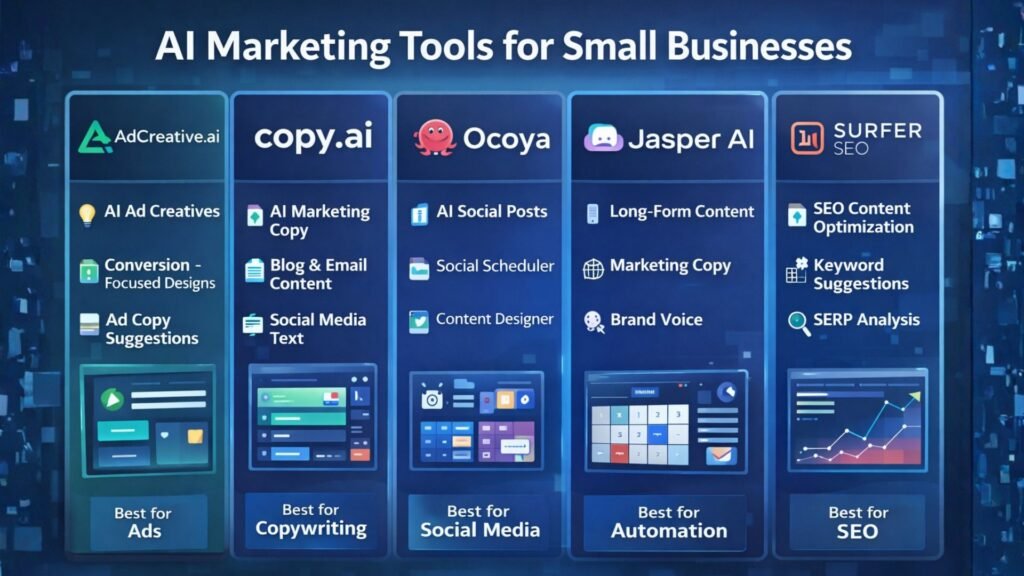

Comparison infographic of AI marketing tools for small businesses highlighting features such as ad creation, AI copywriting, social media automation, content generation, and SEO optimization.
Comparison infographic showing popular AI marketing tools like AdCreative.ai, Copy.ai, Ocoya, Jasper AI, and Surfer SEO for small business marketing.

1. AdCreative.ai 🎯

AdCreative.ai is one of the most powerful AI advertising tools designed to generate high-converting ad creatives automatically.

Instead of manually designing ads, businesses can use AI to generate optimized ad visuals based on proven marketing data.

Key Features

  • AI-generated ad creatives
  • Conversion-focused design suggestions
  • Ad copy generation
  • Creative scoring for performance
  • Integration with major ad platforms

Pros

✔ Generates ads in seconds
✔ Optimized for advertising campaigns

Cons

✖ Most useful for businesses running regular ads
✖ Requires some experimentation

Best For

Businesses running Facebook Ads, Google Ads, and display campaigns.

Try AdCreative.ai here


2. Copy.ai ✍️

Copy.ai is a popular AI writing tool designed to generate marketing content quickly.

The platform helps businesses create blog posts, product descriptions, ad copy, and email marketing content.

Key Features

  • AI marketing copy generator
  • Blog writing tools
  • Email marketing templates
  • Social media caption generator
  • Content idea generation

Pros

✔ Easy to use
✔ Fast content creation

Cons

✖ AI output may require editing
✖ Limited customization

Best For

Entrepreneurs who need quick marketing copy and content ideas.

Affiliate Call-To-Action

Try Copy.ai here


3. Ocoya 📱

Ocoya is an AI-powered social media marketing platform that combines content creation, scheduling, and analytics.

It helps businesses generate posts and automatically publish them across multiple social media platforms.

Key Features

  • AI social media captions
  • Automated post scheduling
  • Graphic design tools
  • Social media analytics

Pros

✔ Excellent for social media automation
✔ Multi-platform integrations

Cons

✖ Analytics features are limited
✖ Advanced features require paid plans

Best For

Small businesses managing multiple social media platforms.

Try Ocoya here


4. Jasper AI 📝

Jasper AI is one of the most advanced AI writing tools for marketing and content creation.

It helps marketers generate blog posts, landing pages, and marketing campaigns.

Key Features

  • Long-form AI writing
  • Marketing copy templates
  • AI brand voice customization
  • SEO-friendly content creation

Pros

✔ High-quality AI writing
✔ Ideal for content marketing

Cons

✖ Higher pricing
✖ Content may require editing

Best For

Bloggers and marketers focused on content-driven growth.

Try Jasper AI here


5. HubSpot AI 🤖

HubSpot integrates AI into its marketing automation platform.

The tool provides advanced features for email marketing, lead generation, CRM automation, and analytics.

Key Features

  • AI email generation
  • Marketing automation workflows
  • CRM integration
  • Campaign analytics

Pros

✔ Complete marketing ecosystem
✔ Powerful automation tools

Cons

✖ Expensive for small startups
✖ Advanced features require premium plans

Best For

Businesses managing large marketing campaigns and sales funnels.


6. Surfer SEO 🔎

Surfer SEO helps businesses create SEO-optimized content that ranks on Google.

The platform analyzes top-ranking pages and provides real-time optimization suggestions.

Key Features

  • Content optimization
  • Keyword suggestions
  • SEO score tracking
  • SERP analysis

Pros

✔ Excellent for SEO-driven content
✔ Data-backed recommendations

Cons

✖ Requires some SEO knowledge
✖ Paid plans can be expensive

Best For

Bloggers and marketers focused on organic traffic growth.


AI Marketing Tools Comparison Table 📊

ToolBest ForKey FeaturePricing
AdCreative.aiAdvertisingAI ad creativesPaid
Copy.aiCopywritingAI marketing copyFreemium
OcoyaSocial mediaAI schedulingPaid
Jasper AIContent marketingLong-form writingPaid
HubSpot AIAutomationCRM marketingPaid
Surfer SEOSEO marketingContent optimizationPaid

Practical Use Cases for AI Marketing Tools 💡

AI marketing tools can transform how small businesses operate.

Social Media Automation

AI tools can:

  • Generate social media posts
  • Schedule content automatically
  • Analyze engagement performance

Ad Campaign Creation

AI can quickly generate:

  • Ad visuals
  • Ad headlines
  • Targeting suggestions

Content Marketing

AI tools can produce:

  • Blog posts
  • Email newsletters
  • Product descriptions
  • Website content

Benefits and Limitations ⚖️

Benefits

✔ Faster marketing execution
✔ Lower marketing costs
✔ Improved campaign performance
✔ Better marketing insights


Limitations

✖ AI-generated content may need editing
✖ Over-automation can reduce brand personality
✖ Some tools require learning time


Best AI Writing Tools for Bloggers in 2026: Tools That Actually Improve Content

How to Get Started with AI Marketing Tools 🛠️

If you’re new to AI marketing, follow this simple process.

Step 1

Choose one or two tools based on your marketing needs.

Step 2

Use AI to automate repetitive tasks such as content creation and social media scheduling.

Step 3

Monitor campaign performance using analytics.

Step 4

Expand your AI marketing stack as your business grows.
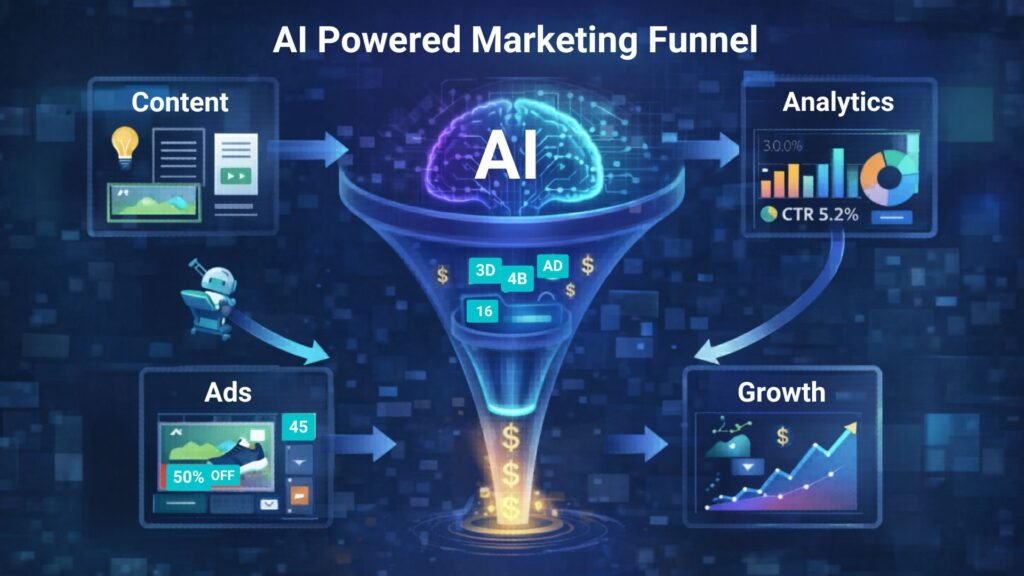

AI-powered marketing funnel showing content creation, advertising campaigns, analytics tracking, and business growth automation.
Illustration of an AI-powered marketing funnel showing how content, ads, analytics, and automation work together to drive business growth.

Conclusion 🎯

Artificial intelligence is transforming digital marketing, allowing small businesses to compete with larger brands.

The best AI marketing tools for small businesses help automate content creation, advertising, and social media management while improving efficiency.

Tools like AdCreative.ai, Copy.ai, and Ocoya allow entrepreneurs and marketers to scale their marketing efforts without large teams or huge budgets.

By adopting AI marketing tools today, businesses can build smarter marketing strategies and unlock new growth opportunities.
Similar Posts

  • ·

    Best AI Writing Tools for Bloggers in 2026: Tools That Actually Improve Content

    Creating consistent blog content can be challenging, especially when bloggers are expected to publish regularly while maintaining high quality. Research, outlining, drafting, editing, and optimizing for SEO all take time. As competition grows online, bloggers are increasingly looking for tools that can help streamline their workflow.

    AI writing tools have become powerful assistants for bloggers and content creators. Instead of replacing writers, these tools help generate ideas, draft articles, improve clarity, and speed up the content creation process. Many modern AI tools can also assist with SEO optimization, marketing copy, and productivity workflows.

    In this guide, we explore the best AI writing tools for bloggers in 2026, how they work, and how they can help bloggers create better content faster.

    Diagram showing an AI writing workflow including idea generation, drafting, editing, and publishing stages used by bloggers and content creators.
    A simple AI writing workflow illustrating how bloggers use AI tools to generate ideas, draft articles, edit content, and publish posts efficiently.

    Quick Tool Summary

    Best Overall: Jasper AI
    Best Budget Option: Rytr
    Best for Beginners: ChatGPT
    Best for Marketing Content: Copy.ai
    Best Productivity Tool: Notion AI


    Why Bloggers Are Using AI Writing Tools ✍️

    AI writing tools are becoming essential for bloggers for several reasons.

    Faster content creation

    AI can generate outlines, drafts, and ideas in seconds.

    Overcoming writer’s block

    Many bloggers use AI tools to brainstorm new content topics.

    Content scaling

    AI allows bloggers to produce more articles without sacrificing quality.

    SEO support

    Some tools assist with keyword integration, readability, and structure.

    These advantages make AI writing tools particularly useful for entrepreneurs, marketers, and freelancers managing multiple content projects.


    Best AI Writing Tools for Bloggers

    Below are some of the most widely used AI writing tools available today.

    Screenshot-style illustration of an AI writing assistant dashboard showing blog content suggestions, SEO tips, and tone settings for generating AI-powered blog posts.
    An AI writing assistant dashboard displaying content suggestions, blog ideas, and tone settings used by bloggers to generate and edit articles efficiently.

    1. ChatGPT

    ChatGPT has become one of the most popular AI writing assistants used by bloggers and content creators. It can generate article ideas, outlines, paragraphs, and full drafts with simple prompts.

    Key Features

    • Blog topic generation
    • Article outlines and drafts
    • Content rewriting and editing
    • Brainstorming ideas

    Pros

    • Very flexible writing assistant
    • Supports multiple writing styles

    Cons

    • Requires good prompts
    • Content still needs editing and fact-checking

    Best For

    Bloggers who want a versatile AI assistant for brainstorming and writing drafts.

    You can try ChatGPT for free here: https://chatgpt.com/


    2. Jasper AI

    Jasper AI is one of the most advanced AI writing platforms designed for marketers and professional content creators.

    Key Features

    • Long-form blog writing
    • Marketing copy templates
    • Brand voice customization
    • Content campaign workflows

    Pros

    • High-quality output
    • Powerful marketing features

    Cons

    • Higher pricing compared to other tools
    • Slight learning curve

    Best For

    Professional bloggers and marketing teams producing high volumes of content.

    Try Jasper AI here → https://www.jasper.ai/


    3. Copy.ai

    Copy.ai focuses heavily on marketing copy but is also widely used by bloggers for idea generation and short-form content.

    Key Features

    • Blog idea generator
    • Social media content creation
    • Marketing copy templates
    • Quick draft generation

    Pros

    • Easy to use
    • Excellent for brainstorming

    Cons

    • Limited long-form writing capabilities

    Best For

    Bloggers who want quick inspiration and marketing copy assistance.

    Try Copy.ai here → Copy AI


    4. Writesonic

    Writesonic combines AI writing capabilities with SEO optimization tools, making it popular among bloggers and marketers.

    Key Features

    • Blog article generator
    • SEO-focused writing tools
    • Content rewriting and editing
    • Marketing copy creation

    Pros

    • Good for SEO content
    • Supports multiple writing formats

    Cons

    • Output may require manual editing

    Best For

    Bloggers who want AI assistance with SEO-optimized content.

    Try Writesonic here


    5. Rytr

    Rytr is known as one of the most affordable AI writing tools available today.

    Key Features

    • Blog writing assistant
    • Tone customization
    • Content rewriting
    • Multi-language support

    Pros

    • Budget friendly
    • Simple and easy interface

    Cons

    • Less advanced than premium tools

    Best For

    Beginner bloggers looking for an affordable AI writing solution.

    Try Rytr here →


    6. Notion AI

    Notion AI integrates AI writing capabilities directly into the Notion productivity platform.

    Key Features

    • AI document editing
    • Writing suggestions
    • Content summarization
    • Project organization

    Pros

    • Excellent for productivity workflows
    • Ideal for managing content ideas

    Cons

    • Limited marketing-focused features

    Best For

    Bloggers who manage writing projects and ideas within Notion.

    Try Notion AI here →


    AI Writing Tools Comparison Table

    Infographic comparing popular AI writing tools including ChatGPT, Jasper AI, Copy.ai, Writesonic, Rytr, and Notion AI with their key features for bloggers.
    Visual comparison chart of leading AI writing tools such as ChatGPT, Jasper AI, Copy.ai, Writesonic, Rytr, and Notion AI, highlighting their main capabilities for blogging and content creation.
    ToolBest ForKey FeaturePricing
    ChatGPTBloggersFlexible writing assistantFreemium
    Jasper AIMarketersLong-form AI writingPaid
    Copy.aiMarketing contentIdea generationFreemium
    WritesonicSEO bloggersSEO writing toolsPaid
    RytrBeginnersBudget-friendly AI writingLow cost
    Notion AIProductivityWriting inside workspacePaid

    Best AI Marketing Tools for Small Businesses to Automate Marketing and Grow Faster

    Practical Use Cases for Bloggers

    Bloggers use AI writing tools in several ways to improve productivity and efficiency.

    Content Idea Generation

    AI tools can quickly generate blog topic ideas based on keywords or niche themes.

    Blog Outlines

    Instead of starting from a blank page, bloggers can create structured outlines using AI.

    Draft Writing

    AI tools can produce first drafts that writers can edit and refine.

    Editing and Optimization

    Some AI tools help improve clarity, grammar, and readability.

    These workflows allow bloggers to focus more on creativity and strategy while automation handles repetitive tasks.


    Benefits and Limitations ⚖️

    While AI writing tools offer many advantages, they still require human oversight.

    Benefits

    • Faster content production
    • Improved productivity
    • Easier brainstorming
    • Scalable blogging workflows

    Limitations

    • AI content requires fact checking
    • Tone may need human editing
    • Some tools generate generic text

    The best results come from combining AI assistance with human creativity and expertise.


    How to Get Started with AI Writing Tools 🚀

    If you are new to AI writing tools, start with a simple workflow.

    1. Choose a topic and research keywords.
    2. Use AI to generate an outline.
    3. Draft the article using AI assistance.
    4. Edit the content to improve accuracy and tone.
    5. Optimize the article for SEO before publishing.

    With practice, bloggers can significantly reduce the time required to produce high-quality content.


    Conclusion

    AI writing tools are rapidly transforming how bloggers create content. From generating ideas to drafting full articles, these tools help streamline the blogging process and improve productivity.

    The key is choosing the right tool for your workflow. Beginners may prefer flexible tools like ChatGPT, while professional bloggers and marketing teams often benefit from advanced platforms such as Jasper AI.

    When used correctly, AI writing tools can help bloggers publish more consistently, scale their content strategy, and grow their online audience in an increasingly competitive digital landscape.

  • ·

    Google Gemini Review 2026: Can It Really Beat ChatGPT?

    If you follow AI even a little bit, you’ve probably heard that Google Gemini is supposed to be the company’s big answer to ChatGPT. In this Google Gemini review, I’m focusing on how Gemini AI actually feels in day‑to‑day use in 2026, and whether it genuinely beats ChatGPT or just offers a different flavour of the same thing. This Gemini vs ChatGPT review is based on typical tasks: writing, research, coding, and general productivity for users in the US and UK.

    Setup and Interface: Gemini Feels Naturally Built Into Google

    The first obvious advantage Gemini has is integration. While ChatGPT mostly lives in its own web app (unless you use plugins or third‑party tools), Gemini is woven directly into Google products that people in the US and UK already use daily.

    In Gmail and Google Docs, Gemini can suggest replies, rewrite emails, draft blog posts, and summarise long text without leaving the page. On Android phones and Chromebooks, Gemini is increasingly replacing the old Google Assistant, so it feels like part of the operating system rather than an extra app.

    ChatGPT, on the other hand, still works best as something you open in a separate tab or app and copy‑paste from. For some people that’s fine, but if you live inside Google’s ecosystem, Gemini’s integration is a big practical win.

    Writing and Content Generation: ChatGPT Still Has the Edge for “Voice”

    For writing tasks, the gap between Gemini AI and ChatGPT is smaller than it used to be, but it hasn’t disappeared.

    Gemini is very good at structured writing: outlines, lists, how‑to guides, meeting notes and summaries. It tends to stay organised, on‑topic and fairly concise. If you need a clean first draft of a blog post, a product description, or a set of bullet points for a presentation, Gemini does the job without much drama.

    ChatGPT, especially in its latest versions, still feels a bit more “human” in tone. It’s better at storytelling, humour, and capturing a particular style of writing. When you ask for a conversational article or a creative angle, ChatGPT often sounds more natural and less like a corporate manual.

    So in this part of the Gemini vs ChatGPT review, the result is mixed: Gemini wins on structure and tight integration with Docs, while ChatGPT remains slightly stronger for voice and personality.

    Search, Facts and Live Information: Gemini Plays on Home Ground

    When it comes to live information, Gemini finally looks like the AI that Google promised. Because it sits directly on top of Google Search, it can pull in fresh results, link to sources, and show you where it found the information.

    For example, if you ask for “best AI tools for small businesses in the UK in 2026” or “latest changes in US student loan rules”, Gemini is usually quicker to ground its answer in current web pages. You can see links, visit the original sites, and dig deeper.

    ChatGPT has browsing modes and integrations, but they still feel like an extra layer bolted on top. Sometimes it browses, sometimes it doesn’t, and occasionally it hallucinates details more confidently than Gemini does.

    That doesn’t mean Gemini is perfect: it can still misread pages or over‑simplify complex topics. But for search‑style questions, especially those relevant to US and UK news, Gemini now feels more reliable more often.

    Coding and Technical Tasks: Close Competition, Slight Preference

    Both Gemini AI and ChatGPT are strong coding assistants in 2026, and for most everyday developers there is less difference than marketing suggests.

    Gemini is excellent when used with Google’s developer tools and cloud services. It can help generate code snippets, explain error messages, and suggest improvements in a fairly straightforward way. If you’re already in the Google Cloud world, that tight connection is useful.

    ChatGPT still has a slight edge in explaining code step‑by‑step and offering multiple versions of a solution. Many developers in the US and UK have already built their personal workflow around ChatGPT, and that familiarity matters.

    If you’re starting from scratch, you can comfortably pick either. If you’re deep into Google’s stack, Gemini will feel more natural. If you’ve been using ChatGPT for a year or more, there isn’t a strong reason to abandon it purely for coding.

    Privacy, Pricing and Value for Money

    On pricing, Gemini and ChatGPT both use a mix of free and paid tiers. Google’s free Gemini is competitive for casual users, and the paid versions are mainly attractive for heavy usage or business integrations.

    For many US and UK users, the real question is not just price but trust. Google has a long history of collecting user data, and some people are cautious about giving Gemini access to their documents and emails, even if it is technically necessary for the features to work. OpenAI has had its own controversies, but it still feels slightly more “separate” from your daily accounts.

    If you already rely heavily on Google Workspace, paying for Gemini’s advanced features can make sense: you are getting an AI layer across tools you’re already paying for. If you prefer to keep AI separate from your inbox and personal files, a standalone ChatGPT subscription may feel safer.

    In 2026, Google Gemini has finally become a serious rival instead of just a late response. It doesn’t completely replace ChatGPT, but for many US and UK users, especially those deep in Google’s ecosystem, it might quietly become the AI they reach for first.

    Final Verdict – Is Gemini Better Than ChatGPT in 2026?

    So, the big question of this Gemini vs ChatGPT review: is Google Gemini actually better?

    The honest answer is: it depends how you work.

    Gemini is best for:

    • People who live inside Google Search, Gmail, Docs and Android
    • Structured work: summaries, outlines, emails, reports and quick research
    • Users who want AI blended directly into their existing tools

    ChatGPT is still better for:

    • More creative writing, storytelling and conversational content
    • Users who like a single, central AI workspace separate from their other accounts
    • Developers and power users who already built habits and prompts around ChatGPT

    In 2026, Google Gemini has finally become a serious rival instead of just a late response. It doesn’t completely replace ChatGPT, but for many US and UK users, especially those deep in Google’s ecosystem, it might quietly become the AI they reach for first.

  • ·

    Top No-Code AI Agent Builders for Agencies

    Scaling an agency in the US or UK used to mean one thing: hiring more people. Every new client meant adding more project managers, more data entry clerks, and more administrative bloat. But operations managers are waking up to a new reality. You don’t need a bigger team to handle enterprise-level capacity; you need better internal infrastructure.

    The secret to maximizing agency margins right now is replacing repetitive administrative headcount with custom AI agents. By leveraging no-code enterprise automation, you can build digital employees that handle your backend operations 24/7. Here at AI Growth Gear, we prioritize software that directly impacts the bottom line. If you want to deploy sophisticated business intelligence and workflow software without writing a line of code, these are the platforms you need.

    MindStudio: The AI Employee Factory

    MindStudio is arguably the most robust platform right now for building highly specialized, multi-step AI agents. It allows you to build custom interfaces and connect different foundation models (like Claude 3 or GPT-4) depending on the specific task.

    • The Operations Play: Stop paying junior staff to summarize endless client discovery calls and format them into briefs. With MindStudio, you can build an internal “Strategy Agent.” You upload the raw call transcript, and the agent automatically extracts the core business objectives, cross-references them with your agency’s standard operating procedures (SOPs), and outputs a polished, ready-to-execute project brief. It turns hours of manual administrative work into a three-second automated workflow.

    Zapier Central: The Action-Oriented Assistant

    You likely already use Zapier to connect your apps, but Zapier Central transforms those passive connections into an active, conversational AI workspace. It allows you to build bots that sit directly on top of your live data.

    • The Operations Play: Zapier Central excels at data triage. Imagine a custom agent monitoring your high-value lead inbox. When a new enterprise inquiry comes in, the agent reads the context, automatically queries your CRM to see if they are an existing contact, drafts a personalized response based on their industry, and pings the correct account executive in Slack with a summary. It acts as an autonomous executive assistant that never drops the ball, perfectly optimizing your agency’s lead response times.

    Flowise: Visual LLM Orchestration

    For agencies handling vast amounts of proprietary data or complex technical documentation, Flowise is a game-changer. It provides a drag-and-drop visual interface for LangChain, meaning you can build highly complex AI logic flows without needing a Python developer.

    • The Operations Play: Build a secure, internal “Knowledge Retrieval Agent” for your team. By connecting Flowise to your agency’s internal Google Drive or Notion workspace, your team can simply ask the agent questions like, “What were the exact deliverables we promised in the Q3 contract for Client X?” The agent searches the secure internal database and retrieves the exact clause in seconds. This eliminates the endless back-and-forth messaging between departments and streamlines overall business intelligence.

    Voiceflow: Conversational Process Management

    While typically known for building customer-facing chatbots, smart operations managers are using Voiceflow to build robust internal conversational interfaces.

    • The Operations Play: Employee onboarding is a massive drain on operational resources. With Voiceflow, you can build an interactive “HR & Onboarding Agent.” Instead of handing new hires a static 50-page PDF of company policies, they interact with the Voiceflow agent. It can guide them through setting up their software stack, answer specific questions about payroll schedules, and train them on agency methodologies. It guarantees a consistent, scalable onboarding experience without tying up your senior staff.

    The Bottom Line

    B2B margins are won and lost in the backend. By investing in no-code workflow software like MindStudio, Zapier Central, Flowise, and Voiceflow, you aren’t just buying tools—you are building a scalable, automated workforce. This allows you to take on larger enterprise contracts without proportionately increasing your overhead.

  • ·

    Scale Your Content Strategy: A Blueprint for AI SEO Workflows

    If you are a content manager or niche site builder, you know the current reality: the SERPs are hungrier than ever. The old playbook of manually researching keywords, crafting individual briefs, and managing a dozen freelance writers on Trello is becoming unsustainable. It’s too slow and too expensive to compete with competitors who have figured out velocity.

    To win at search today, you cannot just “use AI to write.” You need to build an AI SEO strategy that turns manual bottlenecks into automated workflows.

    Scaling isn’t about asking ChatGPT to write 50 articles in one giant prompt—that’s a recipe for generic, low-ranking “slop.” True scale comes from deconstructing the SEO process and using AI to handle the repetitive heavy lifting, leaving the high-value strategic thinking to humans.

    Here is how to graduate from basic prompting to building an enterprise-grade programmatic SEO engine.

    Phase 1: Intelligent Keyword Clustering at Scale

    The biggest mistake SEOs make with AI is starting with the writing phase. Scale starts with structure. You cannot dominate a niche by picking keywords one by one.

    Instead of manually grouping keywords in spreadsheets, dump thousands of raw keyword ideas from tools like Ahrefs or Semrush into a CSV. Then, use ChatGPT’s Advanced Data Analysis feature to perform semantic clustering.

    The Goal: Ask ChatGPT to group keywords not just by similar words, but by identical search intent. This turns a messy list of 5,000 keywords into a clean map of 300 distinct article topics, ensuring you don’t cannibalize your own rankings.

    Phase 2: The Automated Content Brief Factory

    Before you generate a single paragraph of draft copy, you must generate the instructions. The quality of your ChatGPT for SEO content output is directly tied to the quality of the input brief.

    Don’t ask ChatGPT to “write an article about X.” Instead, create a workflow (perhaps using a tool like Make.com or Zapier chained to OpenAI’s API) that takes a target keyword and generates a comprehensive brief based on live SERP data.

    Your automated brief should include:

    • The primary search intent (informational vs. commercial).
    • A suggested H2/H3 structure based on top-ranking competitors.
    • A list of semantic entities and NLP terms that must be included.
    • The specific questions the article needs to answer to win Featured Snippets.

    Phase 3: The “Chain-of-Thought” Drafting Engine

    Once you have a rock-solid brief, you can begin drafting. But don’t try to generate a 2,000-word guide in one shot. AI loses the thread on long outputs.

    Build a workflow that chains prompts together. Step one generates the introduction based on the brief’s hook. Step two takes the introduction and the brief’s first H2 to write the next section, and so on. By breaking the task into modular chunks, you maintain context and improve factual accuracy.

    Phase 4: The Human-in-the-Loop (E-E-A-T Layer)

    This is where the elite SEOs separate themselves from the spammers. You cannot auto-publish raw AI output and expect long-term gains.

    Your workflow must end in a human review queue. The AI is the architect and the bricklayer, but you are the site inspector. The human job is no longer drafting; it’s injecting Experience, Expertise, Authoritativeness, and Trustworthiness (E-E-A-T). Add unique data, personal anecdotes, expert quotes, and ensure the tone matches your brand.

    By automating the research, briefing, and drafting phases, your team spends 80% of their time improving content quality, rather than staring at a blank page.

  • ·

    Top 10 AI Writers of 2026: The Ultimate List

    Remember 2023? It felt like a new “revolutionary” AI writing tool launched every Tuesday. It was chaotic, noisy, and honestly, most of them were just cheap wrappers around the same basic OpenAI API.

    Welcome to 2026. The dust has settled. The contenders have separated themselves from the pretenders.

    Today, having an AI assistant isn’t a competitive advantage; it’s baseline table stakes. But the game has changed. We are no longer looking for tools that can just generate words. We are looking for tools that fit specific workflows, understand nuance, and most importantly, don’t sound like a robot trying too hard to impress its corporate overlords.

    At AI Growth Gear, we don’t believe in “one tool to rule them all.” A novelist needs different features than an SEO agency.

    I’ve tested the market leaders to bring you the definitive top 10 list for 2026, categorized by what they actually do best.


    The Titans (The Generalists)

    1. Claude (by Anthropic)

    The undisputed king of nuance and flow. If you want writing that feels surprisingly human straight out of the box, Claude is currently unmatched. Its latest models understand tone, context, and rhythm better than anything else. It doesn’t overuse clichéd AI words like “delve” or “unleash.” If you are writing long-form essays, newsletters, or books, this is your muse.

    • Best For: Long-form writers, authors, and anyone who hates heavy editing.
    • Pricing: Free tier available; Pro is ~$20/mo.

    2. ChatGPT (by OpenAI)

    The incredibly versatile Swiss Army Knife. You can’t make a list without the OG. While Claude might beat it purely on prose quality, ChatGPT (with GPT-5/4o) is a productivity powerhouse. Its ability to handle multimodal inputs—analyzing a chart, reading code, browsing the live web, and generating an image all in one chat—makes it indispensable for complex projects. It’s less a writer and more a brilliant, jack-of-all-trades assistant.

    • Best For: Brainstorming, coding help, and multi-step complex tasks.
    • Pricing: Free tier available; Plus is ~$20/mo.

    The Marketers (For Growth & SEO)

    3. Jasper

    The enterprise-grade marketing engine. Jasper stopped trying to be just a “chatbot” years ago. In 2026, it is a robust platform for marketing teams. Its killer features are “Brand Voice” (which it nails perfectly) and its ability to turn a single brief into an entire multi-channel campaign (blog, social, email) with AI agents. It’s pricey, but it replaces a junior marketing coordinator.

    • Best For: Marketing agencies and in-house enterprise teams.
    • Pricing: Premium pricing, starting around ~$49/mo per seat.

    4. Writesonic

    The speed demon for SEO and trending topics. If your business relies on catching trending waves on Google, Writesonic is essential. It integrates tightly with live Google data, allowing you to write factually accurate articles on current events faster than competitors. It’s designed specifically to rank, focusing on structure and keywords.

    • Best For: News sites, affiliate marketers, and high-volume bloggers.
    • Pricing: Competitive tier structure based on usage.

    5. Copy.ai

    The GTM (Go-To-Market) automation specialist. Copy.ai has pivoted brilliantly towards sales and GTM workflows. It’s less about “write me a paragraph” and more about “take this LinkedIn profile, analyze their pain points, and write a personalized 3-email cold outreach sequence.” For sales teams, it’s pure gold.

    • Best For: Sales development reps (SDRs), founders doing outreach, and social media managers.
    • Pricing: Free tier available; Pro plans focus on workflow limits.

    The Specialists (Niche Experts)

    6. Perplexity

    The research-first writer. Perplexity isn’t a traditional “writer,” but it’s the best tool to start the writing process. It’s an answer engine that cites its sources in real-time. When I need to write a fact-heavy piece and cannot afford AI hallucinations, I start here to gather my research before moving to a drafting tool.

    • Best For: Journalists, academics, and creating fact-based content briefs.
    • Pricing: Excellent free version; Pro offers deeper models.

    7. Sudowrite

    The novelist’s best friend. If you are writing fiction, ignore the other tools and start here. Sudowrite understands narrative arcs, character development, and “show, don’t tell.” Features like “Story Engine” help you map out entire novels, and its “Describe” button helps you break through writer’s block with sensory details.

    • Best For: Fiction authors, screenwriters, and creative writers.
    • Pricing: Tiered based on word count.

    8. Surfer AI

    The pure SEO optimization tool. Surfer isn’t about creative flair; it’s about math. It analyzes the top-ranking pages on Google for your keyword and tells you exactly what structure, word count, and semantic terms you need to compete. It writes to satisfy the algorithm first, humans second.

    • Best For: Hardcore SEO professionals focused on SERP rankings.
    • Pricing: Per-article pricing model (expensive but effective).

    The Integrators (Workflow Enhancers)

    9. Notion AI

    The messy workspace organizer. Notion AI isn’t trying to write your next novel. It’s trying to make sense of your messy notes. Its strength is summarizing meetings, expanding bullet points into memos, and editing directly within your existing project management workspace. It removes the friction of copy-pasting between apps.

    • Best For: Project managers and teams already living inside Notion.
    • Pricing: Add-on to existing Notion plans (~$10/member/mo).

    10. Grammarly GO

    The final polish essential. You might not think of Grammarly as a “generative” AI, but their latest features are fantastic for rewriting. It’s the ultimate safety net. No matter which tool I use to draft, everything runs through Grammarly for a final tone check and clarity polish before publishing.

    • Best For: Literally everyone who types on a keyboard.
    • Pricing: Essential free version; Premium is a staple investment.

    Final Thoughts from Surbhi

    The best tool in 2026 isn’t the one with the most features; it’s the one that fits your specific daily grind. Don’t fall for the hype. Define your output—are you selling, storytelling, or ranking?—and choose the specialist for the job.

  • ·

    Digital Doubles: HeyGen vs. Synthesia – Choosing Your AI Presenter for 2026

    In business, communication is everything. Whether it’s training your global sales force, delivering personalized video messages to thousands of leads, or creating consistent brand explainers, the demand for engaging video is immense. The traditional approach—hiring presenters, booking studios, shooting, editing—is a bottleneck for even the most agile teams.

    This is where AI Avatar & Business Presenters step in. These aren’t just text-to-speech tools; they create convincing digital humans who can speak your message in multiple languages, with realistic expressions and lip-sync. For businesses in the US and UK looking to scale their video output without scaling their production budget, these platforms are a game-changer.

    At AI Growth Gear, we’ve evaluated the leading platforms with our “Director’s Lens,” focusing on realism, brand integration, and operational efficiency. Here’s how the top two—HeyGen (Avatar IV) and Synthesia—compare for your business.

    The Contenders at a Glance

    FeatureHeyGen (Avatar IV)Synthesia
    Primary StrengthUltra-Realistic Digital TwinsEnterprise-Grade Library & Compliance
    Best ForPersonalized Sales, UGCCorporate Training, Explainers
    WeaknessCustom avatars require more inputStock avatars can feel less unique

    1. HeyGen (Avatar IV): The Ultra-Realist

    HeyGen’s latest iteration, Avatar IV, is pushing the boundaries of what’s possible in AI avatar realism. Its “Digital Twin” feature allows businesses to create incredibly lifelike avatars of actual employees or spokespersons from minimal video footage. The subtlety of facial expressions and natural-sounding voice clones are truly impressive.

    • The Aesthetic: Aimed squarely at hyper-realism. If you want your AI presenter to be indistinguishable from a real human, HeyGen is currently leading the pack. It masters the minute details, making it ideal for maintaining a personal touch at scale.
    • The Director’s Take: “HeyGen is for when ‘authentic’ means ‘looks like you.’ It’s unparalleled for personalized sales videos, founder messages, or any content where the presenter’s unique identity is key. It allows a boutique agency to maintain its human brand persona without physically being in every video.”

    2. Synthesia: The Enterprise Powerhouse

    Synthesia has been the long-standing leader in the corporate AI video space, and for good reason. It boasts an extensive library of over 160 diverse stock avatars and 120+ languages, coupled with robust SOC 2 compliance for data security. Its platform is built for scalable, professional use cases across large organizations.

    • The Aesthetic: Polished, professional, and consistent. While its stock avatars are highly realistic, they aim for broad appeal rather than individual uniqueness.
    • The Director’s Take: “Synthesia is the workhorse of the enterprise. If you need to produce hundreds of consistent training modules, international onboarding videos, or routine explainers, its sheer volume of customizable options and security features make it the undisputed choice. It ensures your corporate communication is slick and reliable across the board.”

    The Verdict: Which Digital Double is Right for You?

    • Choose HeyGen if your priority is Personalization and Ultra-Realism. If you need your AI presenter to look and sound exactly like a specific person to build trust or enhance a unique brand identity.
    • Choose Synthesia if your priority is Scalability and Corporate Readiness. If you require a vast library of diverse avatars, multi-language support, and enterprise-grade security for consistent, high-volume video production.

    Our Recommendation for 2026

    For many agencies, the ideal setup might involve a blend: HeyGen for high-impact, personalized, and client-facing content, and Synthesia for internal training, broad-reach explainers, or situations requiring a diverse range of stock avatars. Both tools excel at making video production accessible, but they serve different strategic objectives.