|

Best AI Tools for Social Media Automation in 2026

Content creator using AI tools for social media scheduling with analytics dashboard and automation workflow

Managing multiple social media accounts manually can quickly become overwhelming. From creating content to posting consistently and analyzing results, it takes time and effort. That’s where AI tools for social media automation come in.

These tools help you generate content, schedule posts, optimize performance, and even design creatives — all with minimal manual work. Whether you’re a marketer, freelancer, or business owner, using AI can significantly boost your productivity and engagement.

In this guide, we’ll explore the best AI tools for social media automation, including powerful platforms like AdCreative.ai, Ocoya, and Copy.ai.

AI system automating social media posts from creation to publishing across multiple platforms
AI tools streamline content creation and automatically publish posts across social platforms

Social media success depends on consistency, creativity, and timing.

AI tools help you:

  • Save hours every week
  • Post consistently
  • Improve engagement rates
  • Scale content production

For businesses, this means faster growth with fewer resources.


🏆 Best Overall — Ocoya
💰 Best Budget — Copy.ai
🚀 Best for Beginners — Buffer
⚡ Best for Ads & Creatives — AdCreative.ai

Close-up of laptop showing content calendar with scheduled posts and analytics graphs
Plan and organize your social media strategy using a structured content calendar

Description:
Ocoya is an all-in-one AI marketing tool designed specifically for social media automation. It combines content creation, scheduling, and analytics in one platform.

Key Features:

  • AI caption generator
  • Social media scheduler
  • Hashtag suggestions
  • E-commerce integrations

Pros:

  • Complete automation solution
  • Easy to use
  • Great for content + scheduling

Cons:

  • Limited advanced analytics
  • Requires subscription

Best For:
Marketers and small businesses

👉 Try Ocoya →


Description:
AdCreative.ai focuses on generating high-converting ad creatives using AI, making it ideal for social media advertising campaigns.

Key Features:

  • AI-generated ad creatives
  • Conversion-focused designs
  • Performance scoring
  • Multiple ad variations

Pros:

  • Excellent for paid ads
  • High-quality creatives
  • Data-driven

Cons:

  • Not a full scheduler
  • Premium pricing

Best For:
Advertisers and eCommerce brands


Description:
Copy.ai helps you generate captions, posts, and marketing copy for social media in seconds.

Key Features:

  • AI caption generator
  • Content templates
  • Multi-language support
  • Fast output

Pros:

  • Affordable
  • Beginner-friendly
  • Saves time

Cons:

  • No scheduling feature
  • Needs editing

Best For:
Freelancers and beginners


Description:
Buffer is a simple and reliable social media scheduling tool with AI assistance for content ideas.

Key Features:

  • Post scheduling
  • Analytics
  • Clean UI

Pros:

  • Easy to use
  • Affordable
  • Great for beginners

Cons:

  • Limited automation features

Best For:
Small businesses


Description:
Hootsuite offers advanced automation, scheduling, and analytics powered by AI.

Key Features:

  • Multi-platform management
  • AI recommendations
  • Deep analytics

Pros:

  • Enterprise features
  • Strong reporting

Cons:

  • Expensive

Best For:
Agencies


📊 Practical Use Cases

  • Schedule a week’s content in minutes
  • Generate captions instantly
  • Create ad creatives with AI
  • Manage multiple accounts
  • Analyze engagement automatically

⚖️ Benefits and Limitations

Benefits:

  • Saves time
  • Boosts productivity
  • Improves consistency
  • Scales content creation

Limitations:

  • Requires subscriptions
  • Limited human creativity
  • Learning curve

🛠️ How to Get Started

  1. Choose a tool based on your goal
  2. Connect your social accounts
  3. Generate content using AI
  4. Schedule posts
  5. Track performance

Content creator working with multiple screens showing analytics dashboards and AI tools
Boost productivity by managing social media with AI tools and real-time analytics

📊 Comparison Table

ToolBest ForKey FeaturePricing
OcoyaAll-in-oneAI + SchedulingMid-range
AdCreative.aiAdsAI CreativesPremium
Copy.aiContent WritingAI CopywritingBudget
BufferBeginnersSimple SchedulingAffordable
HootsuiteAgenciesAdvanced AnalyticsExpensive

✅ Conclusion

AI tools for social media automation are transforming how businesses and creators manage their online presence. With tools like Ocoya, AdCreative.ai, and Copy.ai, you can automate content creation, improve engagement, and scale your growth effortlessly.

If you’re just starting, go with Copy.ai or Buffer. If you want full automation, Ocoya is your best bet. And for ads, AdCreative.ai is unmatched.



Similar Posts

  • ·

    Beyond the Green Screen: Choosing the Best AI Video Generators for 2026

    The statistics are undeniable: video dominates online engagement. But for years, creating high-quality video content has been a monumental task, demanding expensive equipment, skilled crew, and endless hours in the editing suite. This “production bottleneck” has traditionally kept many ambitious brands from fully leveraging video.

    Enter AI Video Generators.

    In 2026, these tools are no longer just novelties. They are rapidly evolving into powerful platforms that democratize video creation, allowing businesses—from bustling agencies in London to innovative startups in New York—to produce engaging content at unprecedented speed and scale.

    But with a new tool emerging every week, how do you choose the right one? At AI Growth Gear, with our foundation in film production and aesthetic communication, we see AI video as more than just pressing a button; it’s about translating vision into compelling motion, with precision and soul.

    Why AI Video is No Longer Optional

    • Speed to Market: Generate marketing videos, social clips, and product explainers in minutes, not days.
    • Cost Efficiency: Drastically reduce reliance on traditional production budgets, freeing up resources for strategy.
    • Scalability: Produce personalized video content for diverse audiences without increasing headcount.
    • Consistency: Maintain brand voice and visual style across all video assets through templating and AI assistance.

    What to Look For: A Director’s Checklist for AI Video Generators

    Not all AI video generators are created equal. Based on our extensive testing and understanding of professional production needs, here’s what to prioritize:

    1. Aesthetic Output (The Surbhi Chauhan Factor): This is paramount. Does the AI produce videos that look genuinely professional, or do they fall into the “uncanny valley” of robotic, overly polished, or bland visuals? Look for tools that allow granular control over style, lighting, and realistic character animation. Can it capture the texture of your brand?
    2. Ease of Use & Workflow Integration: A tool is only useful if it fits seamlessly into your existing operations. Is the interface intuitive? Can you upload scripts easily? Does it integrate with your content calendar or project management tools (like Notion or Zapier)?
    3. Customization & Brand Control: Can you upload your own brand assets (logos, fonts, color palettes)? Does it offer a range of customizable templates? The more control you have over the final output, the better it aligns with your brand identity.
    4. Voice & Lip-Sync Accuracy: If you’re using AI avatars or text-to-speech, pay close attention to the naturalness of the voice and the lip-sync quality. A robotic voice or mismatched lips can instantly break immersion and trust.
    5. Cost vs. Value: Free tools are tempting, but often come with limitations on quality, features, or branding. Evaluate subscription models based on the number of minutes, avatars, or advanced features you truly need. Calculate the ROI: how much time and money will it actually save you compared to traditional methods?
    6. Ethical Considerations & Rights: Understand the tool’s terms of service regarding content ownership and the ethical use of AI-generated faces or voices. Ensure you have the necessary rights for commercial use.

    The Future is in Motion

    AI video generators are not here to replace human creativity, but to augment it. They free up creatives to focus on strategic storytelling, conceptualization, and the subtle “director’s touch” that elevates content. By carefully selecting the right AI video gear, you can transform your content strategy, capture more attention, and truly scale your brand’s message.

    Ready to bring your brand to life in motion? The right AI video partner is waiting.

  • ·

    Build Premium AI Client Portals Without Code

    If you are running a high-end consulting firm or a boutique agency targeting clients in the US and UK, your deliverables are top-tier. But how are you delivering them?

    If you are still relying on scattered email chains, password-protected zip files, and messy shared spreadsheets to manage a five-figure retainer client, you have a perception problem. In the premium B2B space, the experience of working with you is just as important as the results.

    The modern solution is a dedicated, white-labeled client portal. It’s the difference between looking like a freelancer and looking like an enterprise infrastructure.

    Traditionally, building a secure, custom portal required expensive CRM development and dedicated engineering. Today, no-code AI builders have democratized this process. You can now build sophisticated client management software that not only displays data but uses AI to make that data actionable for your clients.

    Here are the top no-code tools to build high-value client portals in 2026.

    Softr: The Fastest Path from Database to Dashboard

    Softr has cornered the market on speed and ease of use, especially if your agency already operates out of Airtable or Google Sheets. It turns those static databases into secure, beautiful web apps in minutes.

    • The Agency Play: Use Softr to build a transparent project tracker. Instead of weekly status calls, give clients a login where they can see real-time progress. Where Softr shines now is its native AI integration. You can use it to automatically generate executive summaries of project status reports within the portal, saving your project managers hours of writing while giving the C-suite client a quick, digestible update.

    Stacker: Deep Permissions for Sensitive Data

    When dealing with larger corporate clients, security and granular permissions are paramount. Stacker excels at taking complex, messy datasets (from sources like Salesforce or complex Airtable bases) and turning them into clean, restricted client views.

    • The Agency Play: If you are a financial consultant or handling sensitive marketing data, you can’t show every client the whole database. Stacker allows you to build one master app where Client A only sees Client A’s data, and Client B only sees Client B’s. You can build a sophisticated, secure B2B portal that looks like a million-dollar custom build, ensuring absolute data privacy while providing high-level visibility.

    Noloco: The Premium White-Label Experience

    For boutique agencies where branding is everything, Noloco offers perhaps the most polished, high-end feel right out of the box. It is designed specifically for building client-facing apps and internal tools that look completely bespoke.

    • The Agency Play: Noloco is ideal for high-ticket creative or strategic agencies. You can fully remove any trace of the builder’s branding, use your own domain, and deeply customize the UI to match your firm’s aesthetic. You can build portals where clients approve creative assets, view AI-generated performance forecasts, and access contract documents in an environment that feels intensely premium and professional.

    Glide: The Mobile-First Action Portal

    Sometimes your clients aren’t at a desk; they are in the field. Glide (which we also love for micro-SaaS) is phenomenal for building mobile-optimized portals that turn data into action.

    • The Agency Play: Imagine you run a property management consulting firm. You can build a Glide portal for your investors that sits on their phone home screen. They can view property performance data and, crucially, use Glide’s AI columns to instantly interact with that data—for example, snapping a photo of a maintenance issue and having Glide’s AI instantly categorize it and draft a work order for approval. It turns a passive report into an active tool.

    The Bottom Line

    A client portal is no longer just a nice-to-have utility; it is a core piece of agency infrastructure. By using platforms like Softr, Stacker, Noloco, and Glide, you are not just organizing files—you are providing a sophisticated software experience that cements client retention and justifies premium retainer fees.

  • ·

    High-ROI AI Ad Platforms for Solo Businesses

    If you are a solo entrepreneur or running a boutique agency targeting the US and UK markets, you already know the pain of sky-high Cost Per Clicks (CPCs). Competing in high-value B2B and SaaS niches means you are going up against massive corporate marketing budgets.

    To win, you can’t just throw money at Google and Meta and hope for the best. You need an advertising ecosystem that acts faster and smarter than a human media buyer ever could. Programmatic advertising and AI-driven ad optimization used to be reserved for Fortune 500 companies. Today, they are the secret weapons for lean digital businesses looking to spend large budgets with surgical precision.

    Here at AI Growth Gear, we constantly test the backend systems that drive real revenue. Operating under the Enoxx News Private Limited umbrella, Editor-in-Chief Ajay K Saklanii emphasizes that scaling digital growth requires removing human error from ad bidding. Here are the top AI advertising platforms to automate and scale your media buying in 2026.

    Albert.ai: The Autonomous Media Buyer

    Most AI ad tools are essentially just analytics dashboards that tell you what you should do. Albert.ai is different—it is a true autonomous doer.

    The Agency Play: Albert plugs directly into your existing search, social, and programmatic tech stack. Instead of a junior media buyer logging in daily to tweak bids, Albert analyzes the landscape and makes micro-adjustments 24/7. It shifts budgets toward high-performing channels, pauses fatiguing creatives, and actively bids based on real-time market conditions. If you are managing multiple high-ticket client accounts, Albert acts as an entirely automated performance marketing department.

    Lemon AI: The Predictive ROAS Engine

    When you are spending heavily on user acquisition (UA), waiting 90 days to see if a campaign is profitable is a luxury solo businesses don’t have. Lemon AI focuses heavily on predictive analytics to eliminate that waiting game.

    The Agency Play: Lemon AI’s models analyze user behavior almost immediately after an interaction (like an app install or a lead form submission) and predict that user’s Lifetime Value (LTV) and Return on Ad Spend (ROAS). For boutique agencies running campaigns in gaming, e-commerce, or B2B SaaS, this means you can aggressively scale up winning campaigns within days—rather than weeks—because the AI has already predicted the long-term profitability of the traffic.

    AdRoll: The Cross-Channel Retargeting Giant

    In the B2B world, high-value clients rarely convert on the first click. The buying journey is long, and staying top-of-mind is critical. AdRoll remains one of the most powerful platforms for closing the loop on your hard-earned traffic.

    The Agency Play: AdRoll consolidates your audience data and follows your highest-intent visitors across the web. Whether they are scrolling through a news site, checking their social feeds, or watching streaming content via Connected TV (CTV), AdRoll’s AI dynamically serves them hyper-relevant retargeting ads. It takes the guesswork out of cross-channel attribution, ensuring your brand stays visible exactly where your prospects spend their time.

    Bidscube: The Programmatic Trading Floor

    Programmatic advertising involves buying ad space in real-time milliseconds before a webpage loads. Historically, navigating Demand-Side Platforms (DSPs) and Ad Exchanges required a massive agency setup. Bidscube democratizes this ecosystem.

    The Agency Play: Bidscube provides the infrastructure that allows solo operators to bid on premium ad inventory globally. Its algorithms analyze hundreds of data signals—from device IDs to contextual relevance—in less than 100 milliseconds to place your ads in front of the right eyes at the lowest possible clearing price. It gives lean agencies omnichannel scale and complete cost transparency, ensuring every cent of a client’s large ad budget is deployed efficiently.

    The Bottom Line

    Managing a six-figure ad spend shouldn’t require a ten-person team. By leveraging platforms like Albert.ai, Lemon AI, AdRoll, and Bidscube, boutique agencies can compete on the global stage. These tools optimize bids, predict revenue, and secure premium inventory automatically, turning ad operations into a high-ROI, self-driving machine.

  • ·

    Best AI Video Tools for Content Creators in 2026

    Video content is dominating the internet. Platforms like YouTube, TikTok, Instagram Reels, and LinkedIn video have made video one of the most powerful ways to reach audiences online.

    However, producing high-quality videos traditionally requires editing skills, expensive software, and significant time investment.

    Artificial intelligence is now transforming this process.

    AI video tools allow creators to generate videos from scripts, automatically edit clips, add voiceovers, and even create AI presenters. For entrepreneurs, bloggers, and marketers, this means producing professional video content without needing a full production team.

    In this guide, we explore the best AI video tools for content creators and how they can help you scale content production faster and more efficiently.

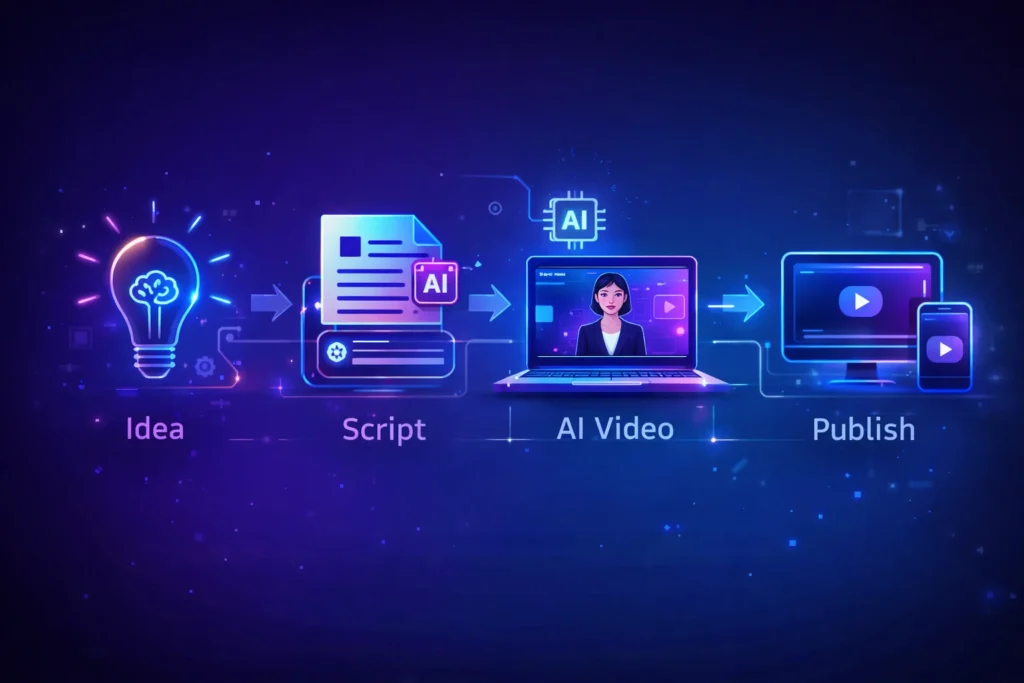
    AI video creation workflow showing idea, script, AI video generation and publishing process for content creators
    An infographic illustrating the AI video creation workflow, where content creators transform an idea into a script, generate AI-powered videos, and publish them across digital platforms.

    Video production used to be complicated and time-consuming. AI technology now allows creators to automate many parts of the process.

    With the right AI video tools, creators can:

    • Produce videos much faster
    • Reduce editing time dramatically
    • Convert blog posts into videos
    • Create faceless YouTube channels
    • Scale social media marketing campaigns

    For freelancers, content creators, and online businesses, these tools help produce more content with fewer resources.


    Best Overall: Pictory AI
    Best Budget Option: InVideo AI
    Best for Beginners: Lumen5
    Best for AI Avatars: Synthesia
    Best for Advanced Creators: Runway ML


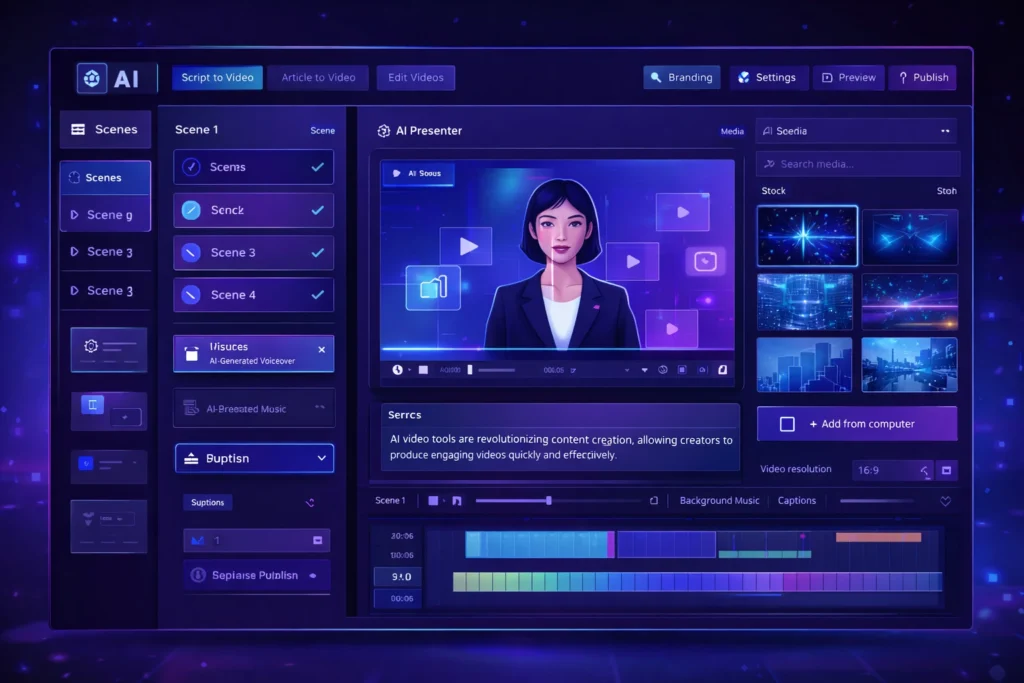
    AI video generator dashboard interface showing AI presenter, video timeline editor and automated video creation tools
    A modern AI video generator dashboard interface displaying an AI presenter, video editing timeline, and automation tools used by content creators to generate videos quickly.

    Pictory AI is widely used by bloggers and YouTubers to convert scripts or articles into engaging videos. It automatically matches your script with visuals, adds captions, and generates voiceovers.

    This makes it ideal for creating faceless YouTube content or repurposing blog posts.

    Key Features

    • Script-to-video automation
    • AI voiceovers
    • Automatic captions
    • Large stock footage library

    Pros

    • Very beginner friendly
    • Fast video creation

    Cons

    • Limited customization
    • Paid plans required for longer videos

    Best For

    Bloggers, YouTubers, and marketers creating educational or faceless video content.

    Try Pictory AI here


    Synthesia allows creators to generate videos using realistic AI avatars. Instead of recording yourself, you can simply write a script and the AI presenter delivers the message.

    This is especially useful for business videos, training materials, and product explainers.

    Key Features

    • AI avatar presenters
    • Support for 120+ languages
    • Text-to-video generation
    • Professional video templates

    Pros

    • Professional looking presenters
    • Great for corporate and educational videos

    Cons

    • Premium pricing
    • Limited emotional expressions in avatars

    Best For

    Businesses, educators, and creators producing professional presentations.

    Try Synthesia here


    Runway ML is one of the most advanced AI video platforms currently available. It includes powerful AI editing tools, video generation models, and creative features used by filmmakers and digital creators.

    This platform is perfect for creators who want more advanced control over video production.

    Key Features

    • AI video generation tools
    • Automatic background removal
    • AI-powered video editing
    • Creative effects powered by AI models

    Pros

    • Advanced creative capabilities
    • Used by professional creators

    Cons

    • Learning curve for beginners
    • Higher cost for heavy usage

    Best For

    Professional creators, filmmakers, and advanced video editors.

    Try Runway ML here


    InVideo AI focuses on creating videos directly from text prompts. Users simply describe the video they want, and the platform automatically generates visuals, voiceovers, and music.

    It’s especially popular among marketers and social media creators.

    Key Features

    • AI text-to-video generator
    • Automated script creation
    • Huge media library
    • Social media optimized templates

    Pros

    • Affordable pricing
    • Simple user interface

    Cons

    • AI voice quality varies
    • Limited advanced editing features

    Best For

    Social media marketers and beginners creating short-form video content.

    Try InVideo AI here


    Lumen5 is designed for turning blog posts into engaging videos. It automatically extracts key points from your article and matches them with visuals.

    This makes it extremely useful for bloggers and digital marketers repurposing written content.

    Key Features

    • Blog-to-video conversion
    • Drag-and-drop editor
    • AI media matching
    • Social media formats

    Pros

    • Easy to use
    • Great for content repurposing

    Cons

    • Limited advanced editing features
    • Repetitive stock footage

    Best For

    Bloggers and marketers converting articles into videos.

    Try Lumen5 here


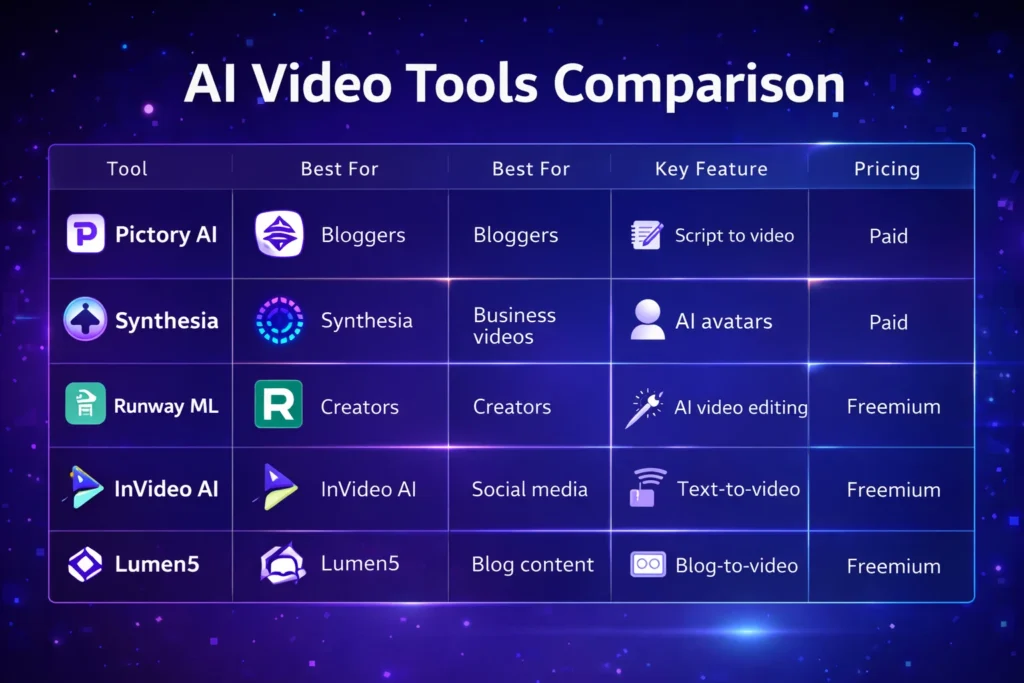
    ToolBest ForKey FeaturePricing
    Pictory AIBloggersScript to videoPaid
    SynthesiaBusiness videosAI avatarsPaid
    Runway MLCreatorsAI video editingFreemium
    InVideo AISocial mediaText-to-videoFreemium
    Lumen5Blog contentBlog-to-videoFreemium

    AI video tools are used for many different purposes.

    Common use cases include:

    • Creating faceless YouTube channels
    • Producing Instagram Reels or TikTok content
    • Repurposing blog articles into videos
    • Creating product marketing videos
    • Producing online course materials

    Entrepreneurs and digital marketers are increasingly using AI tools to scale content creation across multiple platforms.


    • Faster content production
    • Lower production costs
    • No advanced editing skills required
    • Scalable content marketing strategy

    • Limited creative control in some tools
    • Subscription costs for premium features
    • AI-generated content may require manual editing

    Despite these limitations, AI video technology continues to improve rapidly.


    If you are new to AI video tools, follow these steps:

    1. Choose a beginner-friendly platform such as Pictory or InVideo.
    2. Start with short video projects.
    3. Experiment with AI voiceovers and templates.
    4. Optimize videos for platforms like YouTube or TikTok.

    Most platforms offer free trials, allowing creators to test the tools before upgrading.


    Comparison chart of popular AI video tools including Pictory AI, Synthesia, Runway ML, InVideo AI, and Lumen5 showing features and pricing
    A visual comparison chart highlighting key features, best use cases, and pricing models of leading AI video tools used by content creators.

    AI video tools are transforming the way content creators produce video content.

    Instead of spending hours editing footage, creators can now generate professional videos using artificial intelligence. Platforms like Pictory, Synthesia, Runway ML, InVideo AI, and Lumen5 make it easier than ever to create high-quality video content.

    For entrepreneurs, bloggers, and digital marketers, adopting AI video tools can significantly improve productivity and help scale content marketing efforts.

    As AI technology continues evolving, these tools will become an essential part of the modern creator’s workflow.

  • ·

    Cinematic Showdown: Google Veo vs. Runway vs. Sora (2026 Comparison)

    In the film world, choosing a camera is a statement of style. An Arri Alexa feels different than a RED. In 2026, choosing an AI Video Generator is no different. You are choosing the “soul” of your footage.

    At AI Growth Gear, we’ve put the top three engines through a rigorous “Director’s Test.” Here is how they stack up for professional agency use.

    The Competitors at a Glance

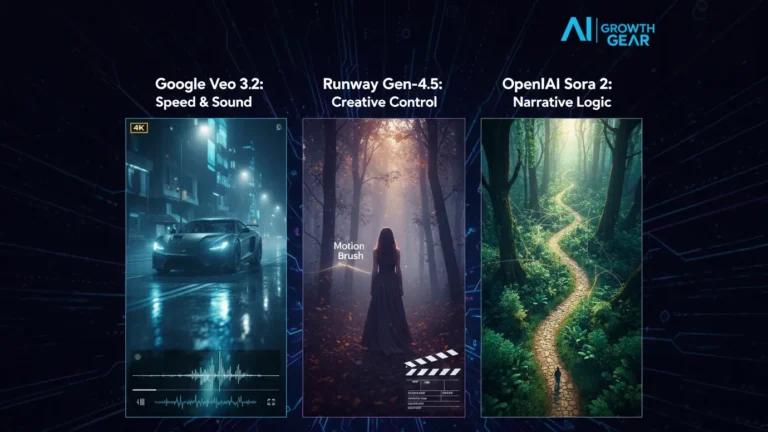
    FeatureGoogle Veo 3.2Runway Gen-4.5OpenAI Sora 2
    Primary StrengthIntegrated Audio & 4K ClarityGranular Creative ControlNarrative Logic & Physics
    Best ForReady-to-use Social AdsHigh-End Brand FilmsLong-Form Storytelling
    WeaknessCan feel “too perfect”Steep learning curveLimited public API access

    1. Google Veo 3.2: The “All-in-One” Workhorse

    Google has leveraged its vast data to create the most stable engine. The standout feature in 2026 is Native Audio Synchronization. When Veo generates a video of a car splashing through rain, it generates the exact sound of that splash perfectly synced to the frame.

    • The Aesthetic: It leans toward commercial realism. It’s vibrant, sharp, and safe.
    • The Director’s Take: “If you need an ad for a UK real estate firm or a US tech startup that needs to look ‘Apple-clean’ in ten minutes, Veo is your gear.”

    2. Runway Gen-4.5: The Artist’s Precision Tool

    Runway remains the favorite for those of us with a NIFT or film background. Their “Motion Brush 3.0” and “Director Mode” allow you to tell the AI exactly where to move the camera (pan, tilt, zoom) and which specific elements should move within the frame.

    • The Aesthetic: Moody, textured, and artistic. It handles “Cinematic Grain” and lighting better than anyone else.
    • The Director’s Take: “Runway doesn’t just ‘generate’; it ‘collaborates.’ It’s the only tool that lets me maintain a specific brand texture without the AI taking over the creative wheel.”

    3. OpenAI Sora 2: The Physics Master

    Sora 2 is still the king of Spatial Consistency. If a character walks behind a tree and comes out the other side, they look identical. Most other AIs still “glitch” the details. Sora understands that a glass of water should reflect the room, and gravity should pull objects down naturally.

    • The Aesthetic: Hyper-realistic and expansive. It excels at wide, sweeping “Drone” shots.
    • The Director’s Take: “Sora is for the ‘Big Picture.’ It’s perfect for world-building or creating complex scenes where physical logic cannot be compromised.”

    The Verdict: Which Gear Should You Pick?

    • Choose Google Veo if your priority is Speed and Sound. It’s the ultimate tool for high-volume content agencies where “done is better than perfect.”
    • Choose Runway if your priority is Aesthetic Control. If your brand relies on a specific “look” or mood, Runway is the only tool that respects your creative direction.
    • Choose Sora if your priority is Realism and Scale. When the physics of the scene must be flawless, Sora is the undisputed leader.

    Our Recommendation for 2026

    For most boutique agencies, a Runway + Veo hybrid workflow is the winner. Use Runway to create the “Hero” visuals that define your style, and use Veo to quickly scale the supporting content with integrated sound.

  • ·

    Top AI Image Generation Tools for Designers in 2026

    Artificial intelligence has transformed the design industry. What once required hours of manual work in tools like Photoshop or Illustrator can now be achieved in seconds with AI image generation tools.

    Designers, marketers, and content creators are increasingly using AI to generate illustrations, concept art, social media graphics, and marketing visuals. These tools use powerful machine learning models to convert simple text prompts into stunning images.

    Whether you’re a freelance designer, a startup founder, or a content creator, AI-powered design tools can significantly speed up your workflow.

    In this guide, we’ll explore the top AI image generation tools for designers, including Midjourney, Leonardo AI, and Canva, and show how each platform can enhance your creative process.

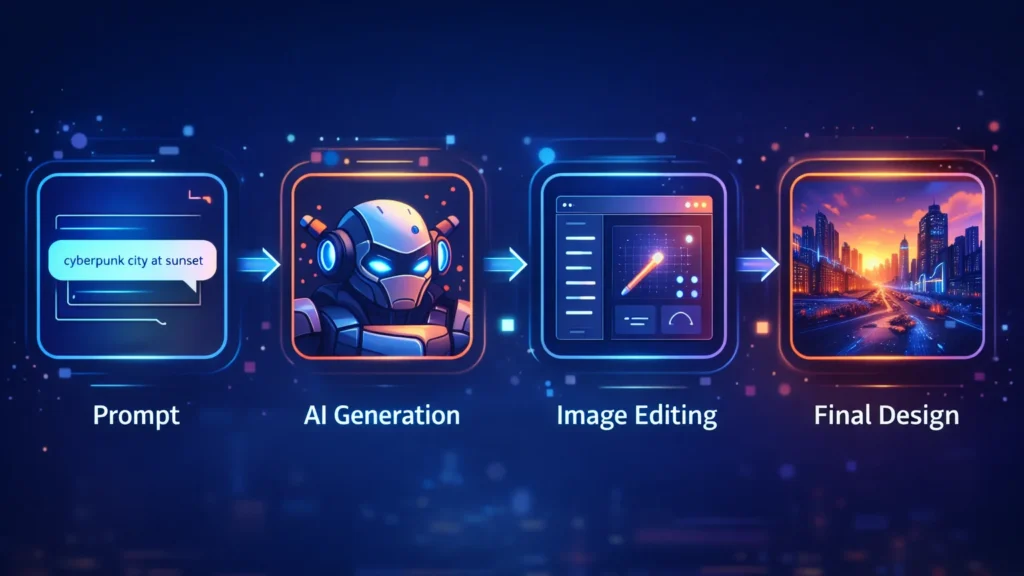
    Workflow diagram showing prompt input, AI image generation, image editing, and final design creation process.
    A visual workflow showing how AI image generators transform a text prompt into a finished design through generation and editing.

    AI design tools are not just about speed—they unlock entirely new creative possibilities.

    Key advantages include:

    • Generate multiple design concepts instantly
    • Create unique visuals without advanced design skills
    • Speed up creative workflows
    • Produce marketing visuals at scale
    • Reduce design costs for startups and creators

    For designers working with tight deadlines, AI tools can act as creative assistants that generate ideas and draft visuals quickly.

    ■ Best Overall: Midjourney
    ■ Best for Game Designers: Leonardo AI
    ■ Best for Beginners: Canva AI
    ■ Best for Marketing Visuals: Canva
    ■ Best for Concept Art: Midjourney

    Below are some of the most powerful AI image generators available today.

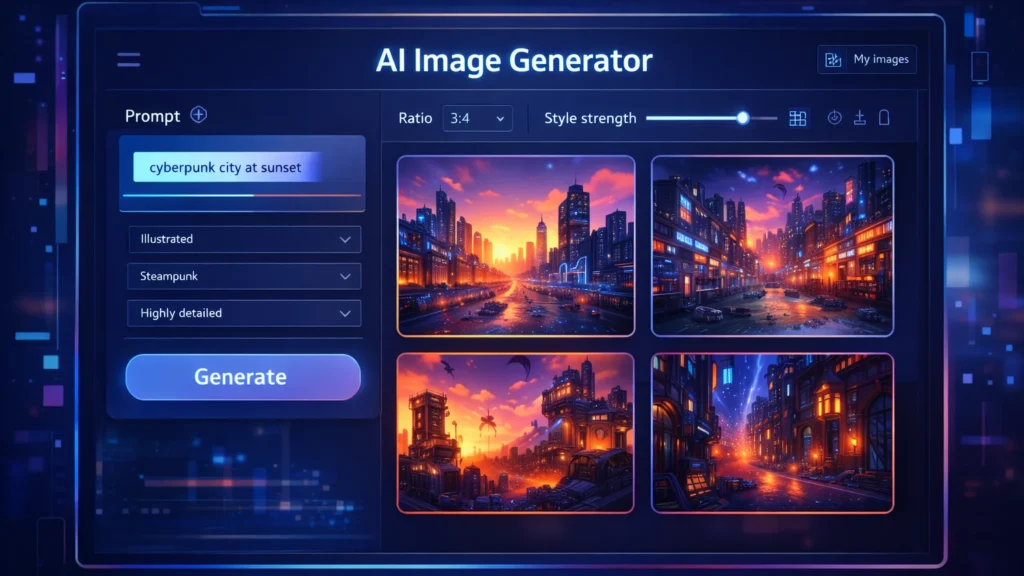
    AI image generator dashboard showing prompt input panel and multiple generated images in a design interface.
    A stylized AI image generator interface where users enter prompts and instantly generate multiple design variations.

    Midjourney is one of the most popular AI art generators used by professional designers and digital artists. It produces highly detailed and cinematic images from simple text prompts.

    Midjourney runs primarily through Discord, making it slightly different from traditional design tools.

    Key Features

    • Extremely high-quality image generation
    • Cinematic and artistic style outputs
    • Advanced prompt customization
    • Active community for prompt sharing

    Pros

    • Exceptional image quality
    • Ideal for concept art and illustration
    • Huge creative flexibility

    Cons

    • Requires Discord interface
    • Learning curve for prompts

    Best For

    Concept artists, creative designers, and illustrators looking for highly detailed artwork.

    Try Midjourney here

    Leonardo AI is becoming a favorite tool among game developers, product designers, and creative professionals who need consistent and customizable AI-generated images.

    It offers more control than many other AI art tools.

    Key Features

    • Custom AI model training
    • Game asset generation
    • Style control and presets
    • Prompt guidance tools

    Pros

    • Strong control over image styles
    • Great for game assets and design assets
    • Fast generation speeds

    Cons

    • Some advanced features require paid plans
    • Interface may feel complex for beginners

    Best For

    Game designers, digital artists, and product designers.

    Try Leonardo AI here

    Canva has integrated powerful AI features into its already popular design platform. With tools like Magic Media and the AI image generator, users can create visuals directly inside Canva.

    This makes it perfect for marketers and beginners.

    Key Features

    • AI text-to-image generator
    • Integrated design templates
    • Drag-and-drop editor
    • AI background removal and editing

    Pros

    • Very beginner-friendly
    • Works within existing design workflows
    • Excellent for marketing graphics

    Cons

    • Image quality may be lower than Midjourney
    • Limited artistic control

    Best For

    Social media creators, bloggers, and marketing teams.

    Try Canva AI here

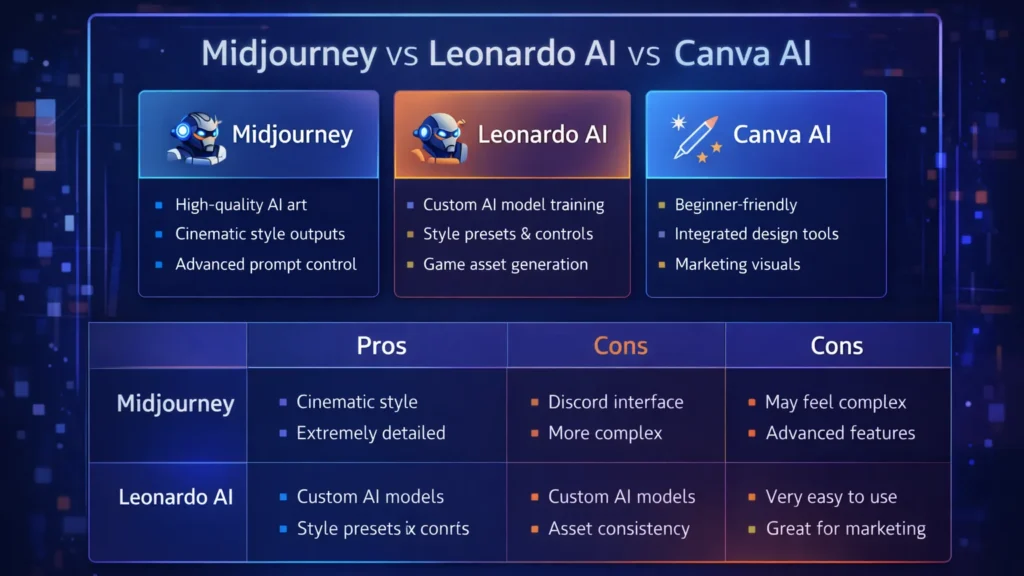
    ToolBest ForKey FeaturePricing
    MidjourneyConcept artistsHigh-quality AI artPaid
    Leonardo AIGame designersCustom AI modelsFreemium
    Canva AIBeginners & marketersIntegrated design toolsFreemium

    Designers and creators are using AI tools in many creative ways.

    Common applications include:

    • Blog and website illustrations
    • YouTube thumbnails
    • Marketing graphics
    • Game assets
    • Concept art
    • Product mockups
    • Social media visuals

    For freelancers and online businesses, AI image generators can reduce the need for expensive design resources.

    Benefits and Limitations ⚖️

    AI design tools offer incredible advantages but also have some limitations.

    Benefits

    • Massive time savings
    • Endless creative variations
    • Lower design costs
    • Accessibility for beginners

    Limitations

    • Some images may look generic
    • Prompt engineering is required
    • Copyright concerns in some cases

    Designers should use AI tools as creative assistants, not replacements for human creativity.

    If you’re new to AI design tools, follow these steps.

    Step 1: Choose the right tool

    Pick a tool based on your use case.

    • Midjourney → creative artwork
    • Leonardo AI → design assets
    • Canva → marketing visuals

    Step 2: Learn prompt writing

    Your prompts determine the output quality.

    Example prompt:

    “Futuristic cyberpunk city at sunset, ultra-detailed digital art”

    Step 3: Experiment with styles

    Try different prompts, lighting, colors, and art styles to discover unique visuals.

    Comparison chart highlighting features of Midjourney, Leonardo AI, and Canva AI image generation tools.
    Feature comparison of three popular AI image generation tools used by designers: Midjourney, Leonardo AI, and Canva AI.

    Conclusion

    AI image generation tools are transforming how designers create visuals. What once required hours of manual work can now be achieved in seconds using powerful AI platforms.

    Tools like Midjourney, Leonardo AI, and Canva AI give designers the ability to experiment, iterate, and produce high-quality visuals faster than ever.

    For entrepreneurs, bloggers, and digital creators, AI design tools offer a powerful way to scale visual content production while maintaining creativity.

    As AI continues to evolve, these tools will become an essential part of every modern designer’s toolkit.